




In This Article
Your social media dashboard is probably lying to you. Most business owners spend their mornings staring at colorful charts that mean absolutely nothing for their bottom line. It’s a classic trap. You’re searching for social media analytics tools for small business that actually make sense, but you’re drowning in a sea of “likes” and “shares” while wondering where the money is. It’s frustrating to pay for high-end features you never touch or feel like you need a data science degree just to post a simple reel. You want results, not a math homework assignment.
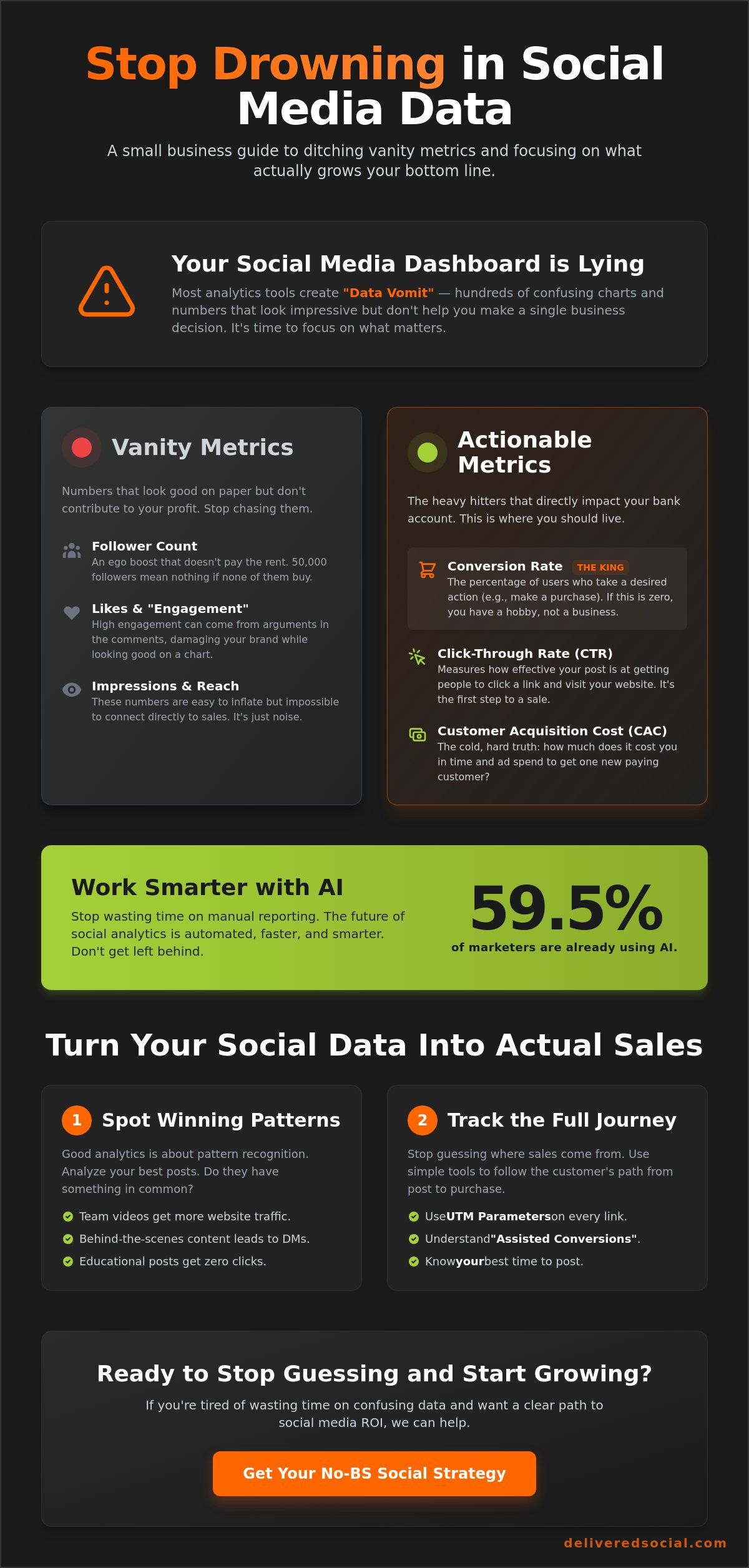
We’re cutting through the noise to find the software that actually moves the needle in 2026. You’ll stop wasting time on vanity metrics and start focusing on the 59.5% of marketers who are already using AI to make their reporting faster and smarter. This guide delivers a curated list of tools that fit your budget, the three metrics that actually matter for growth, and a simple way to automate your reports so you can get back to work. No fluff. No jargon. Just the stuff that works.
Key Takeaways
- Stop drowning in “data vomit” and learn why spotting patterns is the only way to actually grow your brand.
- Ditch the vanity metrics and start tracking the two heavy hitters: Conversion Rate and Click-Through Rate.
- Find the best social media analytics tools for small business that deliver clear answers without the massive corporate price tag.
- Master a simple two-step process to deconstruct your winning posts and turn social engagement into real-world sales.
- Identify the tipping point where DIY analytics becomes a waste of your time and hiring an agency actually saves you money.
Why Most Social Media Analytics Tools Are a Waste of Your Time
Most corporate agencies love to brag about “hundreds of metrics.” They show you heat maps, sentiment analysis, and complex graphs that look like a flight simulator. It’s impressive. It’s also total junk for a small business. You don’t need a mountain of data to see if your marketing is working. You need to know if your posts are actually putting money in your pocket. Most social media analytics tools for small business are built for massive corporations with teams of data scientists. For everyone else, they just create a “data vomit” problem. You get so many charts that you end up doing nothing at all.
Real social media analytics isn’t about counting hearts or thumbs-up icons. It’s about spotting patterns. It’s about seeing that every time you post a video of your team, your website traffic spikes. Or noticing that your “educational” posts get zero clicks while your “behind-the-scenes” content leads to direct messages. If a tool doesn’t help you make a decision in under five minutes, it’s wasting your time. Often, the free native tools inside Instagram and Facebook are more than enough to get started. Don’t pay for a bloated dashboard when you haven’t mastered the basics yet.
The Trap of Vanity Metrics
Having 10,000 followers feels great. It’s a nice ego boost. But if those followers live three states away and never buy your products, they are useless. Your bank account doesn’t care about your follower count. Even “Engagement Rate” can be a liar. If a post goes viral because people are arguing in the comments, your engagement looks amazing, but your brand is taking a hit. A vanity metric is any number that makes you look good on paper but doesn’t contribute a single cent to your actual profit. Stop chasing the fluff. Focus on the numbers that lead to growth.
What Real Analytics Should Actually Do
Good data should be actionable and fast. You need to know which specific posts directly lead to website enquiries. That’s the gold. You also need to know your actual best time to post. Don’t listen to some generic blog post telling you to post at 9:00 AM on Tuesdays. Your audience might be scrolling at midnight. A solid tool will show you when your people are actually active. Finally, you should be able to keep an eye on your competitors without spending four hours a day stalking their profiles. Get the info, make a move, and get back to running your business.
The Metrics That Actually Pay the Bills (And the Ones to Ignore)
You don’t need a PhD to see if your social media is working. You just need to look at the right numbers. Most social media analytics tools for small business will try to distract you with “total reach” or “impressions.” Don’t fall for it. Those numbers are huge because they are easy to get, but they don’t buy groceries. If you want to grow, you have to focus on the metrics that actually impact your bank account. It’s about quality, not just noise.
Conversion rate is the king of all metrics. If 1,000 people see your post and zero people buy your service, you’ve got a hobby, not a business. Next is your Click-Through Rate (CTR). This tells you if your hook is actually strong enough to move people from their feed to your website. Finally, keep a close eye on your Customer Acquisition Cost (CAC). This is the cold, hard reality of what a lead costs you. Recent research on small business analytics use shows that owners who fail to connect their social spend to these financial outcomes often struggle to survive their first three years. Don’t be that statistic.
Tracking the Journey from Post to Purchase
Stop guessing where your customers come from. Use UTM parameters on every link you share. These are small bits of code that act like digital breadcrumbs, showing you exactly which post triggered a sale. You also need to understand “Assisted Conversions.” Most people won’t buy the first time they see you. They might see a post, then a week later search for you on Google. Social media did the heavy lifting, even if it didn’t get the final click. If this sounds like a lot of homework, a professional Social Media Management Company can set these tracking systems up for you. Knowing your numbers is the first step to beating your competition. If you’re feeling stuck, you can always chat with us about your strategy to see where the gaps are.
Ignore These Metrics to Save Your Sanity
Follower counts are digital trophies. They look nice on a shelf, but they don’t pay the rent. You can have 50,000 followers and still have an empty shop. Similarly, “total reach” is a trap. Being seen by a million people is useless if none of them are in your target audience. Finally, stop worrying about post frequency. Flooding the feed with low-quality content just to stay active is a fast way to get muted. One high-impact post that drives real engagement is worth fifty pieces of “filler” content. Focus on the results that matter and ignore the rest.
The Best Social Media Analytics Tools for Small Business in 2026
Choosing the right software feels like picking a movie on Netflix. There are too many options and most of them are boring. You need social media analytics tools for small business that actually give you answers, not just more homework. If you’re a solo founder or a tiny team, start with Buffer. It’s the no-nonsense choice for simple scheduling and basic reporting. It doesn’t have the flashy bells and whistles of the corporate giants, but it won’t make your head spin either. It’s clean, fast, and does exactly what it says on the tin. With plans starting as low as $6 per channel, it’s hard to beat for value.
If you want everything in one dashboard, Metricool is the best all-rounder. It tracks your website, your socials, and even your ad spend in one spot. For those who are genuinely too busy to look at a chart, look at tools like Palaver. These platforms offer AI-driven summaries that tell you exactly what happened last week in plain English. Since 71% of marketing teams report significant time savings from AI-powered dashboards, it’s a smart move for anyone drowning in browser tabs. Finally, if you’re scaling fast and have a dedicated marketing person, Sprout Social is the “I’m getting serious now” tool. It’s an investment, with entry-level plans starting at $249 per user, but the depth of data is unmatched for growing teams.
Budget-Friendly Options That Don’t Suck
You don’t always need to open your wallet. Native platform tools like Meta Business Suite have improved massively. They are free and provide the most accurate data for Facebook and Instagram because they own the source. A common mistake is paying for a “Lite” version of a professional tool. These often cut out the very features that make the tool worth having in the first place. If you are a solo entrepreneur, your time is your most expensive asset. If a free tool takes three hours to give you an answer that a paid tool gives you in three minutes, pay for the tool. Your sanity is worth more than the subscription fee.
The “All-in-One” Giants: Are They Worth It?
Hootsuite and Sprout Social are the heavyweights of the industry. They are powerful, but for many small firms, they are “Too-Much-In-One.” You end up paying for enterprise features like advanced trend detection that you’ll never use. The blunt truth? If you have more than ten accounts and a team of three people, they are worth every penny. If you’re smaller, they might just slow you down with unnecessary complexity. If you’re feeling overwhelmed by the tech stack, working with a Digital Marketing Agency Surrey can help you cut through the clutter and get straight to the results. Sometimes the best tool is a team that already knows how to use them.
How to Turn Your Social Data Into Actual Sales
Data is just a shovel. It won’t dig the hole for you. Most competitors want you to “sit back and watch your stats soar.” That’s a load of rubbish. Stats don’t pay the bills. Sales do. If you’re using social media analytics tools for small business, you need a clear plan to turn those numbers into cash. It isn’t enough to just look at the graphs. You have to make them do something. It starts with looking backwards to move forwards.
Follow these steps to stop guessing and start growing:
- Step 1: Identify your top 3 performing posts from the last 30 days. Don’t look at likes. Look at the ones that drove the most website clicks or direct messages.
- Step 2: Deconstruct *why* they worked. Look at the hook in the first three seconds. Was it a specific question? A bold statement? Check the image. Was it a polished graphic or a raw, behind-the-scenes photo?
- Step 3: Double down on the winning format. If your audience loves short tips, make a month’s worth of them. Kill the losers. If your “Monday Motivation” quotes are getting zero clicks, stop wasting your energy.
- Step 4: Set up an automated weekly report. This should only show the metrics that actually matter. Ignore the fluff and focus on conversions.
- Step 5: Adjust your ad spend based on organic performance. If a post is already flying without help, it’s a safe bet for paid reach. Our PPC Services can help you turn these organic wins into high-converting ad campaigns.
The “Stop, Start, Continue” Framework
This is the fastest way to clean up your strategy. Stop doing what the data says is boring your audience. If your engagement is flatlining, it’s a sign you’re being too safe or too corporate. Start testing one new content pillar every month. Look for gaps in what your competitors are posting and fill them. Continue scaling the content that actually drives enquiries. This isn’t rocket science. It’s just listening to your audience and giving them more of what they actually want.
Automating the Boring Stuff
You have a business to run. You can’t spend all day staring at a dashboard. Set up reports that land in your inbox every Monday morning. Since 71% of marketing teams report significant time savings from AI-powered dashboards, use those features. Using social media analytics tools for small business to automate your reporting means you spend less time on spreadsheets and more time on strategy. Let the AI summarize the chaos into three sentences telling you what to do next. It’s about working smarter, not harder. If you’re ready to stop playing with tools and start seeing real results, reach out to us today and let’s get to work.
When to Ditch the Tools and Hire the Pros
Software is a tool, not a savior. You can subscribe to every high-end platform mentioned in this guide, but a tool is only as good as the person holding it. If you’re spending ten hours a week staring at a dashboard, that’s time you aren’t spending on your actual business. It’s a massive opportunity cost. For many UK owners, the DIY route becomes a full-time job they never wanted. You didn’t start a company to become a data analyst. You started it to solve a problem or sell a product. If the tech is getting in the way of the work, it’s time to pivot.
There’s a point where a professional agency becomes cheaper than a bad DIY strategy. Think about it. Agencies already pay for the enterprise-level social media analytics tools for small business that cost hundreds of pounds a month. They have the systems in place to turn data into action instantly. When you hire pros, you aren’t just buying software. You’re buying a strategy. You’re buying the ability to ignore the noise and focus on your actual strengths. If your growth has flattened or you feel like you’re just “posting for the sake of posting,” those are loud red flags that you’ve outgrown your current setup.
The Reality of “Doing It All Yourself”
Business owners are often the worst people to manage their own social media. It’s a hard truth. You’re too close to the brand. You have an emotional attachment to every photo and every caption. An agency brings a cold, calculated outside perspective. They don’t care if a post was “fun” to make. They only care if it drove a lead. Agencies also have access to pro-grade social media analytics tools for small business and cross-client data that a solo entrepreneur simply can’t reach. This allows them to see trends across the whole UK market before they even hit your feed. It’s an unfair advantage that pays for itself.
Getting Results Without the Headaches
A “No-BS” agency report doesn’t look like a software export. It isn’t a 50-page “data vomit” PDF designed to confuse you into staying. It’s a simple, high-energy summary of what actually happened. It tells you what worked, what we killed, and how many new enquiries landed in your inbox. You get to stop worrying about the latest algorithm shift or the latest updates to UK GDPR. You just get to run your business while we handle the digital heavy lifting. If you’re ready to stop drowning in charts and start seeing real sales, Let’s talk about your social media—no fluff, just results.
Ready to Stop Staring at Charts and Start Making Sales?
You’ve seen the landscape for 2026. The best social media analytics tools for small business are the ones that actually lead to a decision. Don’t get stuck in “data vomit” or chase follower counts that won’t pay the rent. Focus on conversion rates and the specific patterns that drive real enquiries. Whether you’re using AI to summarize your weekly reports or deconstructing your top three posts to find that winning hook, the goal is always action over observation. Software is just a tool; your strategy is the engine.
Since 2016, we’ve been helping brands skip the corporate jargon and get straight to the results. We’re full-service digital experts who believe in a no-nonsense approach to growth. You don’t need another expensive subscription you only half-understand. You need a clear plan that turns your social presence into a lead-generation machine. If you’re ready to ditch the spreadsheets and focus on your business, we’re here to help. Stop wasting time on tools and get a social media strategy that works.
You’ve got the knowledge and the right mindset. Now go out there and start turning those clicks into customers.
Frequently Asked Questions
What is the best free social media analytics tool for beginners?
Meta Business Suite is the undisputed champion for beginners. It is free, accurate, and pulls data directly from the source for Facebook and Instagram. You get clear insights into your audience and post performance without a monthly subscription. Buffer also offers a great free plan for those who just need to manage up to three channels and see basic stats.
How often should a small business check their social media analytics?
You should check your numbers once a week. Checking your dashboard every day is a trap that leads to over-analyzing daily noise. A weekly review gives you enough data to spot real patterns without wasting your time. Save the deep strategy sessions for a monthly deep dive where you can actually pivot your content plan based on long-term results.
Can I track my competitors’ social media performance for free?
Yes, you can track competitors using free tools like the “Pages to Watch” feature inside Facebook. You can also use the free version of Metricool to get a basic look at what other brands in your space are doing. Don’t just copy their homework. Look at their top performing posts to see what your shared audience actually likes, then do it better.
What is a good engagement rate for a small business in 2026?
A solid engagement rate in 2026 usually sits between 1% and 3%. With 75.9% of Instagram’s influencer base now consisting of nano-creators, the focus has shifted toward smaller, more dedicated audiences. Don’t worry about having a massive following. If your 2% engagement is driving actual website enquiries, your social media is doing its job perfectly.
Do I really need a paid tool if I only use Instagram and Facebook?
Probably not. Most social media analytics tools for small business are designed for people managing five or more platforms at once. If you are only on Meta’s platforms, their native Business Suite is powerful enough to handle your reporting. You only need to pay for a tool when you find yourself wasting hours jumping between different apps to collect your data.
How do I track social media ROI without complex software?
Use UTM parameters and Google Analytics 4 to track your ROI for free. By adding a simple tag to the links you share, you can see exactly which post led to a sale or an enquiry on your website. It is the most direct way to connect your social media effort to your bank account without spending a penny on expensive tracking software.
What is the difference between reach and impressions in my reports?
Reach is the number of unique people who saw your content. Impressions is the total number of times your content was displayed, even if the same person saw it multiple times. If you want to know how many new potential customers you are reaching, focus on the reach metric. It is the better indicator of how well you are growing your brand’s footprint.
Is AI actually helpful for social media analytics yet?
AI is a massive time-saver in 2026. About 71% of marketing teams report significant time savings from using AI-powered social media analytics tools for small business. These tools can summarize complex data into plain English and tell you exactly what to do next. Instead of staring at spreadsheets, the AI tells you which formats are winning so you can get back to work.
Share This Article
About the Author: Jonathan Bird































