



Keep reading
Rather we just did it for you?
Let's get your business seen.
Social media, websites, SEO and ads from a team you can actually meet.
You’ve poured hours of heart into your track—yet YouTube still shows a lonely cover image.
Revid once promised an instant, beat-synced fix, but its credit limits and uneven renders now push 49 percent of Trustpilot reviewers to one-star ratings.
The good news? A fresh wave of AI video tools locks every snare hit to motion—without hidden costs.
This guide ranks the six strongest contenders so you can pick a beat-perfect generator and get back to making music.
Why look beyond Revid?
Revid earned early buzz for its one-click, beat-synced videos, but real-world results paint a rougher picture.
Almost half of its Trustpilot reviewers now leave a single star, citing a confusing credit system and uneven visual quality, while only 36 percent award five stars. This split signals growing frustration.
Credits disappear quickly when you generate full-motion scenes, so many creators retreat to slower slideshow mode or pay for an upgrade midway through the month. Want 4K? That sits on a pricier tier. The simple promise of “drop a song, get a video” turns into careful credit math.
Users also report inconsistent imagery: extra limbs in dance shots, random stock clips that miss the vibe, or animations that drift off-beat. Fixes mean more re-renders, more credits, and more time lost.
Add up the disappearing credits, inconsistent output, and premium gates on higher resolution, and it is clear why musicians and marketers are hunting for better tools. The rest of this guide introduces six options that offer tighter sync, fairer pricing, or both.
How we tested and scored each tool
You deserve more than a random list of brand names, so we built a simple, transparent scorecard and ran every platform through the same paces.
First, we dropped the same one-minute EDM loop into each tool. That gave us a tight, high-energy benchmark where sloppy sync stands out. We timed prep, render, and any extra manual steps, so speed and ease of use received real numbers, not gut feel.
Next, we inspected the finished clips on a 32-inch 4K monitor and a phone. We watched for beat accuracy, visual glitches, and resolution claims that crumble on export. When a service capped free outputs at 720p, or plastered a watermark over the hook, we docked points immediately.
Finally, we pulled published pricing tables and calculated cost per finished minute. No marketing math, just what you pay when the credits run out.
Those observations roll into five weighted factors:
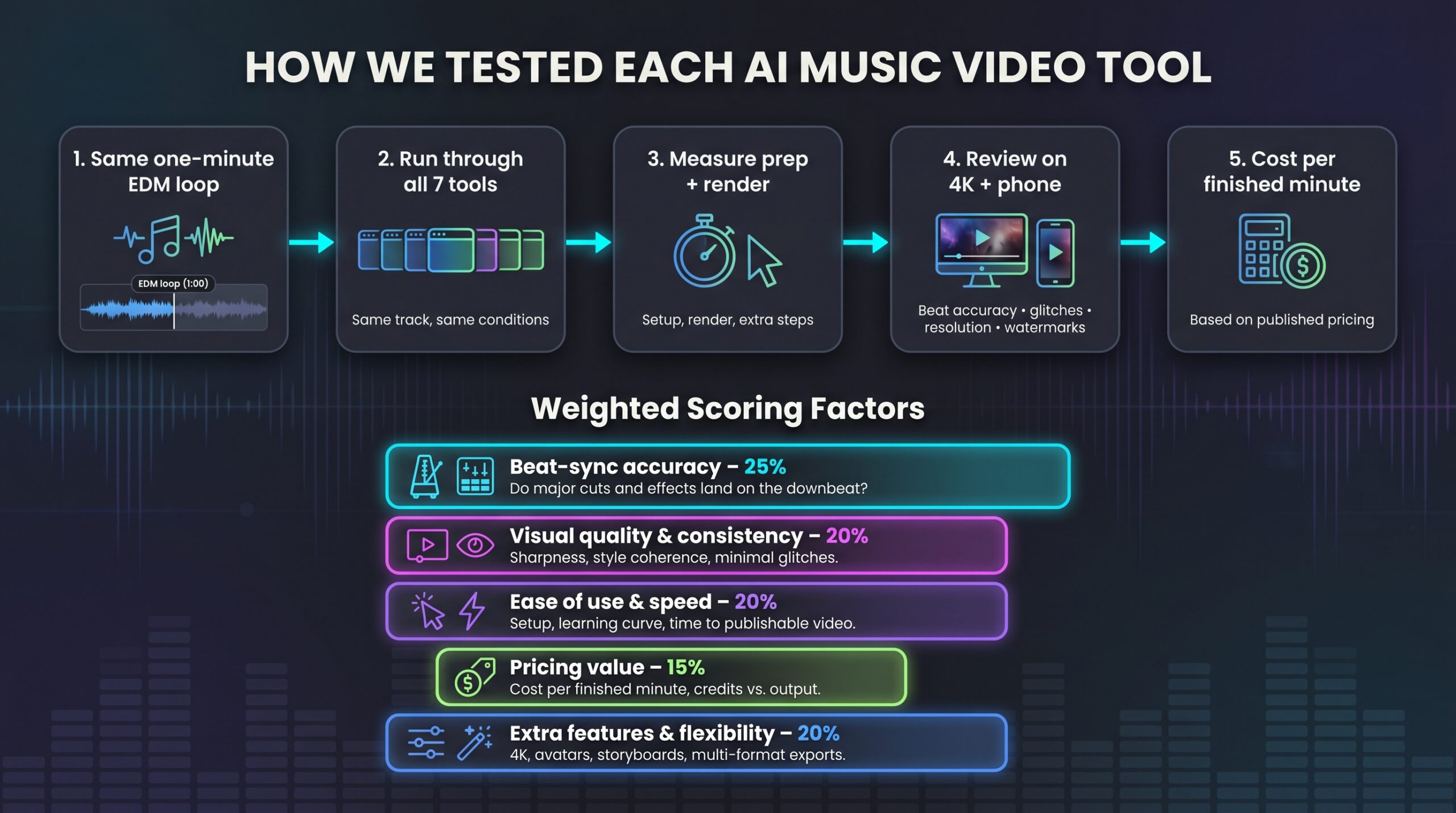
- Beat-sync accuracy, 25 percent
- Visual quality and consistency, 20 percent
- Ease of use and workflow speed, 20 percent
- Pricing value, 15 percent
- Extra features and flexibility, 20 percent
Each tool earns a score from 0 to 10 in every column. We multiply by the weight, then sum. If two platforms tie, the tighter beat sync wins, and if that is still equal, lower cost takes the higher spot. Simple, replicable, and most important, focused on what makes a music video land.
Compare the contenders at a glance
Scan this table first. It distills days of testing into one screen, so you can zero in on the tool that fits your priorities.
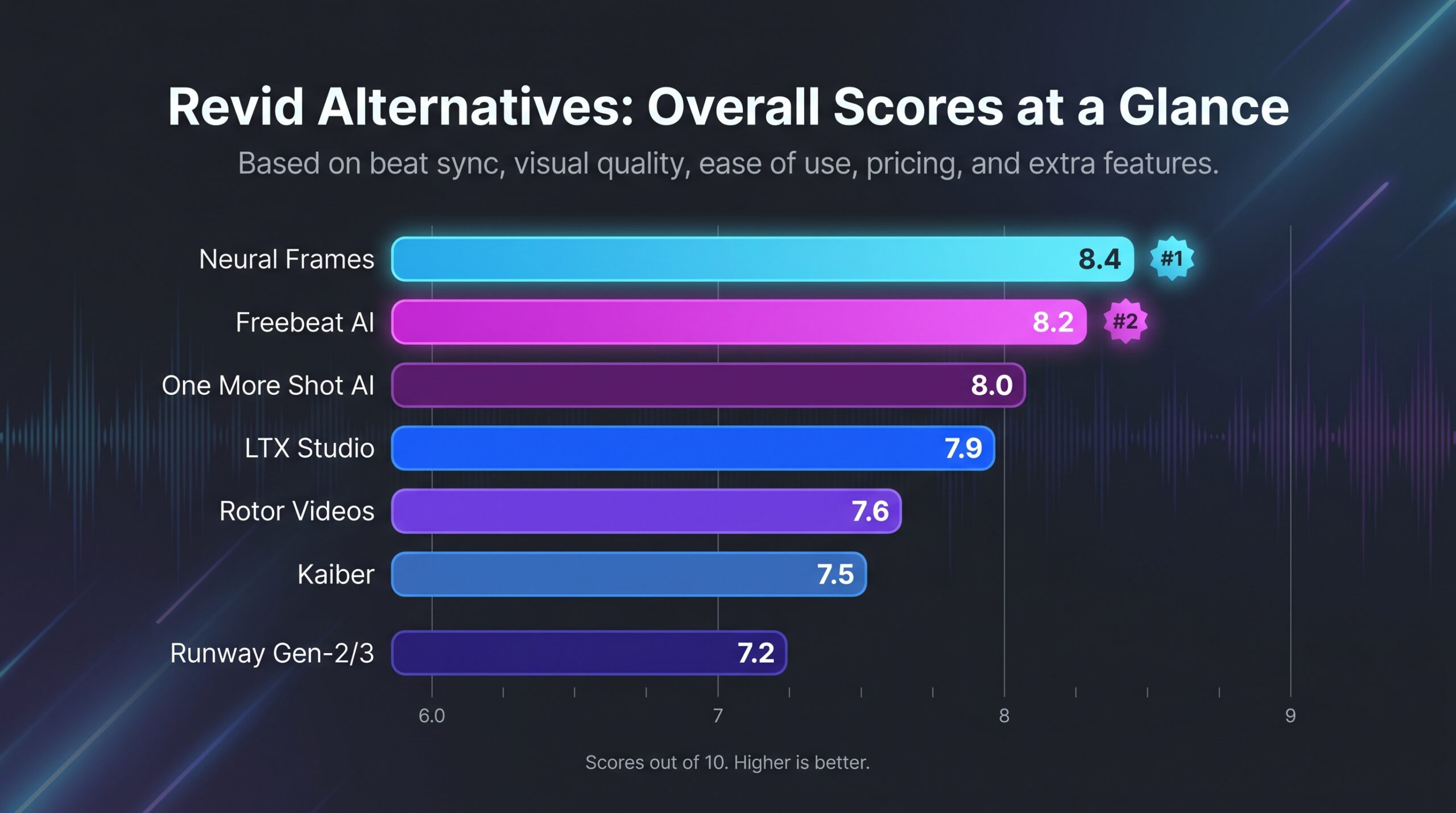
| Tool | Sync accuracy* | Visual quality | Ease of use | Price value | Stand-out feature | Overall score |
| Neural Frames | 9 | 9 | 7.5 | 7 | 4K export with lyric-aware timing | 8.4 |
| LTX Studio | 8 | 8 | 9 | 7 | Auto-storyboards full scenes | 7.9 |
| One More Shot AI | 8 | 7.5 | 8.5 | 8 | Lip-synced avatars | 8.0 |
| Rotor Videos | 8.5 | 8 | 8 | 7 | Large licensed stock library | 7.6 |
| Kaiber | 7.5 | 8 | 7 | 6.5 | Prompt-driven style swaps mid-song | 7.5 |
| Runway Gen-2/3 | 7 | 9 | 6.5 | 6 | Text-to-video realism for custom shots | 7.2 |
*Sync accuracy measures how often major cuts, effect spikes, or avatar moves land on downbeats during our one-minute EDM benchmark.
The scores highlight two truths.
First, you trade control for convenience. Tools at the top handle precise beat analysis for you, while lower-ranked options need more manual editing to shine.
Second, resolution, pricing, and watermark rules still decide who gets crisp output. Only Neural Frames and the latest LTX beta provide true 4K without a watermark, and that clarity costs extra.
Keep these patterns in mind as we explore each platform.
Neural Frames: pro-grade sync in true 4K
Neural Frames feels less like an app and more like a seasoned video director who never sleeps. Autopilot, a one-click mode inside this AI music video creator with 4K exports, converts a raw song into a finished cut in two clicks. It instantly splits the track into eight stems such as vocals, drums, and bass, so every layer can drive its own visual line. Each stem drives its own visual layer, so cuts, flashes, and camera moves land on the beat with striking precision.
Neural Frames Autopilot Interface with Multi-Stem Beat-Synced Timeline
Quality matches that musical intelligence. Across paid plans from $19 to $99, you can upscale to a full 4K master, a level most rivals reserve for their top tier or skip entirely. On our test file, neon edges stayed razor-sharp on a studio monitor and still looked crisp when cropped to vertical.
Control rises with your ambition. One click in Autopilot delivers a polished draft in about fifteen minutes. Need something custom? Open the frame-by-frame editor to nudge keyframes, swap characters, or tweak the grade without starting over.
Because projects live in the cloud, you can pop over to Neuralframes.com on any browser, tweak a keyframe on your laptop, and see the update sync to your phone almost instantly.
That shared workspace also lets a remote bandmate drop timestamped comments, so you polish cuts without juggling export files.
Licensing stays simple: commercial rights travel with the download, so you can post straight to YouTube or TikTok without a takedown worry.
Best for: artists chasing cinematic polish, or labels that need consistent visuals across a campaign. If beat accuracy and resolution top your wish list, Neural Frames sits at the head of the table.
LTX Studio: automatic storyboards that feel cinematic
Most generators deliver a single looping clip, but LTX Studio thinks in scenes. Feed it a song and a short prompt, and the platform sketches a full storyboard with locations, camera angles, and transitions that line up with verses, choruses, and bridges.
The strength lives in its timeline. Scenes are arranged to match the track’s structure, yet you can drag, trim, or swap any shot before rendering. Want the chorus brighter or a cutaway on the guitar solo? Two clicks handle it without prompt roulette.
Visual quality meets the ambition. LTX’s new open-source model renders up to 4K with smoother motion than early diffusion engines. Our test export hit 4K at 30 fps in nine minutes, faster than many tools manage 1080p.
If you are a storyteller—planning concept videos, narrative shorts, or branded anthems—LTX gives you movie-style structure without hiring a director. It may not nail split-second beat cuts like the top-ranked sync tools, but for sweeping arcs it is the most cinematic option in the list.
One More Shot AI: lip-synced avatars ready for TikTok
Imagine your song performed by a virtual singer who nails every syllable. That is One More Shot’s specialty. Upload the track, pick an avatar style—hyper-real, anime, or illustrated—and the engine drives mouth shapes, head bobs, and camera cuts in perfect time with the vocals.

One More Shot AI Lip-Synced Avatar Performance Interface
The process feels like filming with an invisible crew. Start on mobile or web, select Beat-Synced Performance, and the app builds a shot list that follows verses and choruses. Each take lines up with the beat, and lip movements track the lyric transcript, so the result plays like a live session instead of a random animation.
Speed matters. Our 30-second TikTok clip generated in under a minute, rendered at 1080p, and landed in the phone’s gallery without a desktop detour. Cost stays predictable because One More Shot sells generation time as tokens, about ten cents per second. That model beats credit systems where an unplanned rerender can wipe a monthly plan.
Limitations appear on complex phonemes, where the avatar may slip into the uncanny valley, and pure instrumental tracks will not use the lip-sync engine. For vocal-driven hooks that need a face, though, it is the quickest route from bedroom studio to viral short.
Best for: artists who want a performer on screen without stepping in front of the camera, social managers posting daily Reels, and marketers turning jingles into sing-along ads.
Kaiber: prompt-driven visuals that morph with every chorus
If Neural Frames is meticulous and Rotor is hands off, Kaiber sits in the middle. You steer the art style with text or reference images, and Kaiber’s Audio-Reactive engine animates those visuals so they pulse, twist, and cut on cue.
Two workflows matter for musicians:
- Canvas turns a single still into a living scene. Split your song into segments, assign a fresh prompt to each, and watch the clip shapeshift as choruses hit.
- Cuts auto-edits existing footage (yours or stock) to the beat, shaving hours off manual timeline work.
During tests, Canvas outputs ran about a minute of video per five credits and capped at 1080p unless we added the upscaler. That price is higher than some push-button tools but lower than rerendering a Revid slideshow that misses the vibe.
The real draw is style freedom. Want a vaporwave bridge and a cyberpunk drop? Change the prompt at the timestamp marker, and Kaiber stitches them together without breaking rhythm. You will spend some trial-and-error credits refining prompts, a creative cost for full control.
Best for: artists who crave evolving aesthetics and enjoy writing prompts as much as writing riffs. Kaiber lets you paint every bar of the song.
Rotor Videos: real footage, zero AI artifacts
Sometimes authenticity beats novelty. Rotor skips synthetic frames and slices licensed stock clips to your beat like a veteran editor on caffeine.
Setup is easy. Upload the song, pick a visual style—urban nightlife, nature vistas, or abstract light leaks—and let Rotor analyze tempo and mood. In about two minutes you receive a polished draft where every cut lands on a measure change. Because the footage is real, you avoid flickering hands or melting faces that appear in some AI generators.
Flexibility comes from a library of more than one million clips and built-in lyric animation. Swap any shot, trim a section, or add kinetic text inside the browser. The interface feels closer to Canva than Premiere, so non-editors learn quickly.
Pricing stays predictable. Pay per export, around nineteen dollars for HD, or choose an unlimited monthly pass if you post videos every week. The cost is higher than some free AI tiers, but that fee covers footage licenses and removes copyright stress.
Rotor will not conjure dragons or anime heroes, yet when your track needs cinematic B-roll that simply works, this tool delivers broadcast-ready results without surprises.
Runway Gen-2/3: raw creative power if you love editing
Runway is the wild card in this lineup. It will not auto-sync your track, but it can generate hyper-real visuals no other tool matches. Picture a slow-motion lava lamp for the intro, a photoreal dragon riffing on the guitar solo, and a seamless crane shot that feels ready for a streaming budget.
Workflow begins with prompts. Write a sentence or supply an image, choose Gen-2 or the longer-clip Gen-3 beta, and you receive a 4–8-second scene. Repeat for every song section, then assemble everything in Runway’s timeline (or your editor of choice) to lock each clip to the beat.
Runway Gen-2/3 Text-to-Video Prompt and Timeline Interface for Music Videos
The manual effort buys you exceptional fidelity—consistent characters, cinematic lighting, and renders up to 1080p by default, with 4K available on higher tiers. Use in-painting to tweak a single frame or the motion brush to add swirling smoke on a snare hit. No other platform here lets you refine a shot this precisely after generation.
Costs run higher because each generation burns credits, and longer Gen-3 clips increase the spend. Many creators mix a few Runway hero shots with cheaper loops from other tools, keeping budgets sensible while giving the video its standout moments.
Best for: directors at heart, VFX artists, or anyone who treats music videos as a canvas for bold ideas. If you want push-button ease, look elsewhere. If you crave visuals that stop the scroll, Runway is your playground.
FAQ
Can these tools really sync to any genre?
For 4/4 pop, EDM, and hip-hop, yes, because beat grids are predictable and algorithms lock on quickly. Odd-meter prog or jazz with tempo shifts needs manual tweaks, and Neural Frames stem analysis or Kaiber timeline markers provide that control.
What about lyric timing and captions?
Neural Frames auto-generates subtitles. Neural Frames and One More Shot also offer full avatar lip sync. Rotor adds kinetic text when you paste the lyrics, though you place keyframes yourself.
Will I own the finished video?
Each platform grants commercial rights on paid tiers. Rotor licenses its stock clips for standard online use; check its FAQ for national TV spots.
Do I need a monster PC?
All six tools run in the browser. Heavy 4K renders may queue on the server, but you can keep working while they process.
How long does a full song take?
Plan on 10–15 minutes with Neural Frames Autopilot, under a minute with One More Shot for a short clip, and 30 minutes to an hour if you craft shots by hand in Runway.
Conclusion
This guide ranks the six strongest contenders so you can pick a beat-perfect generator and get back to making music.
































