



Keep reading
Rather we just did it for you?
Let's get your business seen.
Social media, websites, SEO and ads from a team you can actually meet.
When someone types “Italian near me” or “Sunday roast Guildford” into their phone, Google shows three restaurants on a map before it shows a single website. If yours isn’t one of them, most hungry people will never know you exist. That little map box is called the Local Pack, and getting into it is what local SEO for restaurants is all about.
I look after marketing for hospitality businesses across Surrey and Hampshire, and the good news is that local SEO isn’t a dark art. It’s mostly a list of jobs, done properly and kept up to date. This guide walks you through every one of them, in order, with examples you can copy.
What is local SEO for a restaurant?
Local SEO is everything you do to show up when people nearby search for somewhere to eat. It covers three places:
- The Local Pack and Google Maps, the map and three listings at the top of most food searches.
- Normal search results, where your website, TripAdvisor page and booking page appear.
- AI answers, such as Google’s AI Overviews and ChatGPT, which increasingly recommend places to eat.
Google decides who appears using three things: how relevant you are to the search, how close you are to the person searching, and how well known and well reviewed you are. You can’t move your restaurant, but you can do a lot about the other two.
It matters because Google is where a big chunk of diners start. Around one in three UK diners use Google to discover new restaurants, according to SevenRooms‘s 2025 UK research.
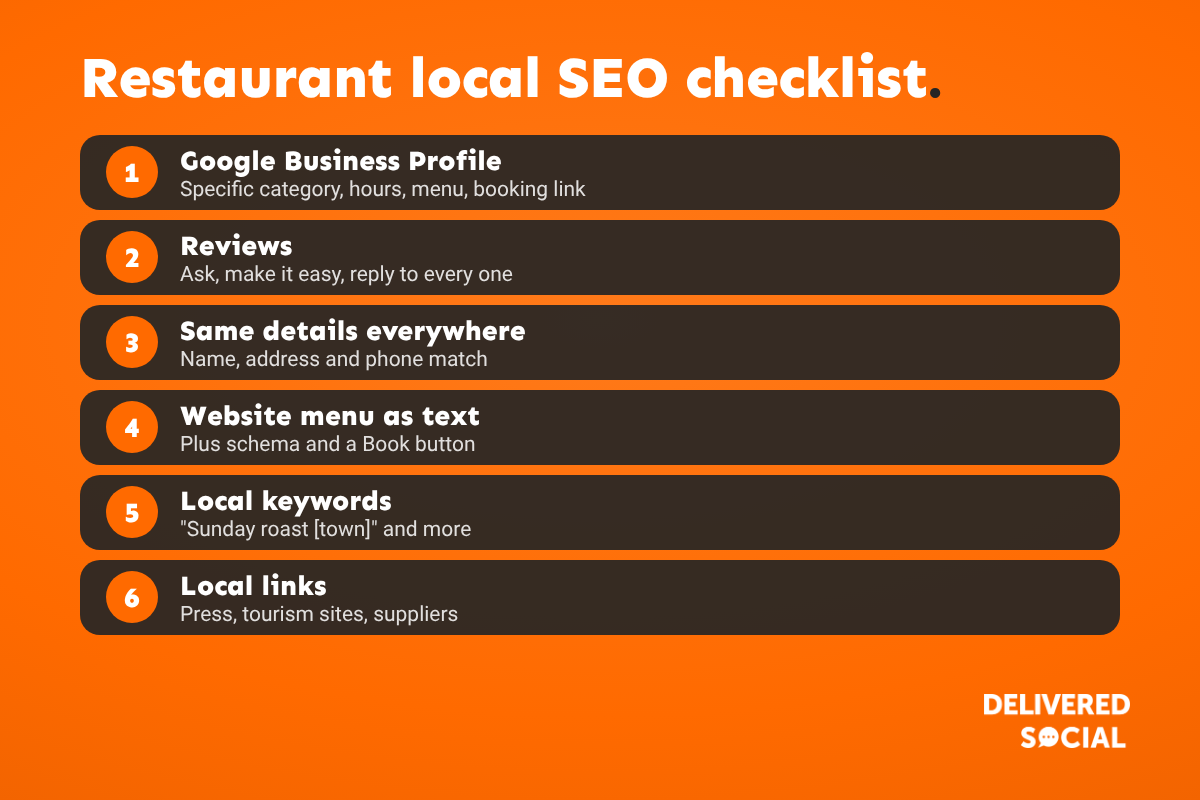
Step 1: Get your Google Business Profile perfect
Your Google Business Profile (it used to be called Google My Business) is the single most important part of restaurant local SEO. Most restaurants set it up once and forget about it. Here’s what a properly finished profile looks like:
- The right primary category. Be specific: “Italian restaurant” or “Gastropub” beats plain “Restaurant”. Add secondary categories for anything else you genuinely are, such as “Pizza restaurant” or “Wine bar”.
- Accurate hours, including special hours for bank holidays, Christmas and private events. Wrong hours are one of the quickest ways to earn a bad review.
- Your menu, with prices, added directly or linked.
- A booking link and an order link that go straight to your reservations system or delivery partner.
- Attributes such as outdoor seating, dog friendly, vegan options, wheelchair accessible and good for kids. People filter by these.
- Fresh photos every week or two: real dishes, your dining room, your team, the outside of the building so people can find you.
- Regular posts for new dishes, events and offers.
- A business description that says what you serve and where, in plain words.
Step 2: Build a steady flow of reviews
Reviews are one of the strongest signals Google uses for local results, and they’re what persuades people to pick you. The goal is a steady stream of fresh reviews, not a burst once a year.
- Ask at the right moment: when someone says they loved their meal, not when they’re paying.
- Make it easy: a QR code on the bill or table card that goes straight to your review link.
- Reply to every review, good and bad. Thank people by name and mention what they enjoyed. Keep replies to negative reviews calm and short, and offer to put it right offline.
- Don’t offer anything in return. Google’s rules don’t allow discounts or freebies in exchange for reviews, and the UK now has laws against fake and incentivised reviews too. It’s not worth the risk to your profile.
Got a review that breaks Google’s rules? Our guide to what Google will take down explains what you can do.
Step 3: Keep your details the same everywhere
Google checks your restaurant’s name, address and phone number (often called NAP) across the web. If they don’t match, it trusts you less. Make sure they’re identical on:
- Your website and Google Business Profile
- TripAdvisor, Yelp and Facebook
- Apple Maps (through Apple Business Connect) and Bing Places
- Your booking platform, such as OpenTable, ResDiary or SevenRooms
- Delivery apps such as Deliveroo, Uber Eats and Just Eat
- Local directories and tourism sites
Our list of the best free UK citation sites covers the directories worth being on.
Step 4: Make your website work for local search
Your website backs up everything your Google profile says. The basics that matter most for restaurants:
- Put your menu on the page as text, not just a PDF. Google can read text, and people on phones hate opening PDFs.
- Show your address, phone number and opening hours on every page, usually in the footer, with an embedded map on your contact page.
- Add restaurant schema. This is code that tells Google your cuisine, opening hours, price range, menu and booking link. Your web developer can add it in an afternoon.
- Make it fast on phones. Most food searches happen on mobile, often while people are already out.
- Put a “Book a table” button at the top of every page.
- Give each service its own page: private dining, Christmas parties, Sunday lunch, takeaway.
Step 5: Use the words local diners actually search for
People rarely search for your restaurant’s name unless they already know you. They search for what they want, plus where. Build those phrases into your page titles, headings and Google Business Profile.
| What people search | Where to use it |
|---|---|
| [Cuisine] restaurant [town], such as “Thai restaurant Guildford” | Homepage title and main heading |
| Sunday roast [town] | A Sunday lunch page |
| Dog friendly pub [town] | Homepage text and Google attributes |
| Private dining [town] | A private dining page |
| Christmas party venue [town] | A Christmas page, live by September |
| Breakfast near [landmark or station] | Breakfast menu page |
| Vegan options [town] | Menu page and Google attributes |
Here’s what a good homepage title and description look like:
- Title: Thai Restaurant in Guildford | Lunch, Dinner and Takeaway | [Name]
- Description: Fresh Thai food in the heart of Guildford. Book a table online, order takeaway or ask about private dining for up to 30 guests.
To find the phrases people use in your area, start typing them into Google and look at the suggestions, check the “People also ask” box, and look at the search terms in Google Search Console once your site is connected.
Step 6: Get mentioned around your town
Links and mentions from other local websites tell Google you’re a real part of the community. Good ones for restaurants include:
- Local news sites and food writers
- Your town’s tourism, business improvement district or “what’s on” pages
- Local food bloggers and Instagram creators
- Suppliers who’ll list you as a stockist or customer
- Local events, charity nights and sponsorships
Step 7: Plan seasonal content early
Christmas party searches start in late summer, Mother’s Day searches start weeks before, and summer terrace searches start on the first warm weekend. Have pages and Google posts ready before the rush, not during it. Our restaurant marketing strategy guide has a simple weekly plan to keep on top of it.
Restaurants with more than one site
If you have several locations, each one needs its own Google Business Profile, its own page on your website with that site’s address, phone number, hours and menu, and its own reviews. Don’t send every profile to your homepage: link each one to its own location page.
Getting recommended by AI search
AI tools build their answers from what they can read about you online. To give them the best chance of recommending your restaurant:
- Keep your Google Business Profile complete and active.
- Answer common questions on your website in plain words, such as “Do you have vegan options?” or “Can I bring my dog?”
- Collect reviews that mention specific dishes and occasions.
- Make sure your menu is readable text, with dishes described clearly.
How to tell if it’s working
Check these once a month:
- Google Business Profile performance: calls, direction requests, website clicks and bookings.
- Google Search Console: which searches you appear for and how many clicks you get.
- Tracked links: add tracking (UTM) tags to the website link on your Google profile so you can see those visits separately in Google Analytics.
- Ask new guests how they found you. It’s simple and surprisingly useful.
Most restaurants see their Google profile activity improve within a few weeks of cleaning it up. Website rankings usually take two to three months to move.
Common restaurant local SEO mistakes
- Choosing “Restaurant” as the only category.
- Menus that only exist as PDFs or photos.
- Forgetting to update hours for bank holidays.
- Different phone numbers on different sites.
- Never replying to reviews.
- Offering discounts in exchange for reviews.
- Adding the town name to your Google business name when it isn’t part of your real name. Google can suspend profiles for this.
Frequently asked questions
How do I get my restaurant to the top of Google Maps?
Complete every part of your Google Business Profile, choose the most specific category, add photos and posts regularly, build a steady flow of reviews and reply to them, and keep your details identical across the web. Distance from the person searching also plays a part, which you can’t control.
How long does local SEO take for a restaurant?
Fixes to your Google Business Profile can show results within a few weeks. Website rankings for competitive searches usually take two to three months or more.
Do reviews really affect my Google ranking?
Yes. The number, quality and freshness of reviews, and how you reply, all help Google decide how prominent you are. They also have a huge effect on whether people choose you.
Is TripAdvisor still important?
Yes, especially in tourist areas. It often ranks on page one for restaurant searches, so keep it accurate and reply to reviews there too.
Should my menu be a PDF?
Offer a PDF if you like, but always have the menu on the page as text too. Google can read it, and it’s much easier to use on a phone.
Can I do restaurant local SEO myself?
Much of it, yes. This guide covers the main jobs. If you’d rather spend your time running the restaurant, an agency can handle it for you each month.
Want more bookings from Google?
We help restaurants, cafes and pubs across Surrey, Hampshire and the UK get found on Google and filled on quiet nights. See how we work as a restaurant marketing agency, explore our local SEO services, or call us on 01483 608 303 for a friendly chat.































