





In This Article
AI is now everywhere, and writing is no exception. With advanced AI blog writer tools, anyone can craft high-quality, long-form articles without spending hours on manual work. Through content automation, bloggers and marketers plan, draft, write, and optimize posts in a fraction of the time. The key to success is learning how to guide AI at every stage.
We will show you how to use AI as a writing assistant that helps you publish detailed, SEO-friendly blog posts that sound natural and offer great value to your readers.
Benefits of Writing Blogs with AI
AI-generated content is rapidly changing content creation. A recent report found that over 50% of new online articles (from a sample of 65,000 English-language URLs between 2020–2025) were classified as AI-generated, which means at least 50% of the content came from AI. This shift highlights how businesses and individual creators are using AI to scale production, save time, and maintain content consistency.
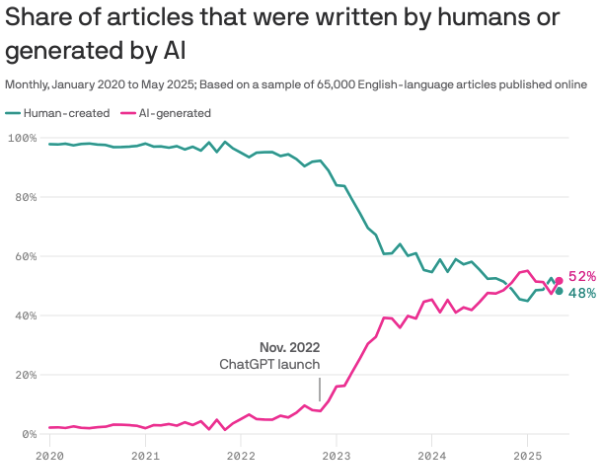
AI offers multiple advantages that make the writing process more organized and easier to scale:
- Speed and productivity. AI drastically reduces writing time. Platforms like ChatGPT, Jasper, Claude or Copy.ai can turn a few prompts into structured drafts within minutes. This lets content creators publish more frequently without compromising on length or coherence.
- Idea generation and topic research. AI is great at brainstorming. It can analyze existing online content, extract trending questions, and suggest related subtopics or headlines. Combined with keyword tools it helps uncover new content opportunities and optimize posts around relevant search queries.
- Consistency and tone control. When configured with style guidelines, AI maintains a uniform tone across all posts, something especially valuable for brands managing multiple writers.
- SEO support. Modern AI systems integrate with SEO tools to insert keywords naturally and structure headings for readability. This helps new bloggers meet technical SEO standards without deep expertise.
- Scalability for Teams. Marketing agencies and editorial teams use AI to scale operations. Draft generation, outline creation, and idea clustering can be delegated to AI, which allows human writers to focus on editing and originality.
AI writing is no longer a novelty – it’s a necessary skill for anyone producing digital content. To stay competitive, writers and businesses must do more than rely on automation; they need to adapt and learn how to use AI intelligently.
How to Write Blog Posts with AI
AI tools can now handle every stage of the blogging process. They can outline topics, write full sections, add statistics, generate tables, and even create images from text prompts. We’ll show how this entire process works in practice: how to work with ChatGPT for writing, how to use an online tool to humanize AI-generated content naturally, and how to optimize and finalize your post.
We’ll break it all down into six simple steps so you can see exactly how to create a full-length, professional blog post using AI from start to finish.

Step 1. Select the Topic and Keywords
A successful AI-generated blog starts with the right topic. Use keyword tools such as SEMrush, Ahrefs, or Google Keyword Planner to find terms that match your audience’s search intent. Once you have a few seed phrases, ask ChatGPT or Jasper to suggest related subtopics and long-tail keywords that attract specific readers.
You can also run a quick competitor analysis. Check what high-ranking blogs in your niche cover and identify gaps they missed. If they’ve written about “how to start a podcast,” you could focus on a variation like “how to start a podcast on a budget.”A well-chosen topic and balanced keyword mix make your post easier to rank and more valuable to readers.
Step 2. Build the Blog Structure and Generate the Content
Once you’ve chosen your topic and keywords, the next step is to give your article a solid structure and generate the first full draft. This is where AI tools truly shine. They can help you produce consistent, well-organized content that aligns with SEO goals and reader intent. While it’s tempting to ask AI to write the whole blog in one go, separate prompts deliver much better results. For example:
“Create a detailed outline for a 2,000-word article titled ‘How to Start a Home Coffee Roasting Business.’ Include an introduction, main steps such as equipment, bean selection, roasting process, marketing, and a short conclusion.”
Your outline is ready if:
Once your outline is ready, start generating each part separately. Prompt examples:
“Write a 150-word introduction about the appeal of home coffee roasting and why more hobbyists are turning it into small businesses.”
“Explain how to choose the right home coffee roasting machine. Include practical examples and beginner-friendly advice.”
“Write a section about marketing homemade coffee beans online. Mention low-cost promotion ideas such as Instagram and local markets.”
You can ask AI to use keywords you previously searched for SEO optimization. Carefully edit each section. Don’t forget that AI tends to produce general statements. To make your blog post stand out, add examples, short case scenarios, statistics or observations after each generated section. If the AI suggests a general benefit like “AI saves time,” expand on it with real detail. You can paste your example into ChatGPT and it will seamlessly integrate it into your post.
Step 3. Use AI Humanizer
To improve your AI-generated articles and make it sound more captivating and human-like, you can use AI humanizers. They can restructure awkward, robotic sentences and remove overused phrasing and cliches. There are a lot of such tools available, so you can easily find one that works for you. If you want a free online tool that works great with longer texts, we recommend Clever AI Humanizer.
It’s a free ChatGPT-based humanizer that supports up to 4,000 words per run and offers a free tier that covers a large monthly volume, up to ~120,000 words depending on your usage. Here is how to humanize AI text:
- Copy the draft generated by your AI writing tool (for example, ChatGPT or Jasper) and paste it into the text box on the AIHumanizer.net homepage.
- Once you’ve pasted your content, click the “Humanize Text” button. The tool automatically scans your writing for patterns that AI detectors usually flag, such as repetitive syntax, unnatural phrasing, and uniform sentence structures. It then rewrites the text, preserving the meaning and context.
- Read through the processed text. Clever AI Humanizer typically improves rhythm and vocabulary diversity, but it’s still smart to review the result to make sure it matches your blog’s personality and message.
- After reviewing, click “Copy Text” to use the new version in your preferred editor.
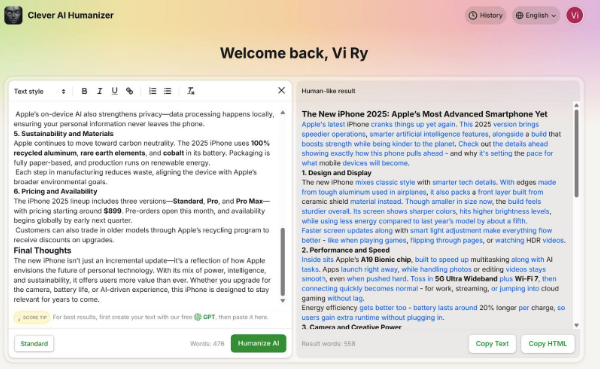
The process is quick and requires no technical knowledge, which makes it ideal for bloggers, marketers, and small teams who want to publish high-quality content at scale.
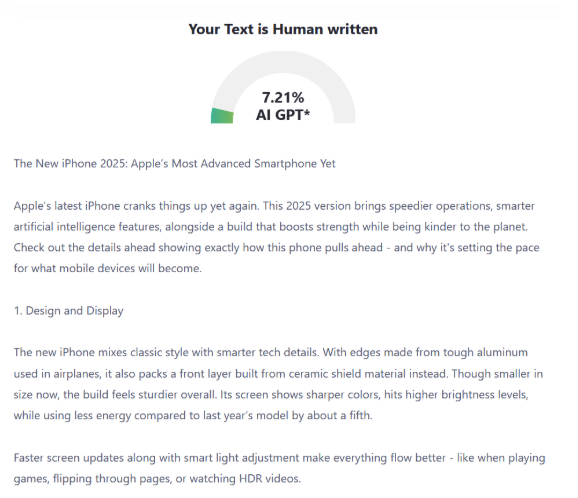
Based on our experience and testing, the tool greatly lowers AI detection scores, on par with top-rated AI humanizers. For example, text originally flagged as 90% AI-written in ZeroGPT or Copyleaks can drop to around 10-15% after processing. See our result above.
Step 4. Optimize AI SEO Content and Fact-Check
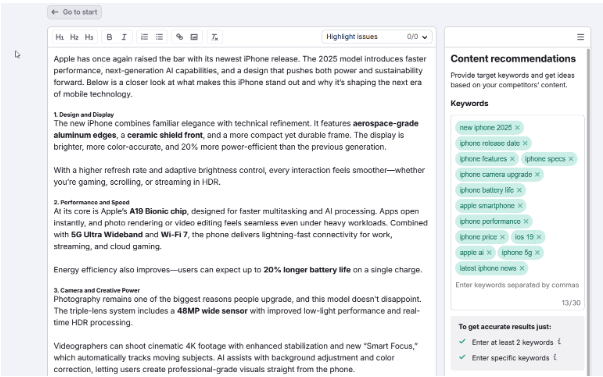
AI-generated text often lacks keyword precision and natural rhythm. Use SurferSEO or Rank Math to check keyword placement and semantic balance. Make sure each heading contains one target keyword and that phrases fit contextually without sounding forced. Adjust tone and flow. Read the article aloud and revise sentences that feel rigid or repetitive. Shorten long phrases and replace generic transitions with more natural ones.
During this phase, prioritize fact-checking. AI systems may hallucinate and insert outdated or inaccurate details, especially when referencing trends or technologies. Verify all data points, examples, and claims using credible sources such as industry reports, official documentation, or recent studies. Replace vague generalizations with specific, verifiable information.
Step 5. Make Final Edits and Publish
Before publishing, take time to polish your AI-generated article. Run a grammar and style check using tools like Grammarly, ProWritingAid, or Wordtune. These help you correct errors and refine phrasing while maintaining your preferred tone. Read the text aloud, it’s the easiest way to catch awkward phrasing or uneven rhythm that automated tools might miss.
After editing, move on to formatting. Add subheadings, bullet lists, and visuals to make the article more engaging. Create a compelling meta title and description that feature your primary keyword and clearly summarize the article.
Finally, preview the post on your CMS to confirm proper spacing and mobile responsiveness. Once everything looks polished, hit publish and share your article across social channels or email newsletters.
Step 6. Review and Iterate
AI copywriting thrives on refinement. Once your article goes live, observe how it performs over the next few weeks. Check which keywords attract clicks, how long readers stay on the page, and what sections lead to higher engagement. Then, use this information to adjust prompts and structure for future posts.
The more you use AI, the better it adapts to your preferred style. Save your best-performing prompts and use them as templates for later content. This ongoing cycle: creation, review, and optimization, turns AI writing into a reliable part of your blogging workflow.
Key Takeaways
These simple blog writing tips help you turn AI-generated drafts into polished, engaging blog posts that perform well and feel genuinely human:
- Use AI for structure, not substitution.
- Optimize every stage: from keyword research to tone adjustment.
- Verify facts, shorten filler text, and add human insights.
- Combine AI content generator and other tools for best results.
FAQ
What’s the best AI tool for writing full-length blog posts?
There isn’t a single tool that fits everyone’s needs. ChatGPT is one of the most flexible options for generating complete blog drafts, while Jasper is great at maintaining brand tone and style consistency. Copy.ai is ideal for quick marketing content, and Writesonic integrates well with SEO features.
Many bloggers use a combination of AI writing tools. For example: ChatGPT for content creation, Clever AI Humanizer for human-like text, SurferSEO for optimization and Grammarly for proofreading to achieve the best balance between creativity and structure.
How do I make AI-generated blog posts sound more human?
To make your AI-written text sound natural, refine tone and add personal thoughts. Replace repetitive phrases, use contractions, and vary sentence lengths to improve rhythm. Include real-world examples, stories, or case studies that reflect human experience. Fact-check every claim to maintain credibility, and avoid robotic transitions like “in today’s world” or “it’s important to note.”
You can also use humanizer tools, which are especially good if you need to bypass AI detection.
Can AI tools create SEO-optimized blog posts automatically?
AI tools can assist with SEO but still need human supervision. Platforms like SurferSEO or Frase can analyze keyword placement and content gaps. However, search engines also reward originality, clarity, and depth, areas that require human input. Always review AI-generated suggestions to make sure keywords fit naturally and that the article truly answers user intent rather than simply meeting SEO criteria.
How long should an AI-generated blog post be for good ranking?
The ideal length depends on topic complexity and competition. Generally, 1,500 to 2,500 words works best for in-depth content that covers a subject thoroughly. For niche or low-competition topics, 800–1,200 words may suffice if the post fully satisfies reader intent. Instead of focusing on word count alone, aim for quality: structure your article clearly, include relevant examples, add media, and keep each section informative and easy to follow.
Share This Article
About the Author: Alice Little































