



Keep reading
Rather we just did it for you?
Let's get your business seen.
Social media, websites, SEO and ads from a team you can actually meet.
If you have ever uploaded a picture to Instagram and watched it get chopped, blurred or squashed, you already know why the right instagram post size matters. The good news is that the rules are simpler than they look, and they changed in your favour over the last couple of years. This guide walks through the sizes and ratios that work today for feed posts, Reels, Stories, carousels and your profile, plus what to do when quality drops.
A quick note on sources: Instagram does not publish one tidy size chart, so we used its official help centre where it says something, and reputable news sources for the announcements. Where a figure comes only from third-party guides, we say so. Always check the preview before you share.
The short version: the instagram post size you need
If you only want the answer, here it is in list form. These are the pixel sizes we use for client work at Delivered Social, and they line up with what most reputable guides recommend.
- Portrait feed post (4:5): 1080 x 1350 pixels. This is our default for photos and graphics.
- Tall photo (3:4): 1080 x 1440 pixels. Now supported for photo uploads, more on that below.
- Square feed post (1:1): 1080 x 1080 pixels. Still fine, still safe.
- Landscape feed post (1.91:1): 1080 x 566 pixels. It works, but it is small on screen.
- Reels and Stories (9:16): 1080 x 1920 pixels.
- Carousel slides: pick one ratio and use it on every slide, usually 1080 x 1350 pixels.
- Profile photo: upload a square image of at least 320 x 320 pixels. Instagram shows it as a circle.
Instagram says it uploads photos at the best quality it can, up to 1080 pixels wide, on its help page about photo resolution. There is little point making your images much wider than that, because Instagram will shrink them anyway.
Instagram image size for feed posts: 4:5, 3:4 or 1:1?
For years, the advice was simple: use square or 4:5 portrait, because anything taller got cropped. In May 2025, Instagram told creators that when you upload a 3:4 image, it will appear exactly as you shot it. Social Media Today reported the change, and noted that it covers single photos and carousels, with 1:1 and 4:5 still supported.
That matters because 3:4 is the shape most phone cameras shoot in. Before, an ordinary photo straight from your camera roll was trimmed to fit. Now it can go up untouched.
So which instagram post size should you pick? Use 4:5 for graphics designed from scratch, 3:4 for phone photos you do not want to crop, and 1:1 for logos or neat product shots. Landscape is allowed but small on a phone screen.
One honest caveat: some third-party guides disagree about the exact limits of the feed, with a few listing the maximum as 4:5 and others saying 3:4. We could not find a single official Instagram page that lists every supported ratio, so we recommend testing with one post and checking the preview. If the preview looks right, you are fine.
The profile grid change, and what it means for your design
This is the bit that catches people out. In January 2025, Instagram head Adam Mosseri announced that profile grids were moving from squares to rectangles, because most of what people upload is now vertical. Business Today covered the announcement. Social scheduling tool Planoly’s write-up describes the new grid as a vertical 3:4 shape, and says it began as a test with a small group of users.
In plain terms, your grid thumbnails are now taller than they are wide. A few things follow from that.
- A 3:4 post fills its grid tile with no cropping.
- A 4:5 post is slightly wider than the tile, so a little may be trimmed from the sides or top and bottom. We could not confirm the exact amount from an official source, so keep important content away from the edges.
- A 1:1 square will be cropped to fill the taller tile, or shown with space around it, depending on the adjustment you choose.
If you do not like how a post appears on your grid, Mosseri’s announcement mentioned you can change it. Tap the three dots on the post, choose “Adjust Preview”, then pick “Fit” or “Fill”. It is worth doing for older square posts that now look cut off.
Our advice is to stop choosing your instagram post size around a perfect square grid. Keep the key part of every image in the middle of the frame, so it works in the feed and the grid.
Reels and Stories
Reels and Stories both use a full-screen vertical shape: 9:16, which is 1080 x 1920 pixels. This is the same on almost every guide we read, though the exact video specifications are on Meta’s side and we could not load an official page to confirm them, so treat the finer details as guidance.
The bigger issue is the safe zone. Instagram puts its own buttons and text over your video: your username at the top, the caption and buttons at the bottom, and the like and share icons on the side. If your text sits under any of those, people cannot read it.
- Keep text and logos away from the top and bottom of the frame. Several guides suggest about 150 pixels clear at the top and 250 pixels at the bottom for Stories, and that is a sensible starting point.
- Leave a margin down the right side of Reels, where the buttons sit.
- Put your key words in the middle of the screen, where they are least likely to be covered.
Reels also appear in your grid, so pick a cover frame with the subject in the middle. We could not confirm the exact grid crop on a Reel cover from an official page, so check the preview.
Carousels
Carousels are the posts you swipe through. The main rule is that every slide needs to be the same shape. Instagram sets the shape from your first slide, so if slide one is 4:5 and slide two is square, the second will be cropped or padded to match. Pick one ratio, design all the slides at that size, and stick with it.
For most of our work we use 1080 x 1350 pixels for each slide. If you are posting photos from your phone, 3:4 at 1080 x 1440 pixels is a good choice now that it is supported.
Make slide one stop the scroll, keep consistent margins on every slide, and put a clear next step, such as “save this”, on the last one.
Profile photo and cover images
Your profile photo is shown as a circle, even though you upload a square. Most guides suggest a minimum of 320 x 320 pixels. We usually upload something larger, such as 1000 x 1000 pixels, so it stays sharp on bigger screens. Put the face or logo in the centre and leave a margin, because the corners are cut off by the circle.
For cover images, Instagram has no Facebook-style banner on a normal profile. What you can set is a Reel cover, a Story Highlight cover and each post’s grid preview. For Highlights, design on a 1080 x 1920 canvas with the icon in the middle, because they are cropped to a circle. We could not confirm an official Highlight cover size.
File formats and file size
JPG and PNG are the formats to use for images. A well-saved JPG is usually the best choice for photos, while PNG suits graphics with sharp text and flat colour. Several guides suggest exporting JPGs at around 80 to 90 per cent quality, and we agree: it keeps the file small without making the image look muddy.
We could not find an official file size limit, so we will not quote one. Keeping images under a few megabytes and about 1080 pixels wide avoids most problems.
Why your instagram post size looks blurry, and how to fix it
Almost everyone has had this: the photo looks crisp on your phone, then soft and grainy on Instagram. This is usually caused by one of four things.
- The image is too small. If you upload something only 500 pixels wide, Instagram has to stretch it, and it will look fuzzy. Start with at least 1080 pixels across.
- The image is too big. Instagram shrinks large files itself, and its own compression can be rougher than yours. Resizing it to 1080 pixels wide yourself gives you more control.
- Heavy compression. Photos that have been saved, sent through messaging apps and saved again lose detail each time. Always upload the original file where you can.
- Text and thin lines. Fine type and delicate lines suffer the most from compression. Use bold fonts and larger sizes for anything you want people to read.
If a video looks soft, export it at 1080 x 1920 in the highest quality your editing app allows, and never post a screen recording of a video.
Our social media content calendar template has space to note the format of each post, which saves last-minute resizing.
Cropping and previewing before you post
The cheapest way to avoid a bad post is to look at it properly before it goes live. Here is a quick routine:
- Check the crop screen in the app when you upload.
- Look at the grid preview. Many scheduling tools now offer a 3:4 grid view.
- Zoom out and look at the image as a thumbnail. If the point is lost, it is too busy.
- Keep the main subject in the middle, with about 10 per cent clear at the top and bottom.
Whatever instagram post size you pick, keep a master version of every design at the biggest size you need, then crop copies for each use.
Accessibility: alt text and readable design
A well-sized image is no use if some of your followers cannot see it. Alt text is a short description of an image that screen readers read aloud. Instagram can generate descriptions automatically using object recognition, as its help centre explains, but they are basic, so writing your own is better.
To add your own, look for the advanced settings option before you share a post. Menu names change, so search the Instagram help centre if you cannot see it.
Good alt text is simple:
- Describe what is in the image in one or two plain sentences.
- Include any text that appears in the image, because screen readers cannot read it otherwise.
- Keep it short and useful rather than stuffed with keywords.
Also use strong contrast between text and background, readable font sizes, and captions on videos.
Does the right size help your reach?
Instagram has not said dimensions are a ranking factor, so be wary of anyone promising one exact size will boost reach. What it does is make your content look professional and less likely to be cropped awkwardly. If numbers have dipped, formatting is rarely the whole story: our guide to an Instagram engagement drop covers seven other checks, and our piece on how to increase followers on Instagram shows what works without shortcuts. To see where your account stands overall, try a social media audit template.
Frequently asked questions
What is the best Instagram post size in 2026?
For most graphics, 1080 x 1350 pixels (4:5) is the best all-rounder. For photos straight from your phone, 1080 x 1440 pixels (3:4) now works too. Square at 1080 x 1080 remains a safe choice.
Can I still post square photos on Instagram?
Yes. Square, 4:5 and 3:4 are all supported for photos. The change is to how posts look on your profile grid, which now uses a taller rectangular tile, so squares may be cropped there.
What is the best Instagram image size for the profile grid?
Because the grid now previews posts in a 3:4 shape, a 3:4 image fills the tile with no cropping. If you use 4:5, keep important content away from the edges.
Why does Instagram make my pictures blurry?
Usually because the file is too small, is already heavily compressed, or has fine text that does not survive compression. Upload the original at about 1080 pixels wide, and use bold text.
What size should my Reels and Stories be?
1080 x 1920 pixels in a 9:16 shape. Keep text away from the top, bottom and right-hand side so Instagram’s buttons do not cover it.
Do I need to add alt text?
You do not have to, but it is a good habit. It helps people using screen readers and takes under a minute per post.
Get the free Instagram Size Cheat Sheet
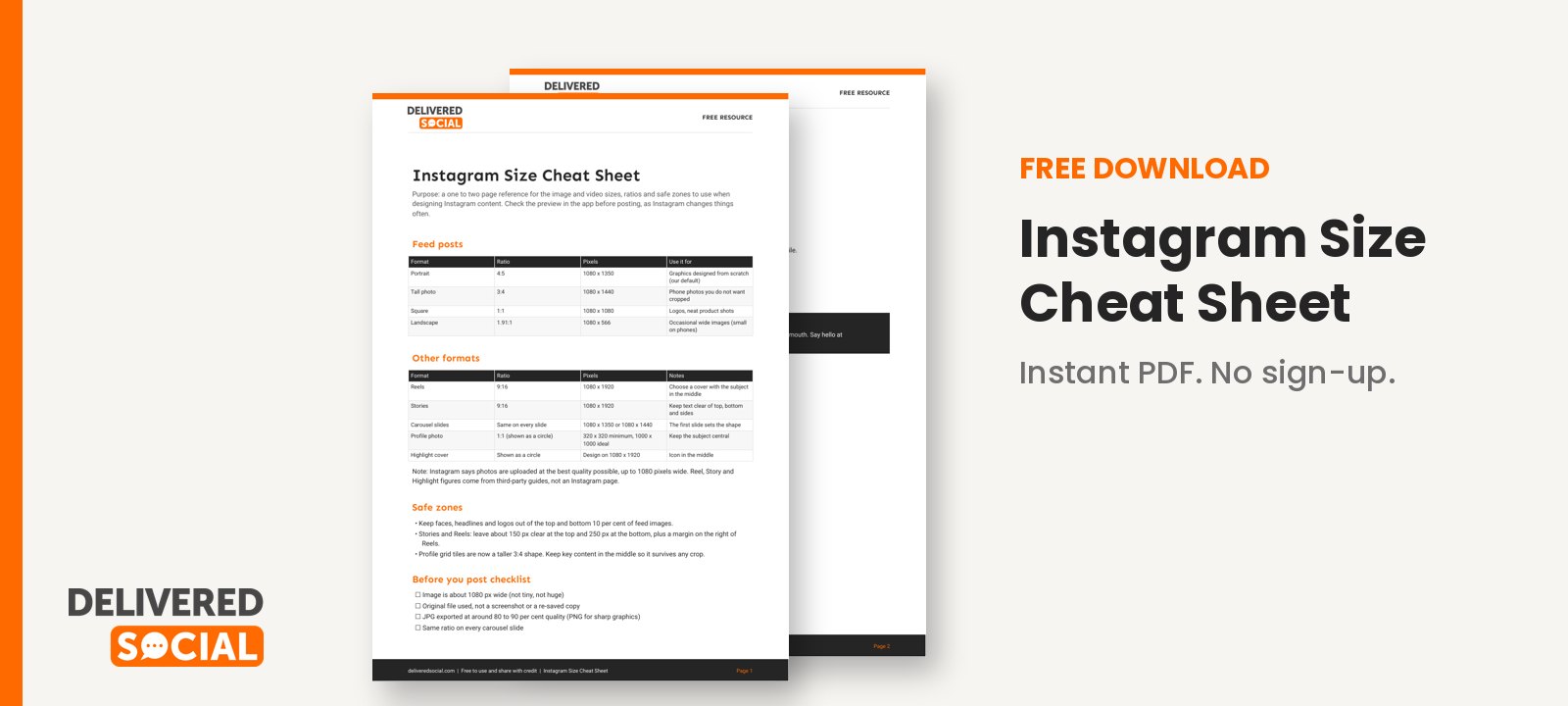
We have put the sizes, ratios and safe zones from this guide onto a one to two page printable reference, so you can keep it next to your desk when you design. Download the free Instagram Size Cheat Sheet and use it whenever you are setting up a new post, Reel or carousel. Keep the golden rule in mind: get the instagram post size right, keep the key content in the middle, and always check the preview.
If you would like a hand with your Instagram, from creating on-brand designs to running your whole content plan, the team at Delivered Social would be glad to help. Feel free to contact us for a friendly chat.
































