



Keep reading
Rather we just did it for you?
Let's get your business seen.
Social media, websites, SEO and ads from a team you can actually meet.
One social video is rarely one file. Once you add the aspect ratios each platform prefers, a few hook ideas and the audiences you want to test, a single concept becomes dozens of exports. This guide shows how to plan those variants before you open an editing app, and how to stop the workload from growing faster than your team.

Why does one social video turn into so many files?
Because every platform has its own idea of what a good frame looks like. TikTok’s ad specifications list three accepted shapes for in-feed ads: vertical at 9:16 with at least 540 by 960 pixels, horizontal at 16:9 with at least 960 by 540, and square at 1:1 with at least 640 by 640. Files can be up to 500 MB.
YouTube Shorts leans the other way. According to Google Ads Help, vertical 9:16 video suits Shorts best and performs better than landscape assets. Horizontal assets still run, but they’re served with blurred bars at the top and bottom. Video ads can be up to 3 minutes long, although only the first 60 seconds play in the Shorts feed.
So a single campaign video might need a vertical cut for Shorts and TikTok, a horizontal cut for YouTube’s standard player and a square cut for feeds. That’s before you change a word of copy.
Is it worth making the extra cuts?
Mostly, yes. Google published a test result in 2022 saying that advertisers who added a vertical creative asset to their Video action campaigns delivered 10 to 20 percent more conversions per dollar on YouTube Shorts than campaigns using landscape assets alone. That figure is a few years old and it comes from Google’s own advertisers, so treat it as a direction rather than a promise.
Google’s Shorts guidance also says that adding sound, whether music, a voiceover or both, has been shown to increase conversions by over 20 percent in Shorts ads. Sound is a cheap variable to test, because it doesn’t change the frame at all.
The point for a small team is simple. The extra cuts pay for themselves only if they cost you very little time to produce. If each one needs an hour in an editor, you’ll stop at two, and the test you planned with six versions quietly becomes a test with two. That’s the real cost of manual work: it shrinks what you’re willing to try.
What actually changes between variants?
Most variants differ in a handful of places. Listing them first keeps the brief honest.
- Frame: 9:16, 1:1 or 16:9, with text and logos moved so nothing sits under platform buttons.
- Hook: the first line of text or the first image, which decides whether anyone keeps watching.
- Offer or call to action: a discount code for one audience, a sign-up prompt for another.
- Audience or location: a town name, a product line, a language.
- Sound: with voiceover, with music only, or silent with captions.
Notice what stays the same: the brand colours, the fonts, the pacing and the overall layout. Those belong in a template. The five items above belong in a data table, one row per video.
Do the maths before you commit. Three frames, four hooks and three audiences make 36 videos. Add five locations and you’re at 180. Dragging 180 text layers into place one at a time is not a realistic plan for a small team.
Where does manual editing break down?

Photo by Mark Cruz on Unsplash
It breaks in two places, and the second is the one teams miss.
The first is time. Even with a good preset, a manual edit means opening a project, swapping the text, checking it fits, resizing for the new frame, exporting and renaming the file. Multiply that by your variant count and the campaign is late before it starts.
The second is consistency. By the fortieth export, someone has nudged a logo two pixels, used last month’s discount code or left a headline overflowing its box. Reviewers then spend their time hunting for errors instead of judging the creative. A small mistake repeated across a batch is also harder to fix than one mistake in one file, because you have to find every file it touched.
How does a template and data workflow work?
The idea is to build the video once and treat everything that changes as a field. You design the master in your editor, flag the parts that are allowed to vary, then let a table of data fill them in. One row of that table gives you one finished video.
For a social team, the interesting question is where that table lives. If it sits in a file on one person’s laptop, only that person can change the videos. If it sits in the campaign’s own Google Sheet or Airtable base, the whole team already works in it. That is the idea behind video editing at scale with Plainly, which connects natively to Google Sheets and Airtable, so the sheet your team already edits is what drives the variants. Changing a hook or an offer code means editing a cell, not reopening a project.
That shifts who does what. The designer owns the template, and the people running the campaign own the sheet. A social manager can fix a typo in row 42 or add a new audience without asking anyone to touch the master file.
Text length is still worth planning for, whatever tool you use. A headline that fits in one market can overflow in another, so set a character limit per column and treat it as part of the brief. A long German headline is the classic way to break a 9:16 frame.
How should you set up the data sheet?
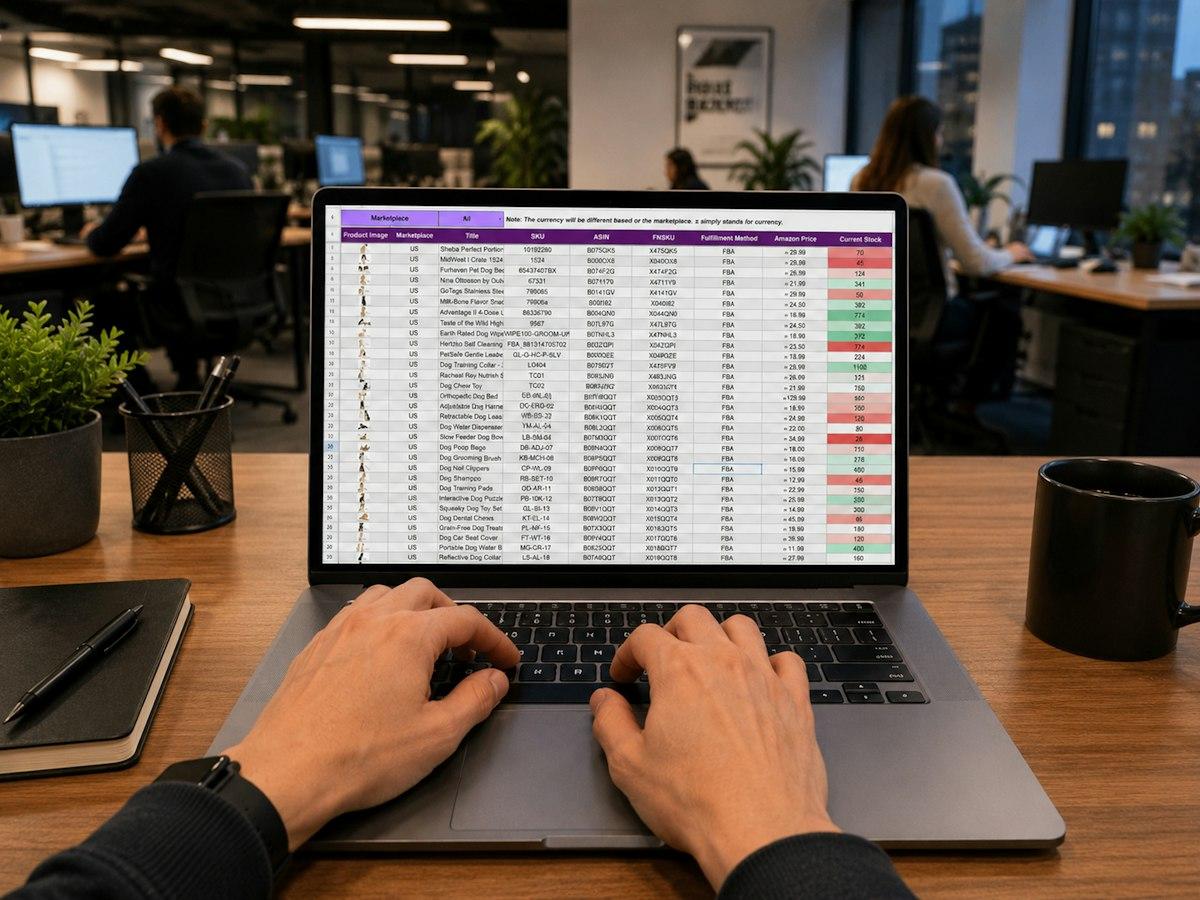
Photo by Gorilla ROI Data Connector on Unsplash
Keep it boring. A sheet that one person can read in ten seconds is a sheet that won’t cause mistakes.
Start with one row per finished video and one column per changing element. A workable set of columns looks like this: video ID, aspect ratio, headline, sub-line, offer code, image link, audio choice and audience label. Put the aspect ratio in its own column so the same template can branch into vertical, square and horizontal layouts from one row.
Then agree a file naming rule before you render anything. Something like campaign, audience, hook number and frame works, because it lets you match a result in Ads Manager to a row in your sheet a month later. If you can’t tell which hook won, the test was wasted.
Finally, change one thing at a time when you can. If two rows differ in headline and audio and frame, you’ve learned very little from the result. The sheet makes this easy, because you can see at a glance which columns differ between any two rows.
What should you check before a batch goes live?
Don’t approve 180 videos by watching 180 videos. Check the extremes instead.
- Longest and shortest text: put the wordiest headline and the briefest one in test rows and watch both.
- Every frame: confirm nothing important sits where platform buttons and captions will cover it.
- File limits: TikTok’s ad specs cap files at 500 MB, so a long high-bitrate export for that platform is worth checking.
- Shorts length: remember only the first 60 seconds play in the Shorts feed, so the message has to land early.
- A random sample: open ten finished files at random and compare them with the sheet.
If the extremes pass, the middle will almost always pass too. If they don’t, you’ve found the problem while it’s still one row instead of 180 files.
Where do you start?
Pick one campaign you already have planned and write out its variants as rows in a sheet before anyone opens an editor. Count them. If the number is above about a dozen, that campaign is a good candidate for a template, and the sheet you’ve just written is the data that will drive it.































