



Keep reading
Rather we just did it for you?
Let's get your business seen.
Social media, websites, SEO and ads from a team you can actually meet.
You set up your campaign, picked your audience, added a budget and pressed publish. Hours later, Ads Manager still says “Not delivering”, or your ads are live but spending almost nothing. It is one of the most common problems with Meta advertising, and it can be frustrating because the reason is not always obvious. This guide explains every common reason for Facebook ads not delivering, what the different delivery statuses mean, and exactly how to fix each one so your ads start reaching people again.
First, read the delivery status
Ads Manager shows a delivery status for every campaign, ad set and ad. Hover over or click the status to see more detail. The status tells you where to look:
| Status | What it means |
|---|---|
| In review | Meta is checking your ad against its advertising standards. Most reviews finish within a day. |
| Rejected | The ad breaks a policy. Edit it or request another review. |
| Not delivering | Something is stopping the ad from running. The detail usually explains why. |
| Scheduled | The start date is in the future. |
| Off | The campaign, ad set or ad has been switched off. |
| Learning limited | The ad set is running but not getting enough results to optimise well. |
| Completed | The end date has passed or the lifetime budget is spent. |
Reason 1: something is switched off
It sounds obvious, but it is the most common cause. An ad only runs if the campaign, the ad set and the ad are all switched on. Check all three toggles. If you duplicated a campaign, the copy may have been created switched off.
Reason 2: the ad is still in review or was rejected
New and edited ads go through review. If it has been more than 24 hours, check for a rejection notice. Common reasons for rejection include:
- Claims that imply personal attributes, such as “Are you overweight?” or “Struggling with debt?”.
- Before and after images in health and weight loss ads.
- Restricted products or services without the right permissions.
- Landing pages that do not work, do not match the ad or are hard to use.
- Misleading or exaggerated claims.
Edit the ad to fix the problem, or request a review in Account Quality if you believe the decision is wrong.
Reason 3: payment problems
If your card expired, a payment failed or you reached your account spending limit, ads stop. Go to Billing and payments in Ads Manager, check for failed payments and settle any balance. Make sure the payment method is valid and has enough available credit, and check whether you have set an account spending limit that has been reached.
Reason 4: your ad account or Page is restricted
If Meta has restricted your ad account, Business portfolio or Facebook Page, nothing will deliver. Open Account Quality in Meta Business Suite to see any restrictions and the reasons. Request a review where possible. Our guide on what to do if your Facebook ad account is disabled walks you through the process.
Reason 5: your audience is too small
If you stacked lots of interests, narrowed by a tiny location, or used a small custom audience, there may simply not be enough people to show your ads to. Check the audience size estimate in the ad set. For most local businesses, a radius around your town and a broad age range works better than layers of narrow interests. Meta’s delivery system usually performs best with room to find the right people.
Reason 6: your budget or bid is too low
Very low daily budgets can struggle to deliver, especially if you have chosen a conversion objective that needs enough data. Bid caps or cost caps set too low can stop delivery altogether, because your ad cannot win any auctions at that price. Try:
- Raising the daily budget for a test period.
- Switching to the default highest volume bid strategy.
- Choosing an objective that matches your budget, such as traffic or leads rather than purchases if you have few sales.
Our guide to how much Facebook ads cost in the UK explains realistic budgets.
Reason 7: audience overlap
If several ad sets target the same people, they compete against each other in the auction, and Meta may only show one of them. Combine similar ad sets or use different audiences for each.
Reason 8: schedule and end dates
Check the start date is not in the future and the end date has not passed. If you set ad scheduling to only run at certain hours, delivery will be limited to those times, which can make spending look slow.
Reason 9: low quality or low engagement creative
Meta favours ads that people are likely to engage with. Ads with low quality images, lots of text in the image, weak hooks or poor feedback from users can deliver less. Check the ad relevance diagnostics in Ads Manager. If your quality, engagement or conversion rankings are below average, test new creative: a different image or video, a stronger first line and a clearer offer.
Reason 10: the learning phase
New ad sets go through a learning phase while Meta works out who to show them to. Delivery can be uneven during this time. Avoid making big edits, as significant changes restart learning. If the ad set shows “Learning limited”, it is not getting enough optimisation events. Broaden the audience, raise the budget or choose an event that happens more often.
Reason 11: special ad category restrictions
If your ads relate to credit, employment, housing or social issues, elections or politics, you must declare a special ad category. These categories limit targeting options and, for some, require authorisation. Ads run without the right category can be rejected or stop delivering.
Reason 12: tracking and pixel issues
If you optimise for conversions such as purchases or leads but your Meta pixel or Conversions API is not recording events, the system has nothing to optimise for, and delivery can stall. Check Events Manager to make sure your events are firing. Our Meta ads best practices guide covers tracking setup.
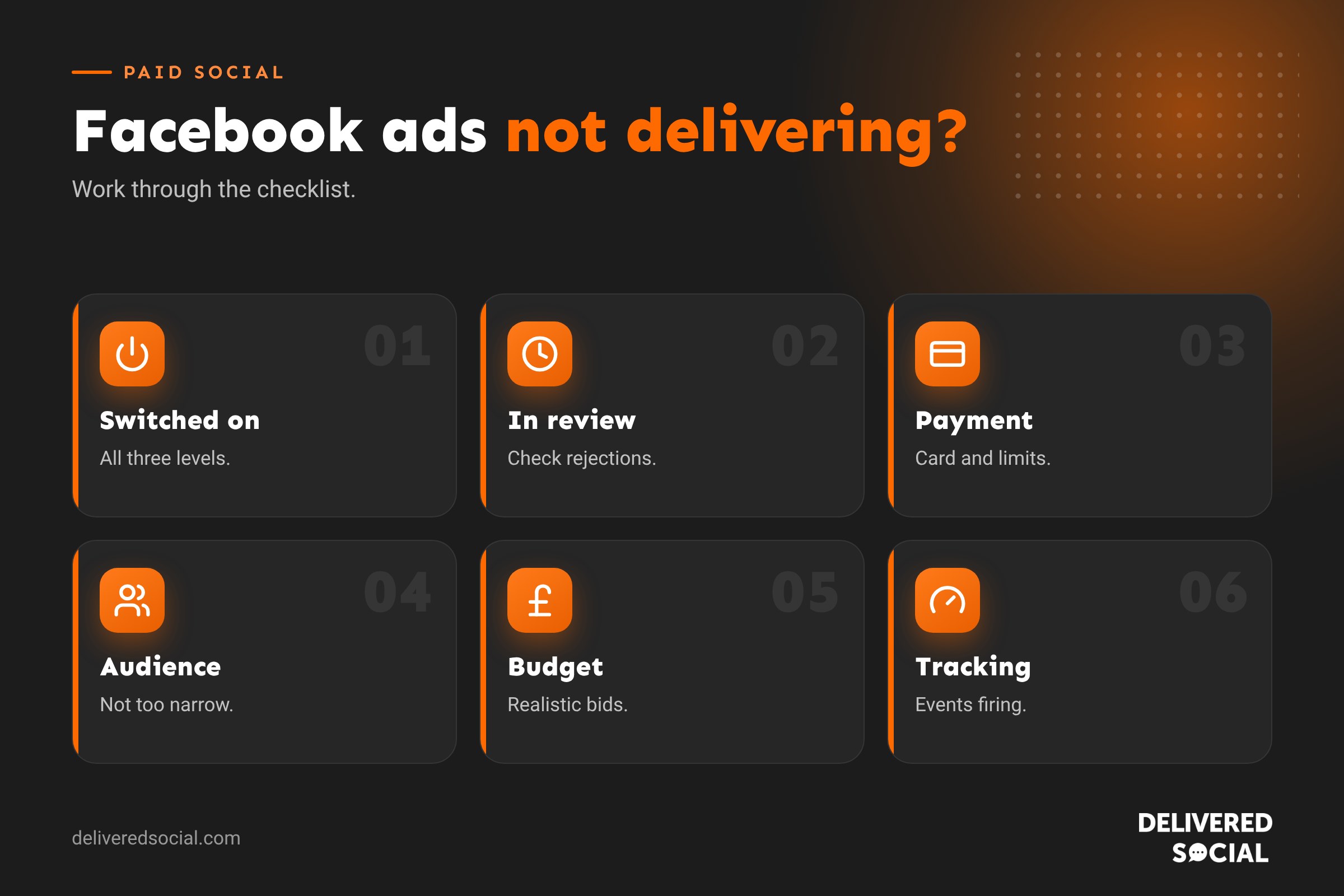
A quick troubleshooting checklist
- Campaign, ad set and ad are all switched on.
- No ads in review for more than a day, and none rejected.
- Payment method valid and no spending limit reached.
- No restrictions in Account Quality.
- Audience size estimate is healthy.
- Budget and bid strategy are realistic.
- No overlapping ad sets competing with each other.
- Start and end dates are correct.
- Creative is strong and relevance diagnostics are not below average.
- Tracking events are firing in Events Manager.
Live but spending slowly?
Sometimes ads are technically delivering but spending far less than the budget. This often happens with narrow audiences, low bid caps, new ad accounts or creative that is not getting engagement. Give new campaigns a few days, then use the checklist above. New ad accounts can also have lower limits at first, which increase as you build a payment history.
A real world example
A Hampshire wedding venue launched a campaign targeting engaged couples within ten miles, aged 25 to 35, interested in three specific wedding magazines. The ads sat at “Not delivering” with an audience too small. We widened the radius to 30 miles, removed the narrow interests and let the “recently engaged” life event targeting do the work. The ads started delivering within hours, and cost per enquiry came down over the following fortnight as the system learned.
When to get help
If your ads still will not deliver after working through the checklist, or your account has been restricted and reviews keep failing, it is worth asking for help. Repeated failed reviews or creating new accounts to get around restrictions can make things worse. An experienced Meta advertiser can usually spot the problem quickly and fix it without putting your account at further risk.
How to stop it happening again
Prevention is easier than troubleshooting. A few habits keep campaigns delivering smoothly:
- Review ads against Meta’s advertising standards before you publish. Avoid personal attribute language, exaggerated claims and restricted products without permission.
- Keep two payment methods on file so a failed card does not stop your ads.
- Protect the account. Use two factor authentication for everyone with access, and remove old staff and agencies. Hacked accounts are a common reason for sudden restrictions.
- Check Ads Manager daily for the first few days of any new campaign, then weekly.
- Refresh creative regularly. Ads that people have seen too often lose engagement, which hurts delivery.
- Keep your landing pages fast and working. Broken pages can lead to rejected ads.
Key takeaways
- Start with the delivery status, which usually points to the cause.
- Check toggles, reviews, payments and restrictions first.
- Small audiences and low budgets or bid caps are common culprits.
- Weak creative and broken tracking can quietly limit delivery.
- Avoid big edits during the learning phase.
Frequently asked questions
Why does my Facebook ad say “Not delivering”?
Something is stopping it, such as it being switched off, rejected, a payment issue or an audience that is too small. Click the status for details.
How long does Facebook ad review take?
Most ads are reviewed within 24 hours, though it can take longer.
Why are my Meta ads not spending the budget?
Narrow audiences, low bid caps, weak creative and new account limits can all slow spending.
Does editing an ad stop delivery?
Edits send the ad back to review and significant changes restart the learning phase.
What does “Learning limited” mean?
The ad set is not getting enough results to optimise. Broaden the audience or raise the budget.
Can a Facebook Page problem stop my ads?
Yes. Restrictions on your Page or Business portfolio can stop ads running.
Should I create a new ad account if mine is restricted?
No. Request a review instead. New accounts can be restricted too.
Want your Meta ads running smoothly?
We plan and manage Facebook and Instagram advertising for businesses across Surrey, Hampshire and the UK. Call us on 01483 608 303.
































