



Keep reading
Rather we just did it for you?
Let's get your business seen.
Social media, websites, SEO and ads from a team you can actually meet.
Most business websites have grown in layers: a blog post here, a service page there, an old news story from five years ago that nobody has looked at since. Over time, that content gets out of date, overlaps and starts working against you. A content audit is a structured review of everything you have published, so you can see what is working, fix what is not and decide what to do next. This guide explains how to do a content audit step by step, the tools you need, how to judge each page and how to turn the results into a plan that grows traffic and enquiries.
What is a content audit?
A content audit is a review of the pages and posts on your website, and sometimes your social media and other channels, measured against clear goals. For each piece of content, you collect data such as traffic, rankings, engagement and conversions, then decide whether to keep it, update it, merge it with something else or remove it. The result is a cleaner, stronger website and a list of gaps to fill.
A content audit is related to, but different from, an SEO audit. An SEO audit focuses on technical issues such as speed, indexing and site structure. A content audit focuses on the words, images and topics themselves. Our guide to SEO audits covers the technical side.
Why do a content audit?
- Improve rankings: updating and strengthening existing pages is often the quickest way to gain search traffic.
- Fix keyword cannibalisation: when several pages target the same topic, they compete with each other. Merging them can lift the combined page.
- Remove outdated information: old prices, discontinued services and expired offers damage trust.
- Find gaps: see which questions your customers ask that your site does not answer.
- Get more from what you have: pages that already get traffic can be improved to bring more enquiries.
- Prepare for a redesign: know what to keep, move and redirect before building a new site.
How often should you audit content?
For most small and medium businesses, a full content audit once a year is enough, with a lighter quarterly check of your most important pages. Busy publishers and ecommerce sites with lots of products may need more frequent reviews. Always audit before a website redesign or migration.
Step 1: set your goals
Decide what you want the audit to achieve before you open a spreadsheet. Common goals include more organic traffic, more enquiries from blog readers, better rankings for key services, or a tidier site before a rebuild. Your goals decide which numbers matter most. If you want enquiries, conversions matter more than page views.
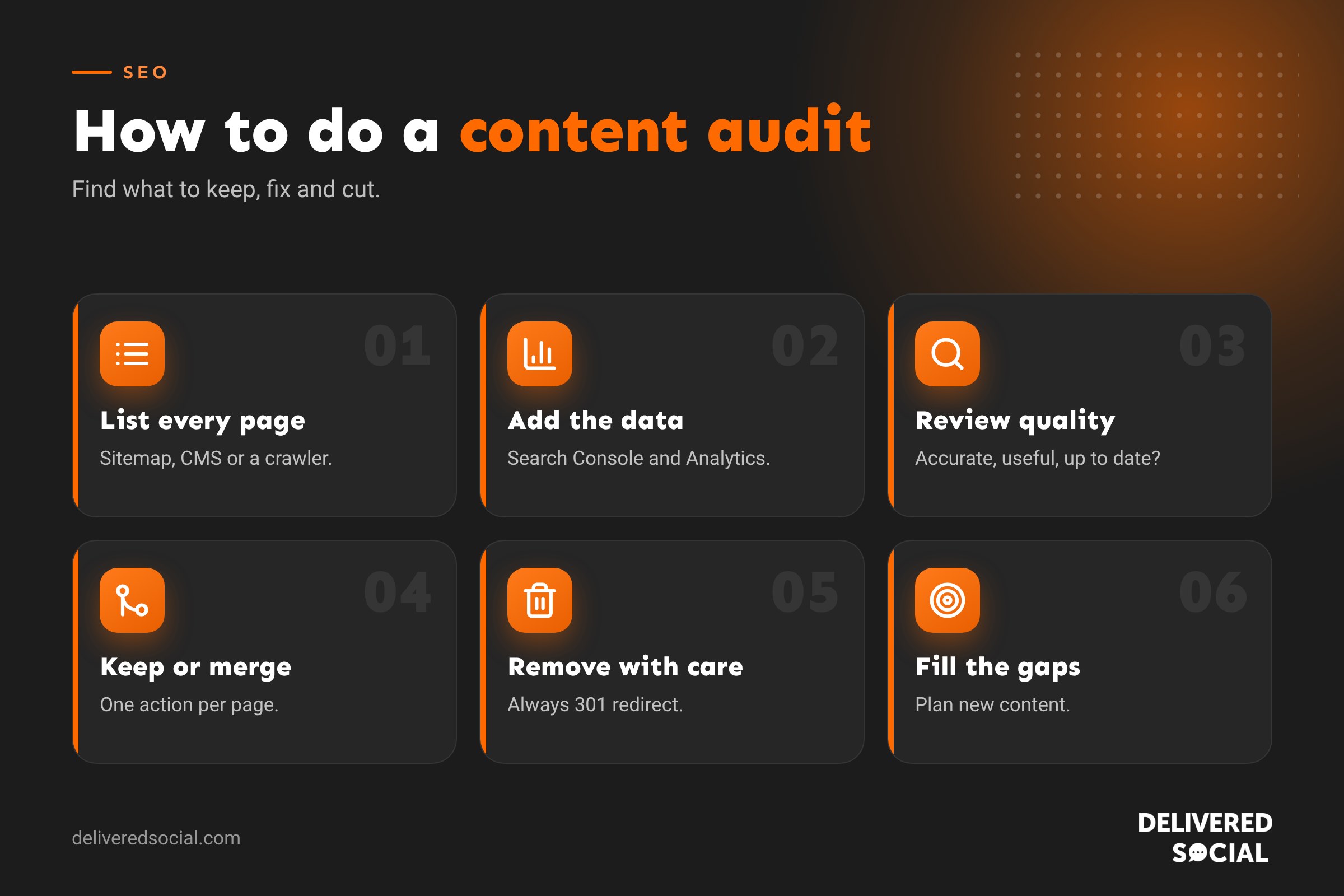
Step 2: list all your content
Create a spreadsheet of every page you want to review. You can gather URLs from:
- Your website’s XML sitemap, usually at yourdomain.com/sitemap.xml or sitemap_index.xml.
- Your content management system, such as the WordPress posts and pages lists.
- A crawling tool such as Screaming Frog SEO Spider, which is free for up to 500 URLs.
- Google Search Console’s Pages report.
Add columns for title, URL, content type (blog, service page, product, landing page), topic, author, publish date and last updated date.
Step 3: gather performance data
For each URL, add data from your analytics tools. A 12 month period smooths out seasonal swings.
- Google Search Console: clicks, impressions, average position and the queries each page ranks for.
- Google Analytics 4: views, engaged sessions, average engagement time and key events such as form submissions or calls.
- Backlinks: the number of other websites linking to each page, from a tool such as Ahrefs, Semrush or Moz.
- Word count and freshness: how long the content is and when it was last updated.
You do not need every metric for every site. For a small business, Search Console clicks, impressions and position, plus Analytics conversions, are usually enough to make good decisions.
Step 4: review the quality of each page
Numbers tell you how a page performs. A quick read tells you why. For each important page, ask:
- Is the information accurate and up to date?
- Does it fully answer the question someone searching would have?
- Is it better than the pages ranking above it?
- Is it easy to read, with headings, short paragraphs and helpful images?
- Does it show real experience and expertise, such as examples, photos of your own work or named authors?
- Does it have a clear next step, such as a link to a service or a contact form?
- Does it link to and from other related pages on your site?
Give each page a simple score, such as one to five for quality, so you can sort and compare later.
Step 5: decide what to do with each page
Every page gets one action. The four most common are:
Keep
Pages that perform well and are accurate. Leave them alone apart from small tweaks, and protect them from accidental changes.
Update
Pages with potential: good impressions but low clicks, rankings just off page one, or information that is out of date. Refresh the content, add missing sections, improve the title and description, add internal links and update the date.
Merge
Several thin or overlapping pages on the same topic. Combine the best parts into one strong page, then redirect the old URLs to it with 301 redirects so you keep any links and rankings.
Remove
Pages with no traffic, no links, no value to customers and no chance of improving, such as old event announcements. Delete them and redirect to the most relevant page, or return a 410 status if there is nothing suitable. Do not remove pages just because traffic is low; some, like terms and conditions, matter for other reasons.
Step 6: find content gaps
An audit is not only about fixing old content. Look for topics you should cover but do not:
- Queries in Search Console where you get impressions but have no dedicated page.
- Questions customers ask in calls, emails and social media.
- Topics competitors cover that you do not, found with keyword research tools.
- Stages of the buying journey with no content, such as comparisons or pricing explanations.
Add these to a content plan with target keywords and priorities.
Step 7: prioritise and act
You will probably end up with a long list. Prioritise by likely impact and effort. Quick wins usually come first: pages ranking in positions 8 to 20 with lots of impressions, important service pages with weak content, and merges that fix obvious cannibalisation. Set a realistic schedule, such as five updates a week, and track results.
Step 8: measure the results
Note the date you changed each page. After six to twelve weeks, compare clicks, positions and conversions with the period before. Most updated pages improve gradually as Google recrawls them. Keep notes on what worked, so your next audit is faster.
Content audit template columns
A simple spreadsheet with these columns works for most businesses:
- URL and title
- Content type and topic
- Main keyword
- Clicks, impressions and average position (12 months)
- Views and conversions
- Backlinks
- Last updated
- Quality score (1 to 5)
- Action: keep, update, merge or remove
- Notes and priority
- Date actioned
Useful content audit tools
- Google Search Console: free search performance data for every page.
- Google Analytics 4: free engagement and conversion data.
- Screaming Frog: crawls your site and lists every URL with titles, word counts and status codes.
- Semrush or Ahrefs: paid tools with content audit features, keyword data and backlinks.
- Google Sheets or Excel: to bring it all together.
Auditing your social media content
The same thinking works for social media. Export your posts from each platform, look at reach, engagement and clicks, and group them by topic and format. Which content pillars perform best? Which formats, such as Reels or carousels, bring followers? Which posts drive website visits? Use the answers to shape next quarter’s content calendar. Our guide to running a social media audit walks through it.
Common content audit mistakes
- Deleting pages without redirects, losing links and rankings.
- Judging pages on traffic alone, ignoring conversions and purpose.
- Collecting data but never acting on it.
- Updating the date without improving the content.
- Trying to fix everything at once instead of prioritising.
- Forgetting internal links when merging or removing pages.
A worked example
Imagine a garden design company with 80 blog posts. The audit shows six posts about patio ideas, each getting a few clicks, all ranking on page two or three. Three old posts about events from 2019 get no traffic at all. A guide to garden planning permission gets thousands of impressions but ranks in position 11, with an outdated section. The plan: merge the six patio posts into one complete guide and redirect the old URLs, remove the event posts with redirects to the blog homepage, and update the planning guide with current rules, a clearer structure and a link to the design service page. Three months later, the merged patio guide ranks on page one and the planning guide moves into the top five, bringing enquiries the old pages never did.
Getting your team involved
A content audit goes faster and produces better results when the people who know your customers take part. Ask sales or customer service staff which questions come up most often and which pages they send people to. Ask subject experts to check technical accuracy on key pages. Share the final plan so everyone knows which pages are changing and why, and agree who owns each update. Small teams can split the audit by section, with each person reviewing the pages they know best, then meet to agree actions.
Key takeaways
- A content audit reviews every page against clear goals using real data.
- List your URLs, add Search Console and Analytics data, then review quality.
- Give every page one action: keep, update, merge or remove.
- Always use 301 redirects when merging or removing pages.
- Prioritise quick wins and measure results after six to twelve weeks.
Frequently asked questions
What is a content audit?
A structured review of your published content to decide what to keep, update, merge or remove.
How long does a content audit take?
A small site can be audited in a day or two; large sites can take weeks.
Will deleting old content help SEO?
Removing genuinely useless pages and merging thin ones can help, as long as you redirect properly.
Is a content audit the same as an SEO audit?
No. An SEO audit covers technical issues; a content audit focuses on the content itself.
What tools do I need?
Google Search Console, Google Analytics and a spreadsheet are enough to start.
How often should I audit my content?
Once a year in full, with quarterly checks on key pages.
Should I update old blog posts or write new ones?
Both. Updating posts with potential is often quicker, while new posts fill gaps.
Want your content working harder?
We audit, update and write website content for businesses across Surrey, Hampshire and the UK. Find out more about our SEO services. Call us on 01483 608 303.
































