




Keep reading
Rather we just did it for you?
Let's get your business seen.
Social media, websites, SEO and ads from a team you can actually meet.
Working with brands has become more structured than ever. Today, brands do not just look at follower counts or viral posts. They want to understand who they are working with, what kind of audience they will reach, and how a collaboration could work, all without having to ask multiple questions.
This is why media kits have become an essential tool for creators. A media kit helps turn a social media presence into something clear, organised, and professional.
CreatorsJet is a platform built to address this exact need. It allows creators to build a professional media kit that lives online and can be shared through a single link. In this review, we explore how CreatorsJet works, how easy it is to use, what features it offers, how pricing is structured, which alternatives exist, and who the platform is best suited for.
What Is CreatorsJet?
CreatorsJet is an online platform designed to help creators present their social media presence in a professional format tailored for brand collaborations. Instead of sending screenshots, PDFs, or long explanations through email or direct messages, creators can share one link that contains all the information brands usually ask for.
The platform focuses on influencer media kits. It brings together social platforms, audience details, past collaborations, rates, and contact information into a single page. This page is live, meaning it can be updated at any time without changing the link.
More details about the platform are available directly on CreatorsJet.
Why Media Kits Matter
Brands now review creators in a similar way to other professional partners. They compare profiles, discuss options internally, and often need to make decisions quickly. When information is scattered across different messages or links, creators risk losing attention early in the process.
Without a media kit, brands usually have to ask for basic information such as audience size, engagement, or previous collaborations. This creates delays and unnecessary back-and-forth. A media kit solves this problem by putting all key information in one place, in a format brands are already familiar with.
CreatorsJet is designed to reduce this friction by helping creators present their profile in a clear and structured way.
For readers who want to see how a CreatorsJet media kit is structured and presented, the influencer media kit page outlines the format in detail.
Common Mistakes Creators Make Without a Media Kit
Many creators still rely on screenshots, scattered links, or outdated documents when working with brands. This often creates friction, especially when brands need to review multiple creators quickly.
If information is not easy to find or up to date, brands may move on without asking follow-up questions. A structured media kit helps avoid these issues by presenting everything clearly from the start.
How CreatorsJet Works in Practice
To explain how CreatorsJet works, this walkthrough uses CreatorsJet’s own socials as the example. This allows the platform to be shown in a realistic way without relying on a third-party creator.
Create an Account and Add Your Social Platforms
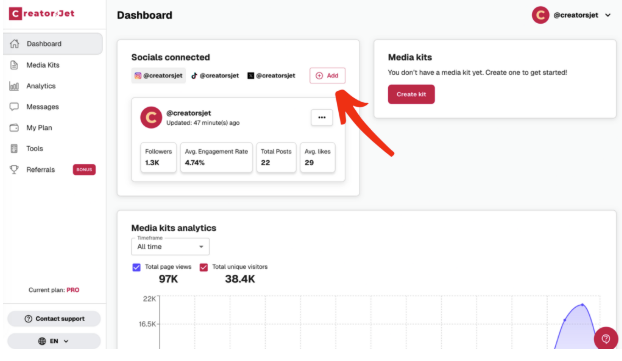
The process starts with creating an account on CreatorsJet. The signup is simple and quick.. Once logged in, users arrive on a clean dashboard where media kits and settings are managed.
The interface feels intentional and easy to understand. There are no unnecessary menus, and the focus remains on creating and managing media kits rather than navigating complex tools.
From there, users can add their social media profiles, which then appear directly inside the media kit. Using CreatorsJet’s own socials as an example, this step automatically displays platform information and public metrics.
One of the main advantages is that creators do not need to manually enter or update numbers every time something changes. This helps avoid one of the most common problems with traditional media kits: outdated statistics.
Create a Media Kit
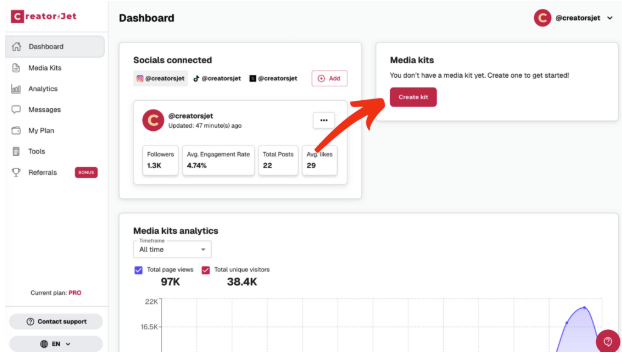
Once social profiles are connected, creating a media kit is straightforward. Each media kit is a live page hosted by CreatorsJet.
Creators can use one media kit or create several, depending on how they work with brands. The structure is predefined, which helps keep everything clear and consistent for anyone reviewing the kit. Because the media kit is live, it can be edited at any time without changing the link.
Edit Your Profile
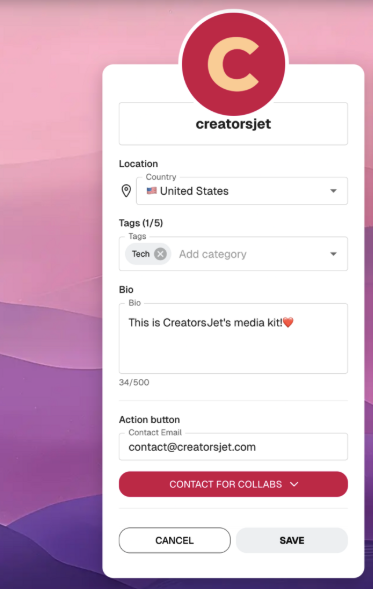
The profile section is where creators set the basic context of their media kit. It includes practical information such as location, category tags, a short bio, and a contact action.
This section is intentionally simple. The bio is meant to be short and direct, giving brands a quick understanding of who the creator is without long explanations. In most cases, brands scan this part in a few seconds before moving on to social stats and collaborations, which is why CreatorsJet encourages clear, concise descriptions rather than promotional copy.
Add Links
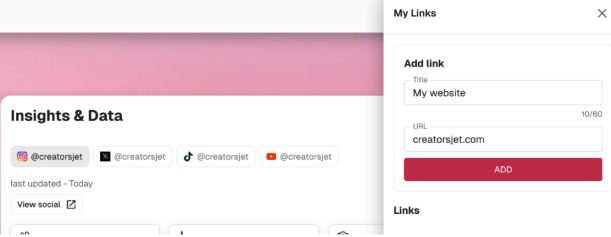
CreatorsJet allows creators to add useful links directly inside the media kit. These links can point to websites or other relevant pages.
By centralising links in one place, creators avoid sending multiple URLs across emails or messages. Brands can explore additional content without leaving the media kit.
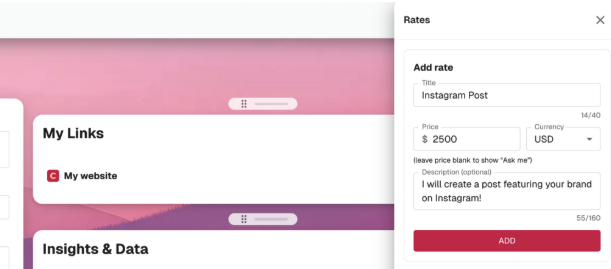
Add Rates
Creators can choose to display their rates inside the media kit. This section allows pricing to be shown for different platforms or content formats.
Rates are optional, but when included, they help set expectations early and reduce unnecessary conversations with brands that are not aligned on budget.
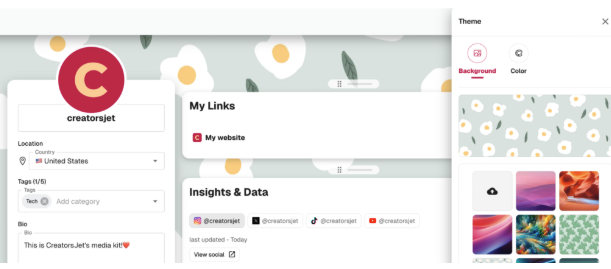
Customise the Theme
CreatorsJet allows creators to customize the visual theme of their media kit by choosing background styles and colour options. The goal is not full design control, but simple visual adjustments that help the kit feel aligned with a creator’s identity.
By keeping theme options limited and structured, the platform ensures that media kits remain clear, readable, and consistent, making them easy to review on both desktop and mobile devices.
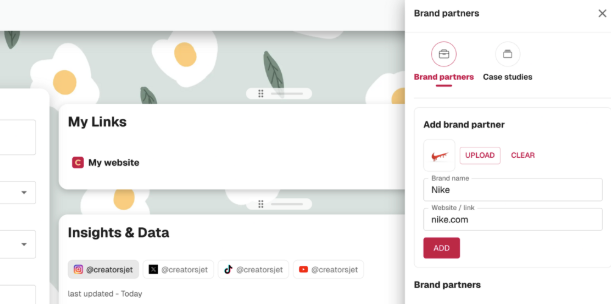
Add Brand Partners and Case Studies
Creators can add brand partners and case studies to highlight previous collaborations. This helps build trust and gives brands context around the creator’s experience.
For brands, this section quickly answers whether the creator has worked with partners before and in what capacity.
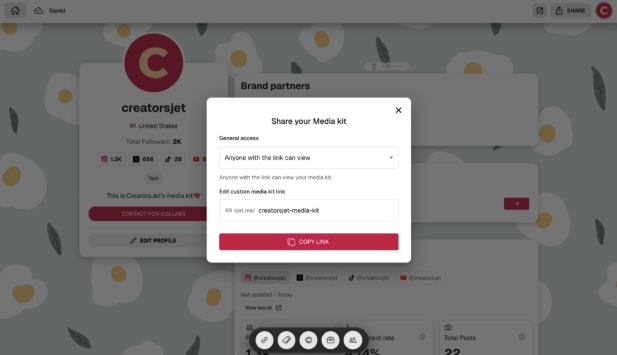
Share Your Media Kit
Once the media kit is ready, it can be shared through a single link. This link can be used in emails, direct messages, link-in-bio pages, or replies to inbound brand inquiries.
Because the media kit is live, any updates are reflected instantly without needing to resend files or links.
CreatorsJet in Practice: Video Walkthrough
For creators who prefer seeing the platform in action, the video below provides a complete CreatorsJet review and media kit walkthrough. It shows how the media kit is structured and how creators typically use it when working with brands.
This video complements the written review and helps visualise how the platform works in real situations.
Key Features That Matter
CreatorsJet focuses on solving practical problems rather than offering an overwhelming number of features. The core value comes from having a single, professional media kit link that stays up to date and can be reused in every brand conversation.
The platform is designed to save time, reduce friction, and present information in a format brands can quickly understand.
Pricing Structure
CreatorsJet uses a tiered pricing model so creators can choose a plan based on how actively they work with brands.
- Free plan
The free plan allows creators to build one media kit and connect a single social account. It also includes access to the money calculators and basic theme customisation. Features such as automatic updates, downloadable media kits, and deeper performance insights are not included at this level. - Starter plan
The Starter plan is designed for creators who collaborate with brands more regularly. It includes one media kit with up to three connected social accounts, daily metric updates, and an automatically updated media kit. Creators can also download their media kit as a PDF. Pricing starts at $12 per month, with a reduced monthly rate available when billed annually. - Pro plan
The Pro plan is aimed at creators managing multiple collaborations or profiles. It allows up to three media kits and up to ten connected social accounts. It also provides access to advanced performance data and includes a verified badge. Pricing starts at $24 per month, with a lower rate available for annual billing.
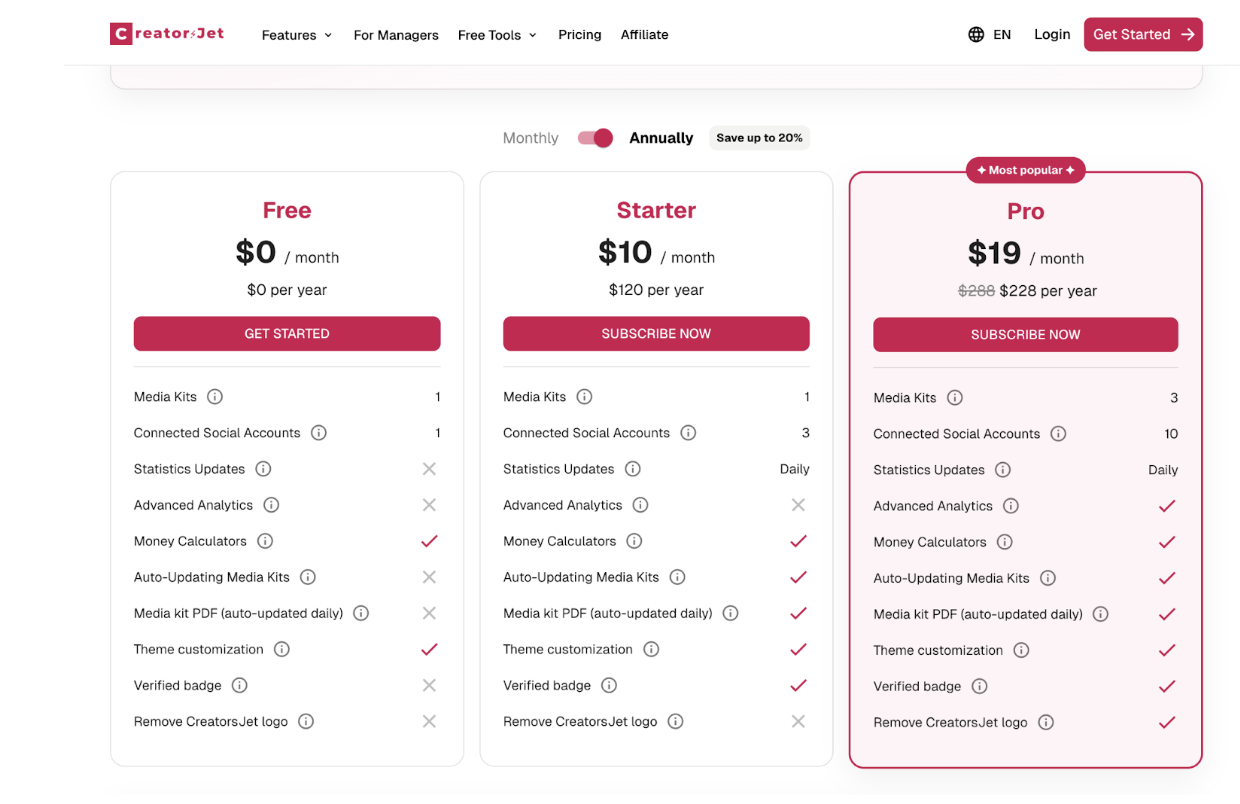
This structure makes it easy to start small and upgrade only when additional features are needed.
Free Tools
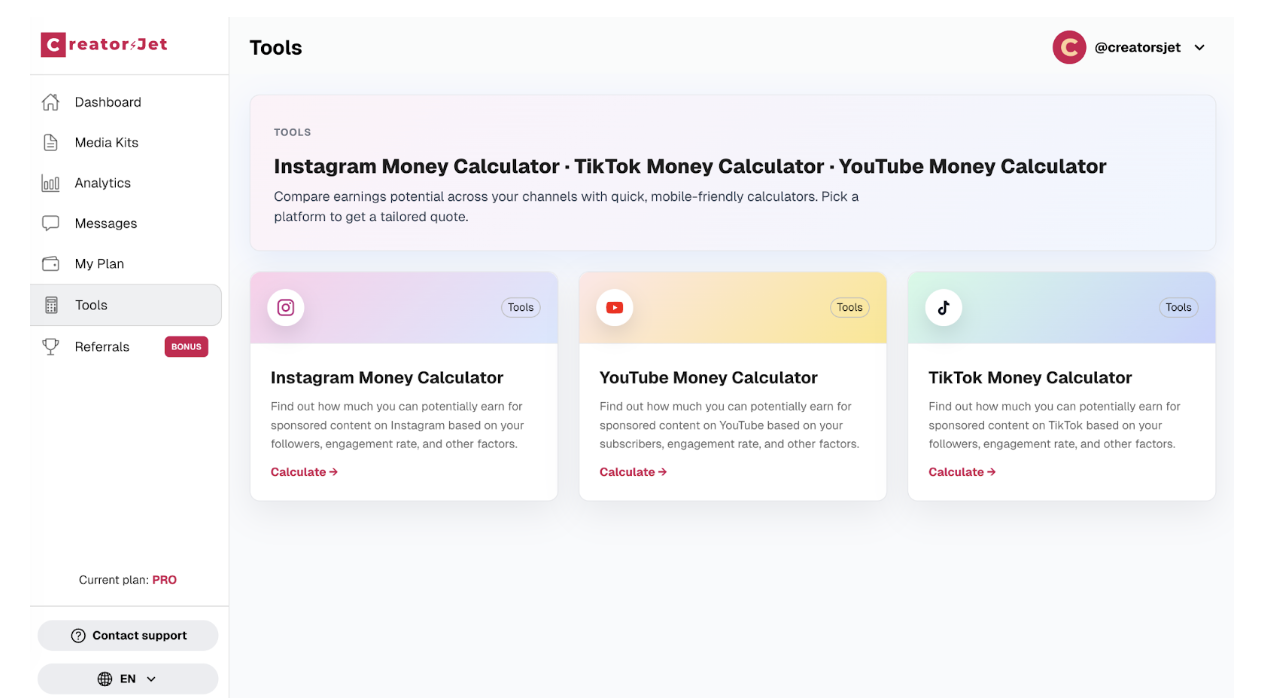
In addition to media kits, CreatorsJet provides three free tools that many creators find useful.
The Instagram money calculator helps creators estimate potential earnings and understand common pricing benchmarks on the platform. The YouTube money calculator provides insight into potential channel value and monetisation based on audience size and engagement. The TikTok money calculator focuses on estimating earning potential using similar signals, helping creators better understand how their audience can translate into brand value.
These tools are helpful for creators who are still learning how to price their work or prepare for brand discussions.
Who Should Use CreatorsJet?
CreatorsJet is useful for anyone with a social media presence who wants to present their profile in a clear and professional way. This includes influencers, UGC creators, freelancers, independent creators, and creators working directly with brands.
The platform is especially relevant for creators who manage brand conversations themselves and want a simple system instead of maintaining PDFs or sending screenshots.
CreatorsJet may be less relevant for creators who never work with brands, only collaborate very occasionally, or already maintain a fully custom portfolio website that is actively updated.
What Is the Alternative to CreatorsJet?
Many creators still rely on static tools to build media kits.
Canva is often used because it is accessible and offers ready-made templates, but media kits created this way are static and require manual updates. Visme provides more presentation-style layouts, but it is still a manual tool and not designed specifically for creator workflows. Traditional PDF media kits offer full control over design but quickly become outdated and are not ideal for mobile sharing.
Compared to these options, CreatorsJet focuses on live media kits that require less maintenance and are easier to share and update.
Pros and Cons
Pros
- CreatorsJet makes it easy to create a professional media kit without design or technical skills.
- Social platforms can be connected quickly, which avoids manually updating follower numbers and basic metrics.
- The media kit lives on a single link that can be shared anywhere, making brand conversations simpler.
- The structure is clear and easy to read, which fits how brands usually review creators.
- A free plan allows creators to test the platform before committing.
Cons
- Visual customisation is intentionally limited, which may not suit creators who want full design control.
- Some advanced features, such as automatic updates and PDF downloads, are only available on paid plans.
- Creators who rarely work with brands may not fully benefit from a subscription-based tool.
Final Verdict
CreatorsJet does not promise growth or guaranteed brand deals. What it offers is structure, clarity, and simplicity.
For creators who work with brands, having a professional media kit makes conversations easier and more efficient. CreatorsJet provides a practical way to achieve this without constant manual updates or design work.
For anyone looking to turn their social presence into something brands can quickly understand, CreatorsJet is a focused and reliable solution.
FAQ
What is a media kit?
A media kit is a professional overview of a creator’s profile, audience, and past collaborations, designed for brands and partners.
Do I need a media kit to work with brands?
It is not mandatory, but it is increasingly expected for professional collaborations.
Can I update my media kit after sharing it?
Yes. Any update is reflected instantly through the same link.
Do I have to show my rates publicly?
No. Adding rates is optional and depends on how you prefer to handle brand conversations.
Is CreatorsJet only for influencers?
No. CreatorsJet is useful for anyone with a social media presence who wants to present their profile in a clear and professional way.
































