



Keep reading
Rather we just did it for you?
Let's get your business seen.
Social media, websites, SEO and ads from a team you can actually meet.
GIFs are short, looping animations that add movement, humour and personality to social media. On Instagram, they can make a Story more playful, a comment more fun and a post more eye catching. But Instagram handles GIFs differently from other platforms, and uploading a GIF file to your feed does not work the way most people expect. This guide explains how to use GIFs on Instagram in Stories, comments, DMs, Reels and posts, how to make your own branded GIF stickers, and how businesses can use them without looking unprofessional.
Where you can use GIFs on Instagram
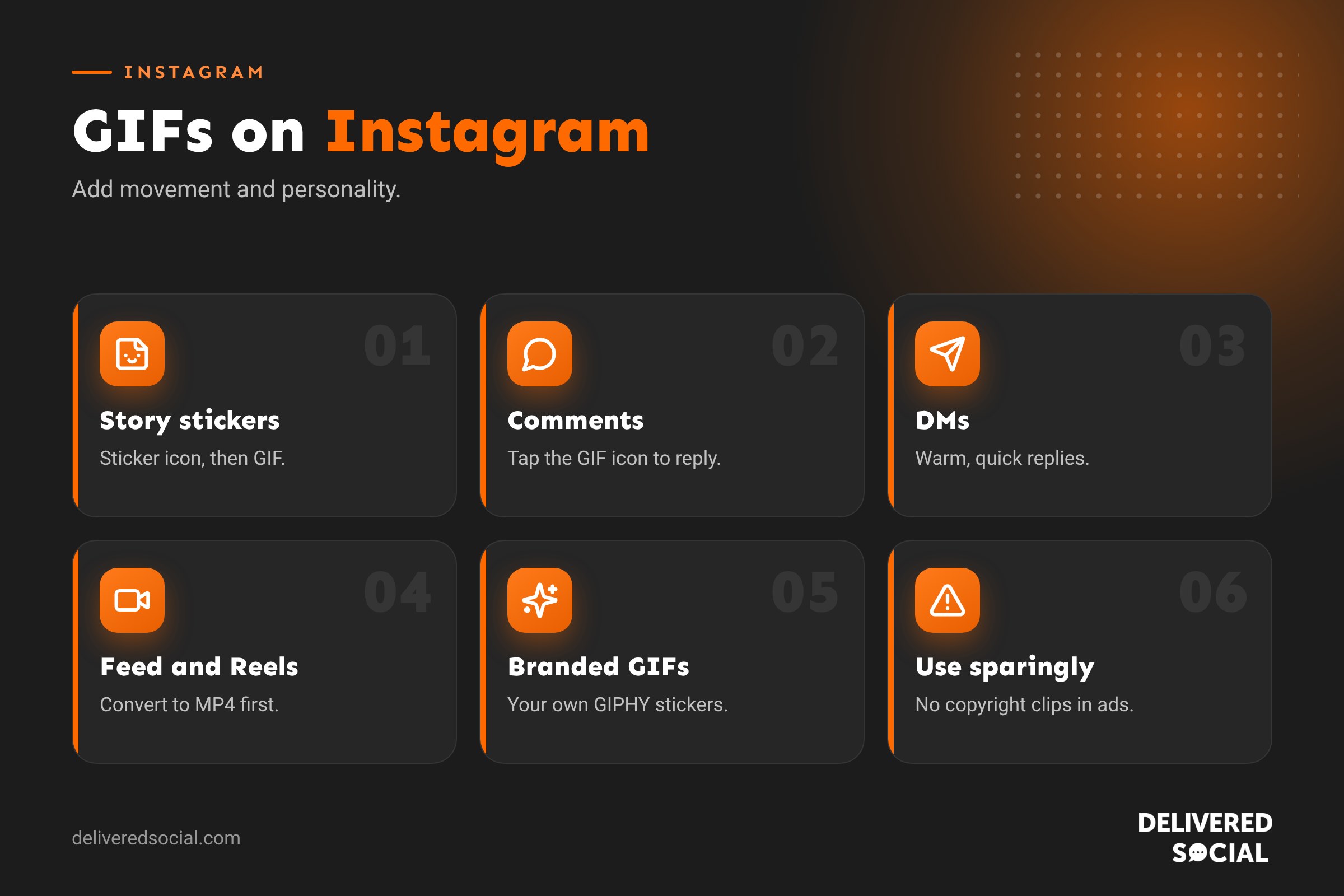
- Stories: as animated stickers layered over your photo or video.
- Comments: as a reply under a post, where available.
- Direct messages: in one to one and group chats.
- Reels and feed posts: by converting the GIF into a short video first.
Instagram’s GIF library is powered by GIPHY, the largest GIF platform, so most of what you find comes from GIPHY’s collection.
How to add a GIF to an Instagram Story
- Open Instagram and tap the plus icon, then Story, or swipe right from your feed.
- Take or choose a photo or video as your background.
- Tap the sticker icon at the top of the screen. It looks like a square smiley face.
- Tap GIF and search for a word, such as “coffee”, “new”, “sale” or “thank you”.
- Tap a GIF to add it. Pinch to resize it, drag to move it and twist with two fingers to rotate it.
- Add as many GIFs as you like, then tap Your story or Close Friends to share.
Tip: search terms such as “arrow”, “underline”, “sparkle” or “circle” bring up animated graphics that point attention to a product, price or link sticker. Our guide on how to post an Instagram Story covers the other Story tools.
How to send a GIF in a comment
Instagram lets people reply to posts with GIFs in many regions. When you write a comment, look for the GIF icon beside the text box, tap it, search and choose a GIF. If you do not see the option, update the app; features roll out gradually, and some accounts restrict comment types. Businesses can use GIF replies to thank customers, celebrate milestones or respond to a funny comment, but should keep them friendly and on brand.
How to send a GIF in an Instagram DM
- Open a chat in your direct messages.
- Tap the sticker or GIF icon beside the message box.
- Search for a GIF and tap it to send.
GIFs in DMs are great for warm, informal replies, such as a “thank you” after an order, but avoid them in complaints or serious conversations.
Can you post a GIF to your Instagram feed?
Not directly. If you upload a .gif file as a feed post, Instagram usually turns it into a still image or will not accept it at all. To post an animation to your feed or as a Reel, you need to turn it into a video first.
How to post a GIF as a video
- From GIPHY: open the GIF in the GIPHY app, tap the share or paper plane icon and choose Instagram. GIPHY converts it into a short MP4 video and opens Instagram for you.
- With an editing app: import the GIF into CapCut, Canva or a similar app, set the length, loop it a few times if it is very short, add music if you like and export as an MP4.
- On a computer: use a free GIF to MP4 converter, then upload the video from your phone or Meta Business Suite.
Instagram videos must be at least three seconds long, so loop short GIFs to reach that length. Export at 1080 by 1920 pixels for Reels and Stories, or 1080 by 1350 for feed posts. Our Instagram Reels size guide covers the details.
Why can I not find GIFs on Instagram?
- Out of date app: update Instagram and restart your phone.
- Temporary outage: the GIF library occasionally stops loading. Try again later.
- Region or account restrictions: some features vary by country and account type.
- Search terms: Instagram filters some words, so try a different search.
- Cache problems: clearing the app cache on Android can help. Our guide to clearing the Instagram cache explains how.
How to make your own GIF stickers for Instagram
Custom GIF stickers are one of the best ways for a brand to use GIFs. When you upload GIFs to a verified GIPHY channel, anyone can find them in Instagram’s Story sticker search. That means customers can add your branded stickers to their own Stories, spreading your name for free.
Step 1: design your stickers
Create short animated graphics with transparent backgrounds. Good ideas include your logo with a little movement, your mascot, a “Shop small” or “Now open” badge, or phrases your customers use. Tools such as Canva, Adobe Express, Procreate and After Effects can export animated files. Keep them simple and readable at a small size.
Step 2: create a GIPHY brand channel
Sign up at GIPHY and apply for a brand or artist channel. GIPHY reviews applications, and only verified channels have their uploads appear in Instagram search, so complete your profile with your website and social links.
Step 3: upload and tag your GIFs
Upload your stickers as transparent GIFs and add tags people are likely to search, including your brand name and general terms such as “coffee” or “Guildford”. Clear, specific tags help your stickers appear in search.
Step 4: tell people they exist
Share your stickers in your own Stories and tell followers what to search for. Add them to event signage and receipts, for example “Search Smiths Bakery in Instagram GIFs”.
How businesses can use GIFs well
- Draw attention: animated arrows and circles guide the eye to a link sticker, price or new product.
- Show personality: a well chosen reaction GIF makes a brand feel human.
- Celebrate: confetti and party GIFs for launches, anniversaries and milestones.
- Countdowns and events: combine GIFs with countdown stickers for launches.
- User generated content: branded stickers encourage customers to share your name in their Stories.
- Behind the scenes: quick animated captions add fun to workplace content.
Dos and don’ts
- Do keep GIFs relevant to your message and audience.
- Do use one or two per Story rather than covering the screen.
- Do stick to brand colours where possible, especially for custom stickers.
- Do not use GIFs in serious posts, complaints or sensitive topics.
- Do not use GIFs of celebrities or film clips in adverts, as you may not have the right to use them commercially.
- Do not cover important text, faces or products.
Copyright and GIFs
GIFs from Instagram’s built in library can be used inside Instagram’s own tools, such as Story stickers. That is different from downloading a GIF of a TV show and using it in a paid advert or on your website. Commercial use of copyrighted clips and famous faces can break copyright and image rights, so for ads and marketing materials, use GIFs you have made yourself, licensed content or GIFs from brands that allow reuse. When in doubt, create your own.
Accessibility
Animated content can be distracting or uncomfortable for some people. Avoid fast flashing GIFs, which can trigger photosensitive conditions, and do not rely on a GIF to carry key information. Put important details in text too, and add captions to videos.
GIFs vs Reels and short videos
GIFs are great for small touches, but they are not a replacement for proper video content. Reels reach new audiences through Instagram’s recommendations, while GIF stickers mostly decorate Stories that existing followers see. Use GIFs to add character, and invest most of your effort in Reels, carousels and Stories that tell people something useful. Our guide to Instagram carousel posts explains another high performing format.
GIF ideas for different businesses
- Café or bakery: steaming coffee cups, “fresh out of the oven”, “treat yourself”.
- Retailer: “new in”, “sale”, shopping bags and sparkles around products.
- Salon: “glow up”, mirror and sparkle GIFs on before and after Stories.
- Gym or coach: “you got this”, flexing arms and countdown timers.
- B2B service: “team win”, celebration and thumbs up GIFs for client news.
- Charity: hearts, “thank you” and “every penny counts” for fundraising updates.
Measuring the impact
Check Story insights for Stories with and without GIFs. Look at forward taps, exits, replies and sticker taps. If GIF Stories hold attention longer, keep using them. If you create custom stickers, GIPHY channel stats show how many times they have been viewed, which can be a surprisingly large number for a popular sticker.
Making GIFs part of your content plan
GIFs work best when they are part of a consistent look rather than random additions. Pick a small set of GIFs and stickers you use regularly, such as an arrow for links, a sparkle for new products and your own logo sticker, so followers start to recognise your Stories at a glance. Save favourites by searching the same terms each time, and note them in your brand guidelines so anyone posting for your business uses the same style. Review them every few months and refresh any that feel dated.
Seasonal GIFs are an easy win too. Christmas, Valentine’s Day, Pancake Day and summer holidays all have plenty of animated stickers that make timely Stories feel festive without much extra work.
Key takeaways
- Add GIFs to Stories with the sticker icon, then GIF, powered by GIPHY.
- Use the GIF icon to send GIFs in comments and DMs.
- To post a GIF to your feed or Reels, convert it into an MP4 video first.
- Verified GIPHY channels let brands create custom stickers anyone can use.
- Use GIFs sparingly, keep them on brand and avoid copyrighted clips in adverts.
Frequently asked questions
How do I add a GIF to my Instagram Story?
Tap the sticker icon, choose GIF, search and tap the one you want.
Can I upload a GIF to my Instagram feed?
Not as a GIF file. Convert it to an MP4 video, for example through the GIPHY app, and post it as a video or Reel.
Why is the GIF option missing on Instagram?
Update the app, check your connection and try again later, as the library sometimes has outages.
Can I comment with a GIF on Instagram?
Yes, in many regions. Tap the GIF icon beside the comment box.
How do I make my own Instagram GIF stickers?
Create transparent animated GIFs, upload them to a verified GIPHY brand or artist channel and tag them clearly.
How long does a GIF video need to be on Instagram?
At least three seconds, so loop short GIFs.
Are Instagram GIFs free to use?
Yes, inside Instagram’s tools. Be careful with commercial use outside the app.
Want Stories that stand out?
We create Instagram content, Stories and branded graphics for businesses across Surrey, Hampshire and the UK. Find out more about our Instagram marketing services. Call us on 01483 608 303.
































