



Keep reading
Rather we just did it for you?
Let's get your business seen.
Social media, websites, SEO and ads from a team you can actually meet.
Your Instagram bio has 150 characters to tell people who you are, what you do and why they should follow you. For a business, it’s often the deciding factor between a new visitor following, booking or scrolling away. This guide gives you Instagram bio ideas and examples for different types of business, a simple formula you can copy, tips on using the name field and links, and the mistakes to avoid.
What makes a good Instagram bio?
A great business bio answers three questions in a few seconds:
- What do you do?
- Who is it for, or where are you?
- What should I do next?
Add a touch of personality and you’ve got a bio that works.
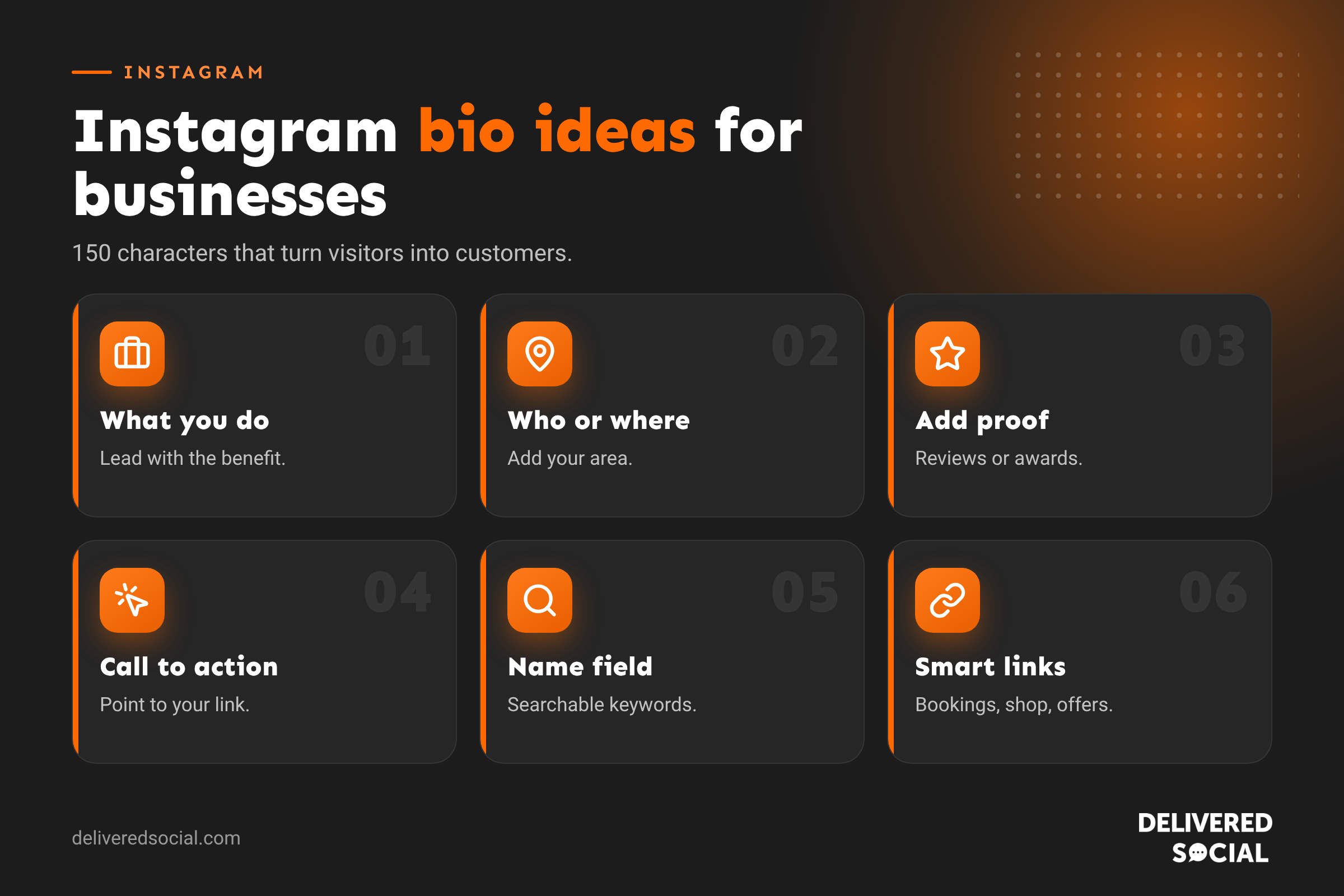
A simple Instagram bio formula
What you do + who or where + proof or personality + call to action
For example:
Wedding cakes that taste as good as they look 🎂
Baked in Farnham, delivered across Surrey
⭐ 120+ five-star reviews
Check dates and book a tasting 👇
Instagram bio examples by type of business
Cafés and restaurants
- Fresh coffee, homemade cakes and the best brunch in Petersfield ☕ Open 7 days. Dogs welcome 🐾 Book a table 👇
- Neapolitan pizza, wood-fired in Southsea 🍕 Eat in, takeaway or delivery. Order online 👇
- Family-run Italian since 1998 🇮🇹 Pasta made fresh every morning. Reservations below
Hair and beauty
- Colour specialists in Guildford 💇♀️ Balayage, blondes and lived-in colour. New clients welcome. Book online 👇
- Lashes, brows and facials ✨ Calm, friendly studio in Woking. Tap to book your treatment
Trades and home services
- Kitchen and bathroom fitters serving Hampshire 🔨 Fully insured. Free quotes. See our latest projects 👇
- Garden design and landscaping 🌿 Patios, planting and lawns across Surrey. Call or message for a quote
- Local electricians you can trust ⚡ NICEIC approved. Same-week appointments. Tap to call
Retail and ecommerce
- Handmade candles poured in small batches 🕯️ Vegan and cruelty-free. Free UK delivery over £30. Shop 👇
- Independent bookshop in Alton 📚 Staff picks, author events and gift wrapping. Visit us or order online
Fitness and wellbeing
- Personal training for busy parents 💪 Home and online sessions. Free first consultation. Book 👇
- Yoga for every body 🧘 Classes in Portsmouth and online. New student offer below
Professional services
- Friendly accountants for small businesses 📊 Tax returns, bookkeeping and payroll. Based in Surrey, working UK-wide. Free chat 👇
- Family law solicitors in Hampshire ⚖️ Clear advice, fixed fees. Call for a confidential chat
Charities and community groups
- Supporting young carers across Hampshire 💛 Donate, volunteer or fundraise 👇
- Community garden and café run by volunteers 🌻 Everyone welcome. Find out how to get involved
Creators and personal brands
- Helping small businesses grow on social media 📱 Tips every week. Free guide 👇
- Wedding photographer | Surrey and beyond 📸 Natural, relaxed, full of fun. Now booking 2027
Use the name field for search
The name field on your profile (not your username) is searchable on Instagram. Use it to include your main keyword as well as your business name, for example:
- “Bloom & Co | Florist Guildford”
- “Sam Patel | Personal Trainer”
- “The Old Forge | Pub & Kitchen”
The name field allows 30 characters, so keep it short and clear.
Instagram bio limits to know
| Element | Limit |
|---|---|
| Bio | 150 characters |
| Name field | 30 characters |
| Username | 30 characters |
| Links | Several links can be added in the bio link section, with the first shown most prominently |
Making the most of your link
Your bio link is often the only clickable route from Instagram to your website. Make it count:
- Link to the most useful page, such as a booking page or current offer, not just your home page.
- Add several links in Instagram’s link section, such as booking, shop and reviews.
- Use a link-in-bio page if you need more options. See our guide to link-in-bio tools.
- Mention the link in captions with “link in bio” when you post about it.
Contact buttons and profile extras
Business and creator accounts can add:
- Contact buttons: call, email or directions.
- Action buttons: book, order food, reserve or buy gift cards through partner tools.
- Category: shown under your name, such as “Bakery” or “Hair salon”.
- Location: your address or area.
- Highlights: saved Stories such as Reviews, Menu, Prices and FAQs that sit below your bio.
Tips for writing your bio
- Lead with the benefit. “Stress-free weddings” beats “Wedding planner”.
- Include your location if you serve local customers.
- Add proof, such as reviews, awards or years in business.
- Use line breaks so it’s easy to scan.
- Use emojis sparingly as bullet points or to add personality.
- End with a call to action pointing to your link or contact buttons.
- Tag related accounts if relevant, such as a sister business or founder.
- Update it for seasons, launches and offers.
Instagram bio mistakes to avoid
- Being vague: “Living the dream ✨” tells customers nothing.
- Stuffing it with hashtags.
- Leaving out your location or service.
- Linking to a broken or irrelevant page.
- Using too many emojis or capital letters.
- Forgetting to add contact details.
- Making it all about you rather than what you do for customers.
Short, funny and creative bio ideas
Personality helps you stand out, as long as it fits your brand:
- Powered by coffee and good ideas ☕💡
- Making Mondays tastier since 2015 🥐
- We fix things. Mostly kitchens. 🔧
- Your dog’s favourite place in Godalming 🐶
- Turning “one day” into “booked” ✈️
How to change your Instagram bio
- Go to your profile and tap Edit profile.
- Tap Bio and type your new bio.
- Tap Done or the tick to save.
Write it in your phone’s notes app first so you can see how the line breaks look.
Test and improve your bio
Your bio is never finished. Check your profile visits and website taps in Insights, then try a new version for a month and compare. Small changes, such as a clearer call to action or a stronger first line, can make a noticeable difference to how many visitors follow or click.
Bio ideas for different goals
What you put in your bio should depend on what you want visitors to do. Here are ideas for common goals:
| Goal | What to include | Example call to action |
|---|---|---|
| More bookings | Your service, area and availability | “Book your appointment below” |
| More enquiries | What you do and a reason to get in touch | “Message us for a free quote” |
| Online sales | What you sell and a delivery or offer hook | “Shop the new collection” |
| Footfall | Your address, opening hours and what makes you special | “Find us on the high street” |
| Email sign-ups | A freebie or reason to join | “Get our free guide” |
| Event tickets | Event name, date and venue | “Tickets on sale now” |
Using Highlights to extend your bio
Your bio is short, but Story Highlights sit right below it and act like extra pages on your profile. Good Highlights for businesses include:
- Reviews: screenshots of happy customer messages and tags.
- Services or Menu: what you offer and prices.
- FAQs: answers to the questions you get asked most.
- Team: introduce the people behind the business.
- Work: before and afters, projects or products.
- Find us: location, parking and opening hours.
Design simple, matching Highlight covers in your brand colours so your profile looks polished.
Personal brand bios for business owners
If you’re the face of your business, your personal account can support it. Mention your role and link to the business: “Founder of @yourbusiness ☕ Coffee lover, dog mum, Guildford local. Sharing the ups and downs of running a café.” People buy from people, and a friendly personal account can bring in customers who then follow the business.
Seasonal bio updates
Changing your bio for key moments keeps it fresh and gives visitors a reason to act now. Try:
- Christmas: “Christmas orders now open 🎄 Last order date 18 December”.
- Summer: “Now open late on Fridays ☀️”.
- Launches: “New spring menu out now 🌸”.
- Events: “See us at the Farnham Food Festival, 12 to 13 May”.
Set a reminder to change it back afterwards so your bio never looks out of date.
Key takeaways
- Say what you do, who it is for and where you are in the first line.
- Use the searchable name field for your main keyword.
- Point your link at the page you most want visitors to see, such as bookings.
- End every bio with one clear call to action, and review it each season.
Social platforms change their menus and features regularly, so it is worth checking the settings mentioned in this guide every few months to make sure everything still works the way you want it to.
Frequently asked questions
What should I put in my Instagram bio for business?
Say what you do, who it’s for or where you are, add proof or personality, and finish with a call to action.
How long can an Instagram bio be?
Up to 150 characters.
Should I use emojis in my bio?
Yes, in moderation. They help break up text and add personality.
Can I add more than one link?
Yes. Instagram lets you add several links in your profile, or you can use a link-in-bio page.
Want an Instagram profile that converts?
We set up and manage Instagram profiles for businesses across Surrey, Hampshire and the UK, from the bio to the content that fills the grid. See our social media management services or call us on 01483 608 303.































