



Keep reading
Rather we just did it for you?
Let's get your business seen.
Social media, websites, SEO and ads from a team you can actually meet.
YouTube Shorts are everywhere: on the home page, in search, in a tab of their own. If you’d rather watch longer videos, are trying to cut down on scrolling, or want to manage what your children see, you might want to turn them off. For years there was no proper way to do it. Now there is. This guide explains how to disable YouTube Shorts using YouTube’s Shorts feed limit, including the zero-minute setting, plus other ways to see fewer Shorts on your phone, computer and TV, and what it all means for businesses that post Shorts.
Can you turn off YouTube Shorts?
Yes, mostly. In October 2025 YouTube added a Shorts feed limit, a daily timer for scrolling Shorts that could be set from 15 minutes to two hours. In April 2026, YouTube added a zero-minute option. Setting the limit to zero stops the endless Shorts feed and removes Shorts from your home feed.
It isn’t a complete block. Shorts from channels you subscribe to can still appear in your Subscriptions feed, and you can still watch an individual Short if someone sends you a link or it appears in search. But for most people, it removes the endless scroll.
How to turn off YouTube Shorts on your phone
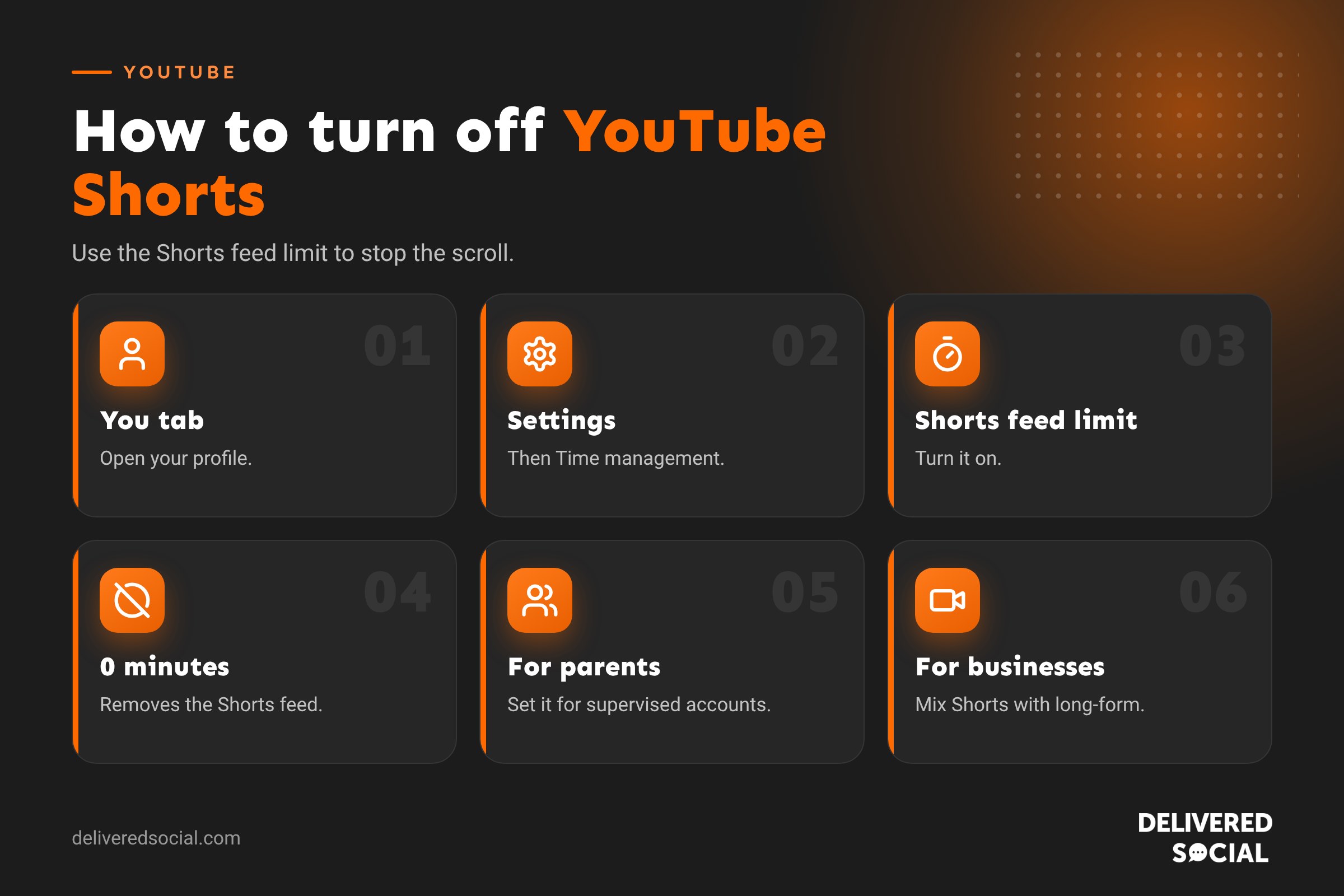
- Open the YouTube app and make sure you’re signed in.
- Tap You (or your profile picture) in the bottom corner.
- Tap the Settings cog.
- Tap Time management.
- Under daily limits, turn on Shorts feed limit.
- Choose 0 minutes.
You’ll see a message that scrolling is paused, though you may still see individual Shorts. If the change doesn’t appear straight away, close and reopen the app.
Can’t see the zero-minute option?
- Update the YouTube app. Older versions start the timer at 15 minutes.
- Wait a few days. YouTube rolls features out gradually.
- Check you’re signed in, as the setting is linked to your Google account.
How to set a daily Shorts time limit
If you don’t want to remove Shorts completely, set a limit instead. Follow the same steps and choose a time between 15 minutes and two hours. When you reach it, YouTube shows a reminder and pauses the Shorts feed. You can dismiss the reminder, so it’s a nudge rather than a lock.
Other ways to see fewer Shorts
Tell YouTube you’re not interested
On the home page, tap the three dots on the Shorts shelf and choose Show fewer Shorts or Not interested. This may hide the shelf for a while, though it often comes back.
Use YouTube in a web browser
On a computer, Shorts appear less prominently. Some people use browser extensions that hide Shorts, but only install extensions from trusted developers, and be aware they can stop working when YouTube changes its site.
Watch from your Subscriptions page
Bookmark your Subscriptions page or go straight to channels you like, rather than starting on the home feed.
Turn on Take a break and bedtime reminders
In Time management, you can also set reminders to take a break after a set time, and a bedtime reminder that tells you when it’s time to stop watching.
Pause watch history
Pausing your watch history means YouTube recommends less based on what you’ve watched recently, which can reduce the Shorts it pushes to you.
Managing Shorts for children and teens
The Shorts feed limit was introduced partly with parents in mind. If your child has a supervised Google account, parents can set the Shorts limit through Google’s Family Link or YouTube’s parental controls, including setting it to zero. Other options include:
- YouTube Kids for younger children, which has its own content settings.
- Supervised experiences for older children, with content levels you choose.
- Screen time limits through your phone or tablet’s own settings.
Why YouTube is letting people turn Shorts off
Shorts are one of YouTube’s biggest growth areas, so allowing people to switch them off is a notable change. It follows growing concern from parents, regulators and users about endless scrolling and screen time. Other platforms have added similar tools, such as daily limits on TikTok and Instagram. For viewers, it means more control over how they use the app.
What this means for businesses that post Shorts
If you use YouTube Shorts to reach customers, should you worry? Not much, for now. Most people won’t change their settings, and Shorts remain a huge source of views. But it’s a reminder not to rely on one format.
- Make Shorts that lead somewhere. Use Shorts to tease longer videos, and link to the full video using YouTube’s related video feature.
- Build subscribers. Shorts from subscribed channels still appear in the Subscriptions feed.
- Use searchable titles. Shorts can still appear in search results, so use keywords people search for.
- Post long-form too. Tutorials, reviews and case studies keep working whatever happens to the Shorts feed.
- Repurpose across platforms. The same vertical video can go on Instagram Reels and TikTok.
YouTube Shorts vs long-form video for businesses
| Shorts | Long-form | |
|---|---|---|
| Length | Up to 3 minutes | Any length |
| Strength | Reach and discovery | Search, trust and watch time |
| Best for | Quick tips, teasers and trends | Tutorials, explainers and reviews |
| Lifespan | Shorter | Can rank in search for years |
Our guide to the YouTube Shorts Fund explains how Shorts have been used to reward creators.
How to turn Shorts back on
- Go to You, then Settings, then Time management.
- Turn off Shorts feed limit, or choose a longer limit.
Shorts will return to your home feed.
Healthy scrolling habits
Whether it’s YouTube Shorts, TikTok or Instagram Reels, short videos are designed to keep you watching. A few habits help:
- Set daily limits on each app.
- Turn off autoplay where you can.
- Keep your phone out of the bedroom at night.
- Decide what you want to watch before opening the app.
- Use subscriptions and playlists instead of the endless feed.
Turning off Shorts on a smart TV or games console
On TV apps, Shorts appear as a shelf on the home screen. The Shorts feed limit is linked to your Google account, so setting it in the mobile app should apply when you’re signed in on your TV too. If Shorts still appear, try signing out and back in on the TV, or use the “Not interested” option on the Shorts shelf. You can also create a separate profile for children with supervised settings.
YouTube Premium and Shorts
YouTube Premium removes adverts and adds background play and downloads, but it doesn’t remove Shorts. The Shorts feed limit is available to everyone, whether or not you pay for Premium.
Should creators worry about the Shorts off switch?
Most viewers enjoy Shorts and won’t switch them off, so for creators and businesses the opportunity remains large. However, the change is a good reminder to build a relationship with your audience rather than relying only on the algorithm. Encourage viewers to subscribe, build an email list from your website, and create longer videos that answer the questions your customers search for. Those assets keep working whatever happens to any single feed.
A quick checklist for limiting Shorts
- Update the YouTube app.
- Go to You, then Settings, then Time management.
- Turn on Shorts feed limit and choose 0 minutes, or a time that suits you.
- Set Take a break and bedtime reminders if you want extra help.
- Use “Show fewer Shorts” on any Shorts shelves that still appear.
- Set up supervised accounts or YouTube Kids for children.
Social platforms change their settings regularly, so it’s worth checking the menus mentioned in this guide every few months to make sure everything still works the way you want it to.
Key takeaways
- YouTube’s Shorts feed limit can now be set to zero, removing the endless Shorts feed.
- Shorts from subscriptions and search can still appear.
- Parents can set the limit for supervised accounts.
- Businesses should use Shorts alongside long-form video rather than relying on one format.
Quick glossary
- Shorts feed limit: a daily timer for scrolling Shorts.
- Time management: the YouTube settings area for limits and reminders.
Frequently asked questions
How do I disable YouTube Shorts permanently?
Go to Settings, Time management, turn on Shorts feed limit and choose 0 minutes. It stays on until you change it.
Does the zero-minute limit remove all Shorts?
It removes the Shorts feed and Shorts from your home feed, but individual Shorts can still appear in Subscriptions or search.
Can I turn off Shorts on a computer?
The Shorts feed limit is set in the app and applies to your account. On a computer you can also use “Show fewer Shorts”.
Can parents turn off Shorts for their children?
Yes. Parents with supervised accounts can set the Shorts feed limit, including to zero.
Why don’t I have the 0-minute option?
Update the app and give it time, as YouTube rolls features out gradually.
Want help with YouTube for your business?
We plan, film and edit YouTube videos and Shorts for businesses across Surrey, Hampshire and the UK. See our social media management services or call us on 01483 608 303.































