



Keep reading
Rather we just did it for you?
Let's get your business seen.
Social media, websites, SEO and ads from a team you can actually meet.
Few Instagram questions are searched as often as this one: if I screenshot someone’s Story, will they know? Instagram has changed its rules over the years, which has left plenty of confusion. The good news is that the answer is fairly simple once you know which features send alerts and which do not. This guide explains whether Instagram notifies people about screenshots of Stories, posts, Reels, DMs and more, what about screen recording, and what businesses should keep in mind when sharing or saving content.
The quick answer
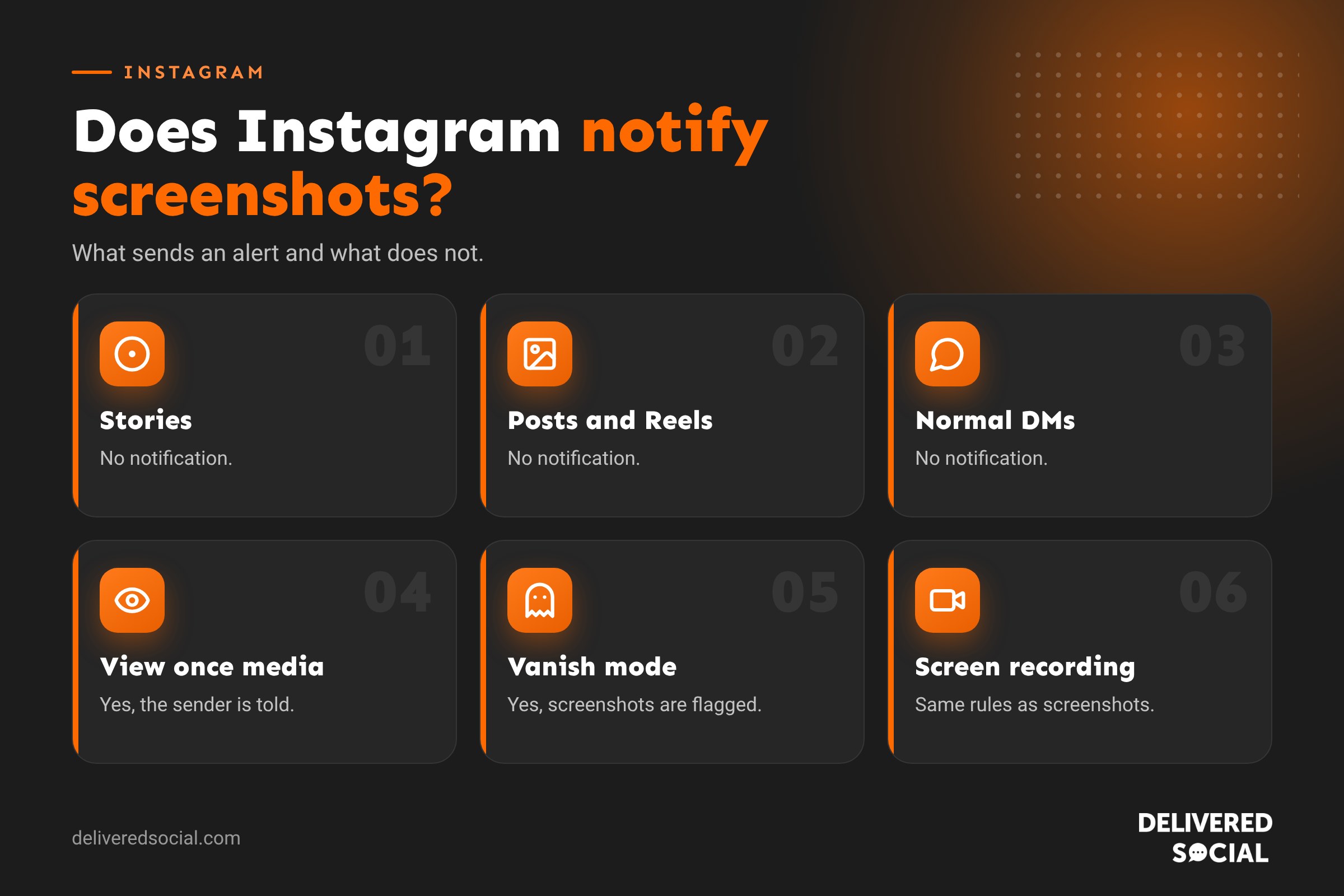
- Stories: no notification.
- Feed posts: no notification.
- Reels: no notification.
- Profiles: no notification.
- Highlights: no notification.
- Regular DMs: no notification.
- View once or disappearing photos and videos in DMs: yes, the sender is notified.
- Vanish mode chats: yes, the other person is notified.
Does Instagram notify when you screenshot a Story?
No. Instagram tested Story screenshot notifications back in 2018 but removed them. Today, if you screenshot or screen record someone’s Story, they are not told. They can see that you viewed the Story, because Instagram shows a list of viewers, but not that you took a screenshot.
Does Instagram notify when you screenshot a post or Reel?
No. Screenshots of feed posts, carousels and Reels do not trigger any alert. Anyone can screenshot public content without the poster knowing.
Does Instagram notify when you screenshot a DM?
For normal messages, no. You can screenshot text messages, photos and videos sent as standard messages without the other person being notified.
The exception is disappearing content:
- View once photos and videos: if someone sends a photo or video set to view once or allow replay, and you screenshot or screen record it, the sender is notified. A small icon appears next to the message.
- Vanish mode: in vanish mode chats, messages disappear when you leave the chat, and Instagram notifies the other person if you take a screenshot.
Does Instagram notify screen recording?
The rules are the same as for screenshots. Screen recording Stories, posts and Reels does not send a notification. Screen recording disappearing messages in DMs or vanish mode does.
Can you see who screenshotted your Instagram post or Story?
No. Instagram does not tell you who took screenshots of your Stories, posts or Reels. Third party apps that claim to show who screenshotted your content are not genuine and may put your account at risk if you give them your login.
What about Instagram Notes and Live?
Screenshots of Notes and Live videos do not send notifications.
Why this matters for businesses
Assume anything you post can be saved
Because screenshots of public content are invisible, assume that competitors, customers and journalists can save anything you post, including Stories that disappear after 24 hours. Do not post anything you would not want shared more widely, such as confidential information, internal documents or customer details.
Be careful in DMs
Customer conversations in DMs can be screenshotted and shared. Keep replies professional, polite and accurate, especially when dealing with complaints. Our guide to DMs covers good DM etiquette.
Screenshots as social proof
On the positive side, customers screenshotting your posts to share with friends is a form of word of mouth. Many businesses also share screenshots of positive messages and reviews, with permission, as testimonials. Always ask before sharing someone’s message and remove personal details.
Sharing and saving content properly
Instead of screenshotting, Instagram offers built in ways to save and share:
- Save: tap the bookmark icon to save posts and Reels to a private collection.
- Share: tap the paper plane to send a post to friends or add it to your Story.
- Remix and collab: use official features to build on others’ content with credit.
Saves and shares are positive signals for Instagram’s algorithm, so businesses should encourage them. Phrases such as “Save this for later” or “Send this to a friend who needs it” can boost engagement.
Reposting other people’s content
Screenshotting someone’s post and reposting it as your own can break copyright and Instagram’s rules. If you want to feature customer or creator content, ask permission, credit the original account clearly and ideally use Instagram’s sharing or collab features. Our guide to Instagram collab posts explains a better way to share content with others.
Protecting your own content
You cannot stop people taking screenshots, but you can reduce misuse:
- Add a subtle watermark or logo to original images and graphics.
- Use Close Friends for Stories meant for a smaller group.
- Use view once photos in DMs for sensitive images, so you know if they are captured.
- Keep sensitive information off social media entirely.
- Report accounts that repost your content without permission.
Have the rules changed before?
Yes. Instagram briefly notified users about Story screenshots in 2018 and has changed DM features several times. Rules may change again, so if privacy matters for a particular message, assume screenshots are possible and use disappearing messages when you need to know.
Instagram vs other apps
Snapchat notifies users when someone screenshots their Snaps, Stories and chats, which is a key difference from Instagram. Facebook and WhatsApp do not notify for screenshots of normal content, although WhatsApp blocks screenshots of view once media altogether.
A quick privacy checklist for your business account
Before posting, ask whether you would be comfortable seeing the content shared outside your followers. Check that no customer names, addresses, order numbers or internal screens are visible in photos or screen recordings. Brief staff who manage DMs to keep replies professional, as conversations can be captured. These simple habits protect both your customers and your reputation.
What viewers can see on your Stories
While screenshots are invisible, Instagram does show other activity. On your own Story, swipe up to see the list of people who viewed it, plus any replies, reactions and sticker responses such as poll votes and quiz answers. For business accounts, Story insights also show reach, forward taps, back taps, exits and link clicks. A back tap often means someone wanted to look again, which can be a sign they found something worth remembering, possibly by taking a screenshot. Use these numbers to see which Stories hold attention and plan more like them.
Screenshots and online safety
For individuals, the lack of screenshot alerts is a reminder to think before sharing. Private Stories shared with Close Friends can still be captured and passed on by anyone on that list. Teach children and teenagers that anything sent online can be saved, even disappearing messages, because someone could use another device to take a photo of the screen. If you receive a screenshot of your content being used to bully or harass, report it to Instagram and keep a record of what happened.
Using screenshots in your own marketing
Screenshots can be useful content. Many businesses share screenshots of kind customer messages, five star reviews, sales milestones or behind the scenes dashboards as social proof. Always blur names, profile pictures and personal details unless the customer has agreed to be shown, and never share screenshots of private complaints. A well chosen screenshot of a genuine thank you message can be more persuasive than a polished advert, because it feels real.
Common myths about Instagram screenshots
- Myth: Instagram notifies Story screenshots. It did briefly in 2018, but not now.
- Myth: apps can show who screenshotted you. They cannot, and they put your account at risk.
- Myth: screenshots of normal DMs are flagged. Only disappearing media and vanish mode trigger alerts.
- Myth: airplane mode hides screenshots of view once media. Do not rely on tricks; assume the sender may be notified.
Key takeaways
- Instagram does not notify people when you screenshot Stories, posts, Reels or profiles.
- Normal DMs do not trigger notifications.
- View once media and vanish mode chats do notify the sender.
- Screen recording follows the same rules as screenshots.
- Businesses should assume anything posted can be saved and shared.
Frequently asked questions
Does Instagram notify when you screenshot a Story?
No.
Does Instagram notify when you screenshot a DM?
Only for view once or disappearing media and vanish mode chats.
Can people see if I screen record their Story?
No, but they can see you viewed it.
Can I see who screenshotted my post?
No, Instagram does not show this.
Does Instagram notify screenshots of Reels?
No.
Is it legal to repost a screenshot of someone’s post?
Reposting without permission can breach copyright; ask first and give credit.
Does Instagram notify when you screenshot a Highlight?
No. Highlights are saved Stories, and screenshots of them do not send any notification to the account owner.
Can businesses stop people screenshotting their posts?
No. You cannot block screenshots of public content, so watermark original graphics and keep sensitive information off Instagram.
Does Instagram notify screenshots of profile pictures?
No. Viewing or screenshotting someone’s profile picture or bio does not notify them.
Want an Instagram strategy that works?
We plan and manage Instagram content for businesses across Surrey, Hampshire and the UK. Find out more about our Instagram marketing services. Call us on 01483 608 303.
































