



Keep reading
Rather we just did it for you?
Let's get your business seen.
Social media, websites, SEO and ads from a team you can actually meet.
You can write a brilliant page and still never be found, simply because it doesn’t use the words your customers type into Google. Keyword optimisation fixes that. It’s the process of choosing the right search terms for each page and using them in the places Google and your visitors pay most attention to, without sounding like a robot.
When a new client’s website comes to us, one of the two problems we see most often is pages with no keyword focus at all. Service pages that never say the service, location pages that never mention the town, blog posts written around an idea rather than a search. This guide shows how to fix that, page by page.
What is keyword optimisation?
Keyword optimisation means matching each page on your website to the searches you want it to appear for, then making that match clear in the page itself. It has two parts:
- Choosing the keyword: the main search term a page should target, plus a few close variations.
- Placing the keyword: using it naturally in your title, headings, opening, URL and links, so Google understands what the page is about.
If you haven’t chosen your keywords yet, start with our guide to how to choose keywords for SEO, then come back here.
Why it still matters
Google is much better at understanding meaning than it used to be, and AI answers now summarise many searches. But search engines still rely on clear signals to decide what a page is about. A page that clearly answers “boiler repair in Guildford” will usually beat a vague page about “heating solutions”, even if the vague page is well written. Clear keyword use also helps AI tools pick out and quote your answer.
Step 1: Give every page one main keyword
This is the most important rule. Each important page should have one main keyword and a handful of close variations. For example:
| Page | Main keyword | Variations |
|---|---|---|
| Home page | plumber Guildford | plumbers in Guildford, Guildford plumbing |
| Service page | boiler repair Guildford | boiler engineer, boiler breakdown |
| Blog post | why is my boiler losing pressure | boiler pressure dropping, low boiler pressure |
If two pages chase the same keyword, they compete with each other and often neither ranks well. Merge them into one stronger page instead.
Step 2: Put the keyword where it counts
- Title tag: near the start, under about 60 characters. “Boiler Repair Guildford | Same-Day Callouts | [Name]”.
- H1 heading: the main heading on the page, closely matching the title.
- First paragraph: say what the page is about in the first two or three sentences.
- Subheadings (H2s): use variations and the questions people ask.
- URL: short and descriptive, such as /boiler-repair-guildford/.
- Meta description: doesn’t directly affect rankings, but a clear description with the keyword gets more clicks.
- Image alt text: describe the image honestly, using the keyword where it genuinely fits.
- Internal links: link to the page from other pages using descriptive words, such as “our boiler repair service”, not “click here”.
Step 3: Write for people, not keyword counts
There is no magic keyword density. Repeating a phrase over and over (keyword stuffing) makes pages unreadable and can count against you. Instead:
- Use the main keyword a few times where it reads naturally.
- Use synonyms and related words: “boiler”, “heating”, “engineer”, “Gas Safe”.
- Answer the questions people ask about the topic, clearly and early.
- Add the details that show real experience: prices, timings, examples, photos.
A page that covers the topic properly will naturally use the right words.
Step 4: Match the search intent
The same words can mean different things. Before you optimise, search for your keyword and look at what Google shows:
- Service pages and maps mean people want to buy or call. You need a service page.
- Guides and lists mean people want to learn. You need an article.
- Product listings mean people want to shop. You need a product or category page.
If your page type doesn’t match what Google already ranks, even perfect keyword placement won’t get it there.
Step 5: Optimise for local searches
For businesses that serve an area, local keywords are often the easiest wins:
- Include your town or area in the title and H1 of your main service pages.
- Create a page for each area you genuinely serve, with local detail, not copied text with the town name swapped.
- Use the same keywords in your Google Business Profile description and services.
Our guide to Google Maps marketing covers the local side in more detail.
Step 6: Check your pages are actually indexed
This is the other problem we see most often on new client sites: important pages that Google hasn’t indexed at all, so no amount of keyword work can help. In Google Search Console, use the URL Inspection tool on each key page. If it says the page isn’t on Google, fix the reason first (a noindex tag, a blocked page in robots.txt, or a page with no internal links) and request indexing.
Step 7: Measure and improve
- In Google Search Console, open Performance and filter by page to see which searches it appears for.
- Look for searches with lots of impressions where you rank in positions 5 to 20. Small improvements to the title, headings and content can push these onto page one.
- If a page ranks for a search you didn’t target, consider adding a section that answers it properly.
- Review your main pages every few months.
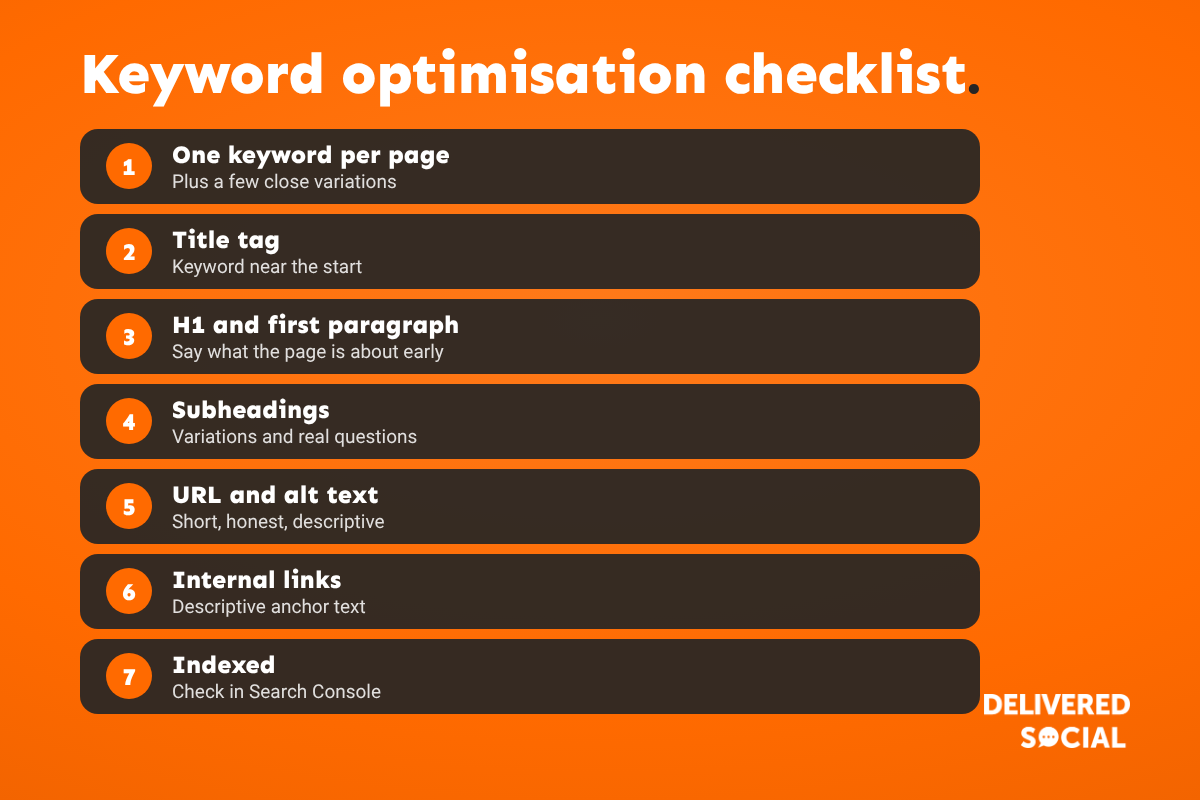
A quick keyword optimisation checklist
- One main keyword per page, plus close variations
- Keyword near the start of the title tag
- H1 that matches the title
- Keyword in the first paragraph
- Variations and questions in the H2s
- Short, descriptive URL
- Clear meta description
- Honest, descriptive alt text
- Internal links with descriptive anchor text
- Page indexed in Search Console
Common keyword optimisation mistakes
- Several pages targeting the same keyword.
- Stuffing the keyword into every sentence.
- Optimising for words you use internally rather than words customers search.
- Ignoring local terms when you serve a local area.
- Forgetting the title tag, the most important place of all.
- Never checking Search Console to see what’s working.
Frequently asked questions
What is keyword optimisation in SEO?
It’s choosing the right search terms for each page and using them clearly in the title, headings, content, URL and links, so search engines and visitors understand what the page is about.
How many times should I use a keyword on a page?
There’s no set number. Use it in the key places (title, H1, opening, a subheading) and then write naturally. If it reads awkwardly, you’ve used it too much.
Is keyword optimisation still important with AI search?
Yes. AI Overviews and chat tools still need to understand what your page covers. Clear topics and direct answers help you rank and get quoted.
What is keyword stuffing?
Repeating a keyword unnaturally to try to rank. It makes content hard to read and goes against Google’s spam policies.
How long does keyword optimisation take to work?
Changes to titles and content on pages Google already crawls can show results within a few weeks. Competitive keywords usually take a few months.
Should every page target a different keyword?
Yes. Giving each page its own main keyword stops your pages competing with each other.
Want your pages optimised properly?
We optimise websites for small and medium-sized businesses across Surrey, Hampshire and the UK, starting with the pages that bring in enquiries. See our SEO services or call us on 01483 608 303 for a friendly chat.































