



Keep reading
Rather we just did it for you?
Let's get your business seen.
Social media, websites, SEO and ads from a team you can actually meet.
If you’ve only ever advertised on Google, Microsoft Advertising is one of the easiest wins in paid search. It’s the platform behind ads on Bing, and you may know it by one of its old names: Microsoft adCenter or Bing Ads. The audience is smaller than Google’s, but clicks are often cheaper, there’s less competition and you can copy your Google campaigns across in minutes.
This guide explains what Microsoft Advertising is, who sees your ads, and how to set up your first campaign step by step.
From adCenter to Microsoft Advertising
- Microsoft adCenter was Microsoft’s original search ads platform, launched in 2006.
- It was renamed Bing Ads in 2012.
- In 2019 it became Microsoft Advertising, the name it uses today.
So if you’re searching for “Microsoft ad center” or “Bing Ads”, it’s all the same platform.
Where do Microsoft ads appear?
- Bing search results, including on Windows and in the Edge browser.
- Microsoft Copilot, where ads can appear alongside AI answers.
- Partner search sites, such as Yahoo and DuckDuckGo, which show ads from Microsoft’s network.
- Microsoft properties such as MSN and Outlook, depending on your campaign type and settings.
Why advertise on Microsoft as well as Google?
- Cheaper clicks. Fewer advertisers usually means a lower cost per click than Google for the same searches.
- A different audience. Bing is the default on Windows PCs and Edge, so it’s used more on desktop, at work and by older searchers. That suits many B2B and professional services businesses.
- Easy to start. You can import your Google Ads campaigns, keywords and ads, then adjust.
- LinkedIn profile targeting. You can adjust bids by job function, industry or company, which Google can’t do.
The catch is volume. Bing has a small share of UK searches overall, though a noticeably bigger one on desktop. Microsoft Ads works best as an addition to Google Ads, not a replacement.
How to set up Microsoft Advertising, step by step
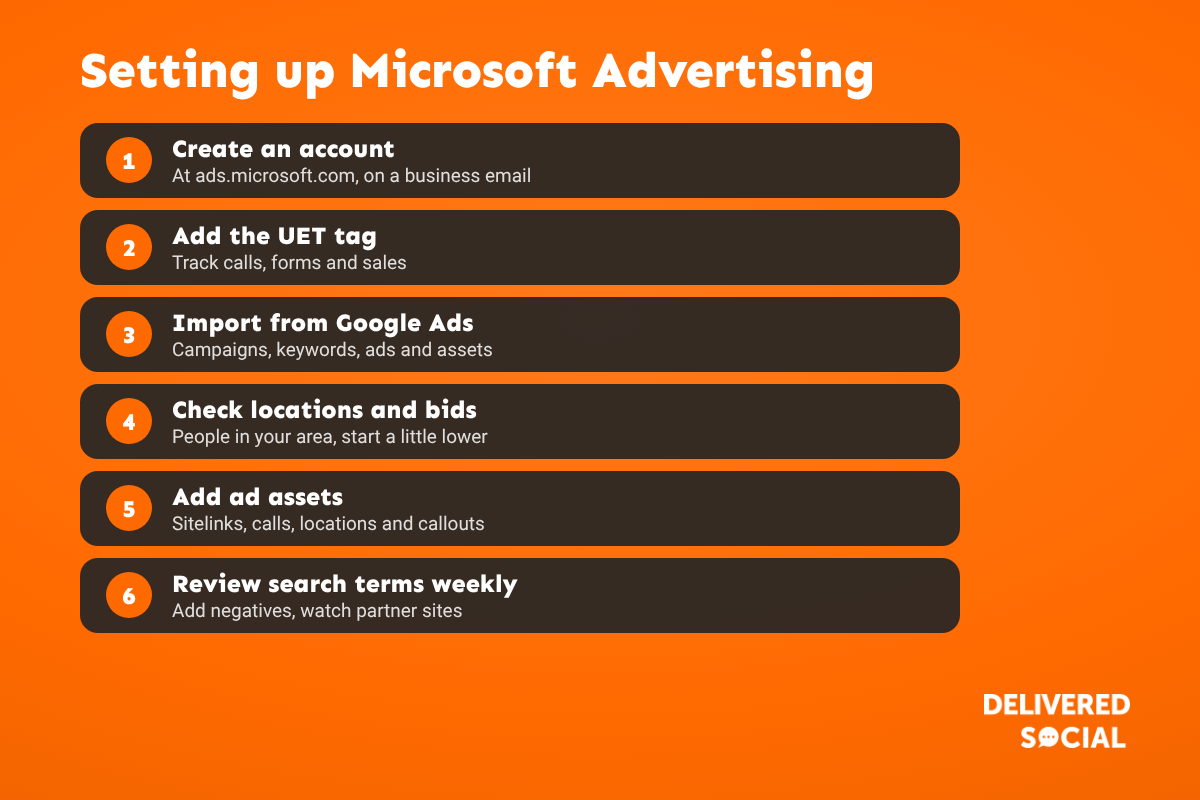
- Create an account at ads.microsoft.com, using an email address your business will always control.
- Add the UET tag. Universal Event Tracking is Microsoft’s version of the Google tag. Install it on your site (or through Google Tag Manager) and set up conversion goals for calls, forms and sales.
- Import from Google Ads. Use Import, then “Import from Google Ads”, sign in and choose the campaigns. You can schedule the import to keep them in sync.
- Check the settings it copied: locations (make sure it’s people in your area), languages, ad schedule and budgets.
- Review bids. Start a little lower than on Google, then adjust once you see the data.
- Add ad assets: sitelinks, call, location and callout assets.
- Decide on search partners. Partner sites can bring cheap clicks but sometimes lower quality. Watch the results and exclude poor sites.
- Launch and check the search terms report weekly, adding negative keywords as you go.
Starting from scratch instead?
If you don’t run Google Ads, build a simple Search campaign: one campaign per main service, tightly themed ad groups, phrase and exact match keywords, two or three responsive search ads per ad group, and a landing page that matches each ad group. Our guide to Quality Score explains why that structure matters, and the same principles apply on Microsoft.
How much does Microsoft Advertising cost?
Like Google, it’s an auction: you pay per click and set your own daily budget. Clicks are often cheaper, but there are fewer of them, so a smaller budget can go further. For many small businesses, setting aside 10 to 20% of their Google Ads budget for Microsoft is a sensible test. See our guide to how much PPC costs for the bigger picture.
Common Microsoft Ads mistakes
- Importing from Google and never checking the location settings.
- Forgetting to install the UET tag, so there’s no conversion data.
- Leaving the import running after making Microsoft-only changes, which can overwrite them.
- Ignoring partner site performance.
- Judging it on click volume instead of cost per enquiry.
What we look at first
When we take over any paid search account, Google or Microsoft, the same three problems come up most: broken or missing conversion tracking, wasted search terms with no negative keywords, and ads sending people to the wrong landing page. Fix those and Microsoft Ads can become a cheap, steady source of enquiries.
Frequently asked questions
Is Microsoft adCenter the same as Bing Ads?
Yes. Microsoft adCenter became Bing Ads in 2012, which became Microsoft Advertising in 2019.
Is Microsoft Advertising cheaper than Google Ads?
Clicks are often cheaper because there’s less competition, but there’s also less search volume.
Can I copy my Google Ads to Microsoft?
Yes. The Google import tool copies campaigns, keywords, ads and assets. Check locations, bids and budgets afterwards.
Do Microsoft ads show in Copilot?
Microsoft shows ads in Copilot alongside AI answers, using your existing campaigns.
Is Microsoft Advertising worth it for a small business?
Usually, as a low-cost addition to Google Ads, especially for B2B and services with desktop or older audiences.
Want your paid search to work harder?
We manage Google Ads and Microsoft Advertising for small businesses across Surrey, Hampshire and the UK. See our PPC management or call us on 01483 608 303 for a friendly chat.































