



Keep reading
Rather we just did it for you?
Let's get your business seen.
Social media, websites, SEO and ads from a team you can actually meet.
Social media for restaurants, cafés and bakeries works best when it does three things: makes your food look irresistible, makes it easy to book, order or visit, and shows the people and atmosphere that make you different. You do not need a professional camera or a big team. You need good light, a phone, a simple weekly routine and accounts that are set up to turn interest into tables.
Below we cover how to do social media for restaurants in practice: food photography on a phone, keeping menus and bookings simple, handling reviews, how social media ties into local search, and content ideas for Instagram and TikTok that suit restaurants, cafés and bakeries.
Why social media matters so much for restaurants
Food is one of the few things people happily look at all day on social media, and diners use it to choose where to go. Around 45% of UK diners say they find new restaurants on social media, according to SevenRooms‘s 2025 UK research. That makes it one of the biggest discovery channels you have, alongside Google.
Social media does four jobs for a restaurant:
- Discovery: people nearby see your food and find out you exist.
- Proof: recent posts, a busy room and happy guests show you’re open, popular and worth the trip.
- Bookings: a clear link from post to booking page turns interest into covers.
- Loyalty: regulars see what’s new and come back more often.
Want the bigger picture first? Our restaurant marketing strategy guide shows where social media fits alongside Google, email and your website.
Which platforms should a restaurant use?
You don’t need to be everywhere. Pick two or three and do them properly. Here’s how each one earns its place:
| Platform | Best for | What to post |
|---|---|---|
| Almost every restaurant, café and bakery | Reels of dishes, Stories on service days, a pinned post with your booking link | |
| TikTok | Reaching younger diners and people searching for places to eat | Short, real videos: the kitchen, a signature dish, the team |
| Local families, older diners, events and community groups | Events, set menus, Christmas and Mother’s Day bookings | |
| Google Business Profile | People ready to eat now, searching “near me” | Weekly posts, fresh photos, offers and events |
| Private dining, corporate events and Christmas parties | Occasional posts aimed at office managers and local businesses |
Treat TikTok and Instagram like search engines too. Many people now search them for “best brunch in [town]” before they look on Google, so use those words in your captions and on-screen text.
Making Facebook work
- Create Facebook events for quiz nights, live music, tasting menus and seasonal dates. People can save them and invite friends.
- Join local community groups and share genuinely useful posts where the group rules allow it.
- Turn on the booking or menu button on your Page and keep your hours up to date.
- Answer messages quickly. Lots of people still book, ask about allergens or check opening times through Messenger.
Set up your profiles to take bookings
Before you post anything, make sure someone who finds you can act straight away. On every platform, check:
- Your bio says what you serve, where you are and one thing that makes you different.
- Opening hours are correct and updated for bank holidays and seasonal changes.
- Your address and phone number are filled in and match your website and Google Business Profile.
- A booking or ordering link is in your bio, and action buttons are switched on where your booking or delivery partner supports them on Instagram and Facebook.
- Your menu is easy to find, ideally as a page on your own website rather than a PDF.
A website menu page that loads quickly on a phone helps customers and search engines alike. If your current site makes this hard, our restaurant website design team builds sites around menus and bookings. Or, if you would rather hand the whole lot over, our restaurant marketing agency team can run your social media, Google listing and ads for you.
Culinary photography on a phone
Food is the star, so culinary photography for social media matters more than any caption. A modern phone is more than enough if you get the basics right.
Light is everything
- Shoot by a window in daylight, with the light coming from the side or slightly behind the plate.
- Turn off overhead lights and avoid the flash, which flattens food and creates harsh shine.
- Diffuse strong sun with a white napkin, a sheet of baking paper or a net curtain.
- Bounce light back into shadows with a white menu card or a piece of card.
Angles and styling
- Overhead works for flat dishes, pizzas, sharing boards and table spreads.
- A low side angle suits burgers, stacks, cakes and drinks, where height matters.
- Get close. Show texture: the crumb of a loaf, the glaze on a pastry, steam from a bowl.
- Keep the background simple and on brand, using your own tables, boards and crockery.
- Add hands and action: a pour, a slice, a sprinkle or a fork going in.
- Clean the lens before every shoot. Kitchen phones get greasy.
Make it a routine
Schedule a short shoot when a new dish goes on, or set aside half an hour before service once a week, when the kitchen is calm and the light is good. Plate one portion for the camera, photograph it from two or three angles, film a few seconds of video, and you have content for several posts.
Video is where restaurants shine
Food is made for short video. Movement, sound and process are hard to resist, and Instagram Reels and TikTok both reward content people watch to the end.
Instagram ideas
- A Reel of a signature dish being made, from raw ingredients to the pass.
- Carousels of new menu items with a short line about each one.
- Stories with daily specials, cake of the day or what has just come out of the oven.
- Polls and question stickers: “Which should go on the winter menu?”
- Meet the team posts with your chefs, bakers, baristas and front of house.
- Collab posts with local suppliers, so the post appears on both accounts.
TikTok ideas
- Satisfying process clips: icing, laminating dough, flipping, plating.
- Early morning bakery prep, from the first bake to the full counter.
- Honest behind the scenes, such as a busy Saturday service or a kitchen deep clean.
- Answering comments with video replies, such as “How do you get your crust like that?”
- Trends and sounds adapted to your venue, where they suit your style.
Tag your location on every post. It helps people nearby discover you, and it makes your posts appear when someone looks up your venue.
Related reading: Professional Restaurant Website Design Service to Grow Organic Visits
Related reading: Influencer Marketing for Restaurants: Drive Reservations Today
More post ideas that fill tables
- Dish of the week. One dish, filmed the same way every week, so people start looking out for it.
- The busy room. A full dining room on a Saturday night is the best social proof you have.
- Last-minute tables. “Four tables free tonight from 7pm” in your Stories fills seats that would otherwise earn nothing.
- Your suppliers. The farm, the fishmonger, the local brewery. It shows quality and gives them a reason to share you too.
- Guest posts. Reshare photos and videos guests tag you in, with their permission.
- Answers to common questions. “Are you dog friendly?”, “Do you have vegan options?”, “Can I bring a cake?” Each one makes a quick, useful video.
For more ways to fill quiet nights and bring regulars back, see our list of 25 restaurant marketing ideas.
Social media for bakeries and cafés
Bakeries and cafés have a different rhythm from restaurants, and their content should reflect it. Much of the business is daily, habitual and local, so social media is about reminding people you are there and giving them a reason to drop in.
- Post what is fresh today, ideally in Stories each morning.
- Show limited runs and seasonal bakes, so people come in before they sell out.
- Promote pre-orders for celebration cakes, Christmas, Easter and other busy dates well in advance.
- Feature your regulars and the dog friendly corner, with permission.
- Explain your craft, such as sourdough timings or how a cake is built, which builds value and justifies price.
Reviews and replies build trust
For hospitality, reviews often decide whether someone books. Make collecting and answering them part of your routine.
- Ask for reviews at the right moment, such as a card with the bill or a follow up after a booking.
- Reply to every review on Google and Facebook, thanking people by name for the specific thing they mentioned.
- Handle complaints calmly, apologise for the experience and take the detail offline.
- Share great reviews as simple graphics or Stories.
- Reply to comments and DMs quickly, especially booking and allergy questions.
Never offer discounts or freebies in exchange for positive reviews. Platforms prohibit it, and UK consumer protection law treats fake or incentivised reviews seriously.
Local search and social work together
When someone searches “brunch near me” or “bakery in” plus a town, Google usually shows a map with local businesses. Your Google Business Profile is what appears there, and it works hand in hand with your social media.
- Keep your Google Business Profile complete: category, hours, menu, booking link, attributes such as outdoor seating or vegan options, and photos.
- Add new photos regularly. The same food photos you take for Instagram can go on your profile.
- Use Google posts for events, offers and new menus, alongside your social posts.
- Keep name, address and phone number consistent across Google, social profiles, your website and directories.
- Link your social profiles from your website and your website from your social profiles.
Social activity on its own is not a direct ranking factor, but it brings people to search for you by name, leave reviews and visit your website, all of which support your local visibility.
Who should run your restaurant’s social media?
This is the question most guides skip, and it’s usually why restaurant accounts go quiet. You’ve got three options:
- The owner or manager. Free, and nobody knows the restaurant better, but it’s often the first job dropped on a busy week.
- A member of the team. Often a front-of-house person who loves content. Give them a couple of paid hours a week, clear guidelines and a simple approval process, so it isn’t squeezed into breaks.
- An agency or freelancer. Consistent and skilled, and frees you up, but they need access to the building for filming and someone on site to send them daily updates.
Whoever runs it, write a one-page guide: your tone of voice, how to reply to complaints, what never to post (guests’ faces without permission, the kitchen mid-clean) and who approves offers.
How much does restaurant social media cost?
| Option | Typical cost | Good for |
|---|---|---|
| Do it yourself | Your time: around 2 to 4 hours a week | New and small restaurants |
| A team member | A few paid hours a week | Venues with a keen, creative team member |
| Freelancer | Usually a few hundred pounds a month | Posting and editing, with you supplying content |
| Agency | Usually from a few hundred to over a thousand pounds a month | Strategy, filming, posting, ads and reporting |
| Paid ads | From around £5 to £20 a day for local campaigns | Launches, events, quiet nights and Christmas |
Prices vary a lot depending on how much filming, how many platforms and whether ads are included, so always ask what you’ll get each month and how results will be reported.
Paid social ads for restaurants
Organic posts build your following. Ads put a specific offer in front of the right people quickly, and Facebook and Instagram ads let you target people within a few miles of you.
- Promote one thing at a time: a set menu, an event, Christmas parties or gift vouchers. Not “come and eat with us”.
- Keep the radius tight. Most people won’t travel far for an everyday meal. Go wider only for special occasions.
- Retarget people who’ve engaged. Show a booking ad to people who watched your videos or visited your website.
- Upload your email list (with consent) to reach regulars or find people like them.
- Send people to a booking page, not your homepage, and judge ads on bookings, not likes.
If you’d rather have this handled for you, see how we run Facebook and Instagram ads.
Working with local food creators
- Choose local reach over big numbers. A creator with 5,000 followers in your town is worth more than one with 200,000 spread around the world. Ask to see where their audience is.
- Agree what you’re offering and what you’d love in return before they visit.
- Make sure posts are labelled. In the UK, if a creator gets a free meal or payment in return for a post, it needs to be clearly labelled as an ad. The ASA publishes guidance on this.
UK rules to keep in mind
- Alcohol: UK advertising rules say alcohol ads mustn’t appeal to under-18s or link drinking with social or sexual success. Keep drinks posts focused on the drink and the occasion, and use age targeting on paid ads.
- Offers: state any conditions clearly, such as dates, times and “Sunday to Thursday only”.
- Guests in photos: ask before filming or posting anyone who can be recognised, and always ask parents before featuring children.
- Allergens: don’t make allergy claims in posts that your kitchen can’t guarantee. Point people to ask your team.
A simple weekly routine
| Day | Task |
|---|---|
| Monday | Plan the week’s posts and specials, reply to weekend reviews |
| Tuesday | Photo and video shoot before service |
| Wednesday | Post a Reel or TikTok, update Google Business Profile |
| Thursday | Weekend push: specials, availability and booking link |
| Friday to Sunday | Daily Stories, reply to comments and messages |
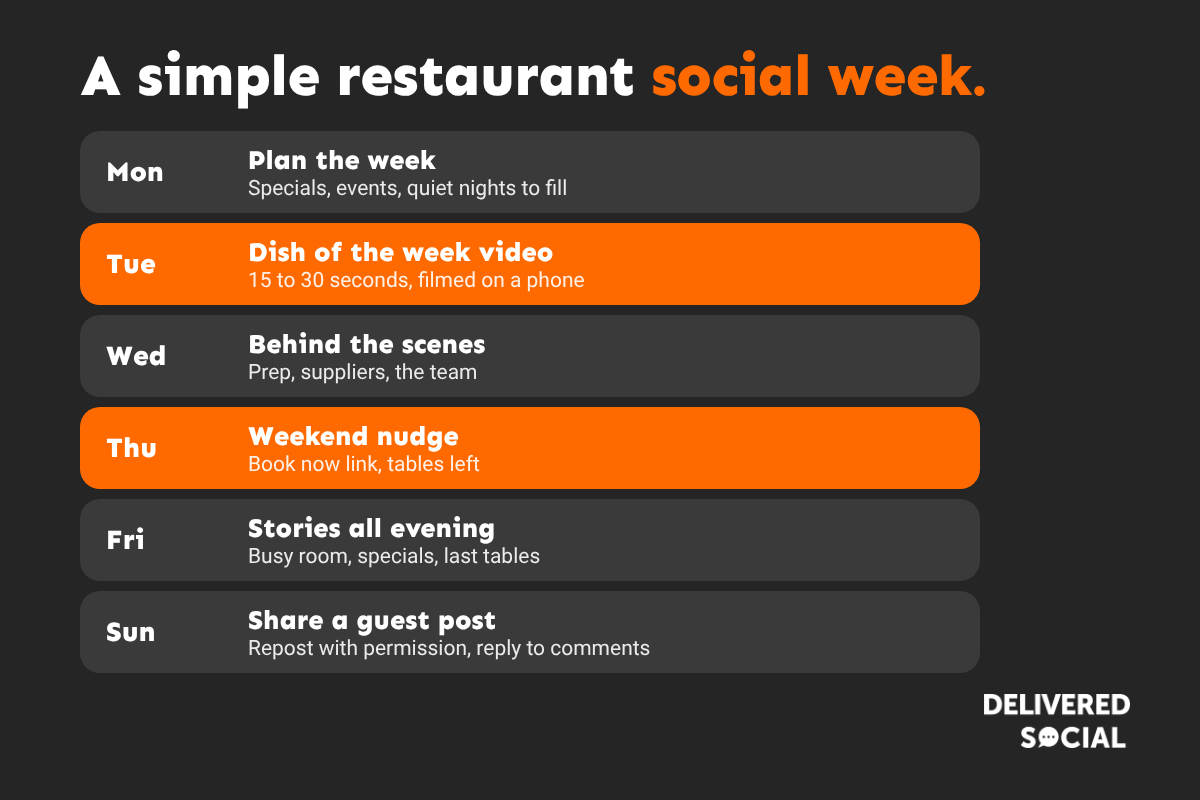
Batch your filming. Fifteen minutes before Tuesday service can give you a whole week of clips. A scheduling tool, such as Meta Business Suite (free) for Facebook and Instagram, lets you plan posts in one sitting.
How to tell if social media is filling tables
Likes are nice, but they don’t pay the rent. These are the numbers that matter:
- Bookings from social: add tracking (UTM) tags to your bio and post links so you can see social visits and bookings in Google Analytics and your booking system.
- Offer codes: a named offer such as “Supper Club” or a short code tells you exactly how many people came from a post.
- Link clicks and profile visits: in Instagram and Facebook insights.
- Messages and calls: how many booking enquiries arrive through DMs.
- Reach to non-followers: shows whether you’re getting in front of new people.
- Ask guests: “How did you hear about us?” Keep a tally by the till.
Review your numbers once a month. Do more of what brings bookings, and stop what doesn’t.
Restaurants with more than one site
- Decide whether you’ll run one brand account or one per site. One account is easier to grow; separate accounts work well when each site has its own character.
- Always tag the right location and link to that site’s own booking page.
- Give each site manager a simple way to send in photos and news, and keep one person in charge of the brand’s voice.
Common restaurant social media mistakes
- Posting in bursts, then going quiet for weeks.
- Only posting professional photos and no real moments.
- No booking link, or a link that goes to the homepage.
- Out-of-date opening hours or menus on your profiles.
- Ignoring comments and messages.
- Judging success by likes instead of bookings.
- Constant discounting in posts, which teaches people to wait for deals.
A 30-day plan to get started
- Week 1: tidy your profiles. Update bios, hours, booking links, Highlights and your Google Business Profile (our guide to local SEO for restaurants walks you through it).
- Week 2: film a batch of 10 short clips: dishes, team, kitchen, room, suppliers.
- Week 3: start posting to the weekly routine above and use Stories every service day.
- Week 4: add tracking links and an offer code, then try a small local ad for one event or offer.
Frequently asked questions
How often should a restaurant post on social media?
Three to five feed posts or videos a week plus daily Stories is a good target. Consistency matters more than volume.
Which platform is best for restaurants?
Instagram and TikTok suit food content best, Facebook works well for local events and older audiences, and Google Business Profile is essential for bookings.
Do I need a professional photographer?
Not for everyday posts. A phone, window light and simple styling are enough. A professional shoot is worth it for your website and menu launches.
How do I get more bookings from social media?
Make booking easy with a link and action buttons, post specials and availability before busy periods, and reply quickly to messages.
How much should a restaurant spend on social media ads?
Many independent restaurants start with around £5 to £20 a day for a specific campaign, such as an event, a set menu or Christmas bookings. Track bookings from each campaign and only increase spend on what works.
Should I hire an agency to run my restaurant’s social media?
If you don’t have the time or someone on your team who enjoys it, an agency can keep you posting consistently and run ads properly. Ask how they’ll film content, what they’ll post each month and how they’ll report on bookings, not just followers.
Let us fill your tables
Our social media management service creates and posts content for restaurants, cafés and bakeries, and our restaurant website team makes sure menus and bookings work properly. Get in touch to talk about your venue.































