



Keep reading
Rather we just did it for you?
Let's get your business seen.
Social media, websites, SEO and ads from a team you can actually meet.
You check your analytics and your website traffic has dropped. Before you panic, take a breath: the cause is often simpler than it looks, and sometimes the “drop” isn’t real at all. This guide walks through the checks we run when a website’s SEO web traffic falls, in the order we run them, and how to recover lost traffic.
Step 1: check it’s a real drop
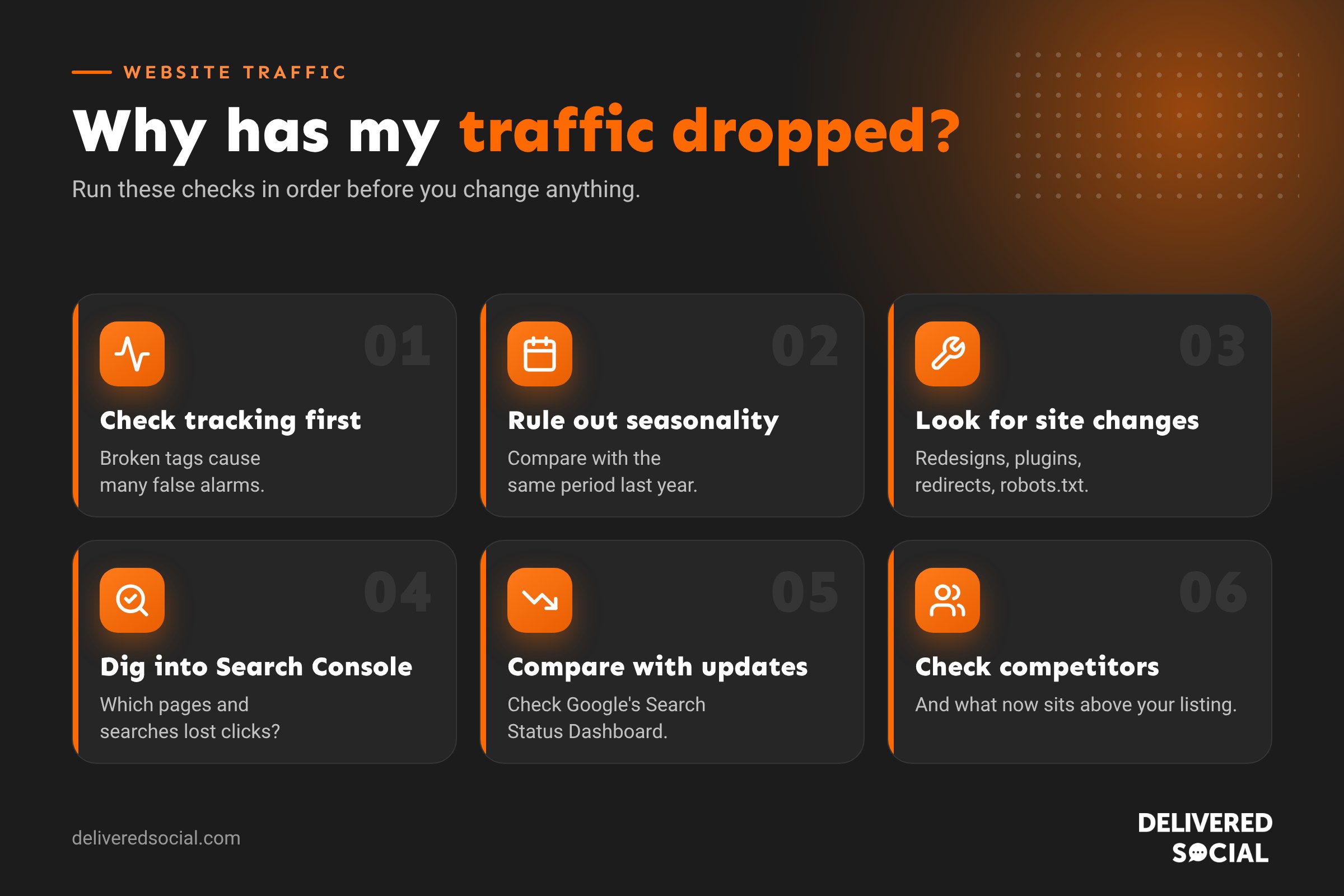
Broken tracking causes more “traffic drops” than Google does. Check these first:
- Is your Google Analytics tag still on every page? Theme changes, new plugins and cookie banners can remove or block it.
- Did you change your cookie banner? Stricter consent settings can reduce what Analytics records, even when visitor numbers haven’t changed.
- Compare with Google Search Console. If Search Console clicks are steady but Analytics has fallen, it’s a tracking issue, not an SEO one.
- Check enquiries and sales. If they’re normal, your traffic probably is too.
Step 2: rule out seasonality
Compare with the same period last year, not just last month. A garden business will always be quieter in winter, and B2B sites drop over Christmas and in August. Google Trends shows whether interest in your topic has fallen overall.
Step 3: look for changes on your website
| Change | What can go wrong |
|---|---|
| New website or redesign | Old URLs not redirected, pages removed, content cut down |
| Moving to HTTPS or a new domain | Missing redirects, Search Console not updated |
| Plugin or theme updates | Accidental noindex tags, broken pages, slower speed |
| Robots.txt edits | Important pages blocked from crawling |
| Content changes | Key pages rewritten, retitled or deleted |
| Hosting problems | Downtime, slow responses, server errors |
Also check you haven’t been hacked: search Google for site:yourwebsite.co.uk and look for pages you don’t recognise, often in other languages or selling unrelated products.
Step 4: dig into Google Search Console
- Performance report: compare the last 3 months with the previous period. Which pages and searches lost clicks?
- Clicks vs impressions: if impressions are steady but clicks fell, your listing may be less attractive, or an AI Overview or other feature may be answering the question.
- Pages report: look for a rise in pages “not indexed”.
- Manual actions and Security issues: check for warnings. See our guide to Google penalty recovery.
Step 5: compare with Google updates
Google confirms major ranking updates on its Search Status Dashboard. If your drop lines up with a core update or spam update, it’s likely algorithmic. Look at which pages now rank above yours and be honest about how yours compare.
Step 6: check your competitors and the results page
- Have new competitors appeared with better content?
- Has Google added AI Overviews, maps, videos or ads above your listing?
- For local businesses, check your Google Business Profile performance too. A suspended or edited profile can cut calls overnight.
How to recover lost traffic
| Cause | Fix | How long it usually takes |
|---|---|---|
| Broken tracking | Reinstall the tag, check consent settings | Immediately |
| Missing redirects | Redirect old URLs to the right new pages | Weeks |
| Noindex or robots.txt mistake | Remove the block, request indexing | Days to weeks |
| Hacked site | Clean up, secure, request a review | Weeks |
| Core update | Improve content quality and experience | Months, often after a later update |
| Stronger competitors | Improve and expand your key pages | Months |
How to protect your traffic in future
- Plan redirects before any website redesign or migration.
- Keep backups and test updates on a staging site.
- Check Search Console monthly, and set up email alerts.
- Don’t rely on one channel: build email, social media and your Google Business Profile too.
Frequently asked questions
Why has my website traffic suddenly dropped?
The most common causes are broken tracking, seasonality, website changes, Google updates and stronger competitors.
How do I know if it’s a Google update?
Check whether the timing matches an update on Google’s Search Status Dashboard and whether Search Console clicks fell at the same time.
Will my traffic come back on its own?
Sometimes, after a later update, but it’s best to find and fix the cause.
Should I change everything on my website?
No. Diagnose first, then make targeted changes. Big, rushed changes can make things worse.
Need help finding out what went wrong?
We help small businesses across Surrey, Hampshire and the UK diagnose traffic drops and get their websites back on track. See our SEO services or call us on 01483 608 303 for a friendly chat.































