



Keep reading
Rather we just did it for you?
Let's get your business seen.
Social media, websites, SEO and ads from a team you can actually meet.
If you’re planning an online shop, WordPress and Shopify are usually the first two names on the list. Both can run a successful ecommerce business, but they work in very different ways. Shopify is an all-in-one hosted platform built purely for selling. WordPress, with WooCommerce, is a flexible website system you host and control yourself. This guide compares WordPress vs Shopify on cost, ease of use, design, SEO, payments, apps, security and growth, so you can choose the right one for your business rather than the one with the loudest adverts.
The quick answer
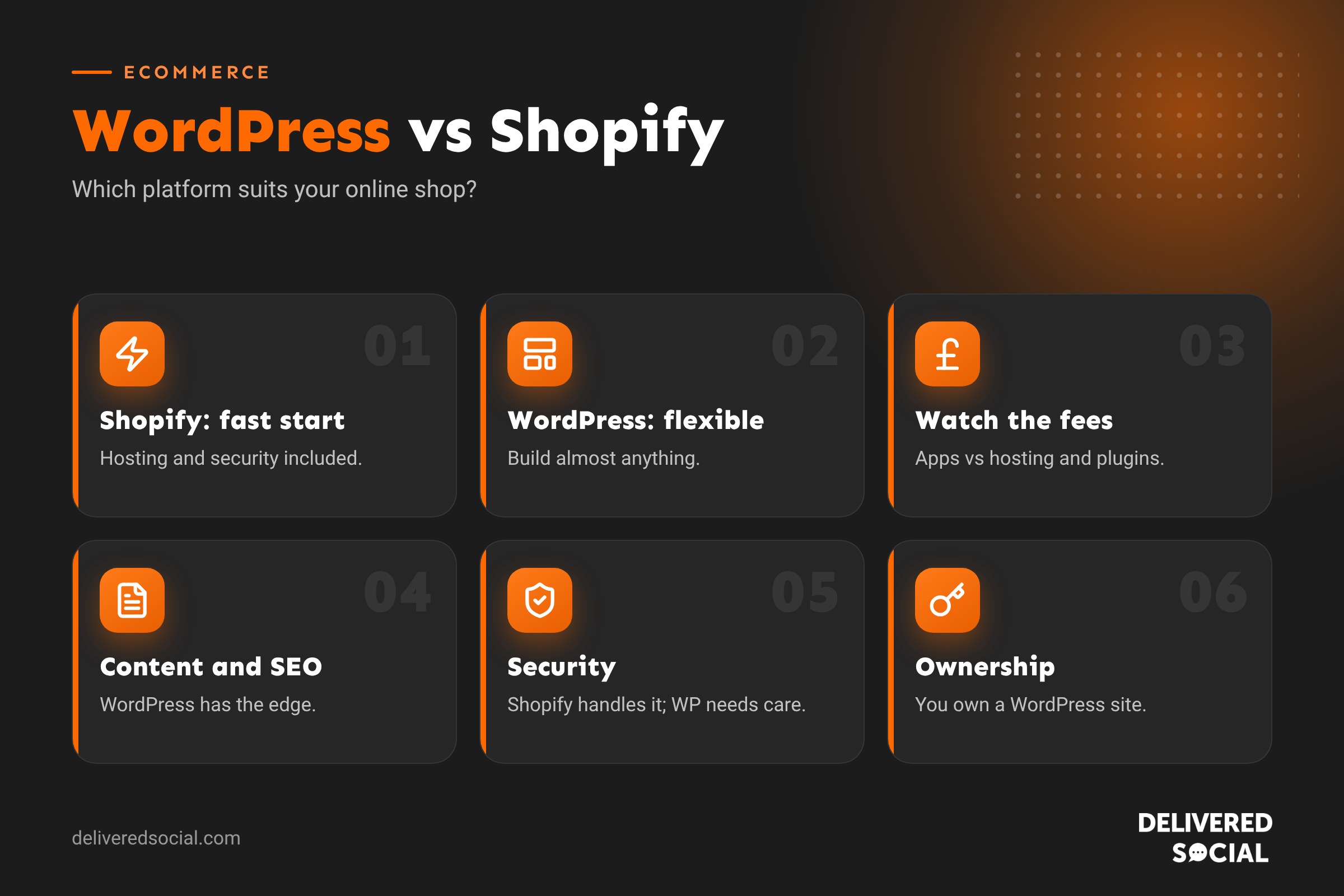
- Choose Shopify if you want to start selling quickly, sell mainly products, and prefer one monthly fee with hosting, security and updates handled for you.
- Choose WordPress with WooCommerce if you want full control, a content-rich website with a shop as one part of it, lots of custom features, or lower ongoing platform fees.
Neither is “better” for everyone. The right choice depends on what you sell, how much content you publish, your budget and who will look after the site.
What is Shopify?
Shopify is a hosted ecommerce platform. You pay a monthly subscription and Shopify provides the hosting, security, checkout, payment processing and core shop features. You choose a theme, add products and start selling. Extra features come from apps in the Shopify App Store, many of which have their own monthly fees.
What is WordPress with WooCommerce?
WordPress is free, open-source software that powers over 40% of websites. On its own it’s a content management system for pages and blogs. WooCommerce is a free plugin that turns WordPress into a full online shop. You need your own hosting, domain and security, and you can extend the site with thousands of themes and plugins. Our guide to WordPress for ecommerce explains how it works in more detail.
WordPress vs Shopify at a glance
| Shopify | WordPress + WooCommerce | |
|---|---|---|
| Set-up | Very quick, everything in one place | More set-up: hosting, theme, plugins |
| Ongoing costs | Monthly plan plus app fees | Hosting, premium plugins and maintenance |
| Transaction fees | Extra fees if you don’t use Shopify Payments | No platform fee, only payment provider fees |
| Design freedom | Good, within theme limits | Almost unlimited |
| Content and blogging | Basic blog | Excellent, WordPress’s main strength |
| SEO control | Good, some fixed URL structures | Very flexible |
| Hosting and security | Handled by Shopify | Your responsibility or your agency’s |
| Ownership | You rent the platform | You own the site and its files |
| Best for | Product-focused shops wanting simplicity | Content-led businesses and custom shops |
Cost comparison
Costs are often where people get caught out, because the headline price is rarely the full picture.
Shopify costs
- A monthly plan, which rises as you move to bigger plans.
- Card processing fees on each sale through Shopify Payments.
- Extra transaction fees if you use a different payment provider.
- Premium themes, usually a one-off payment.
- Monthly app subscriptions for features like reviews, subscriptions, bundles or advanced SEO. These can add up quickly.
WordPress costs
- Hosting, from a few pounds a month for basic plans to more for fast managed hosting.
- A domain name.
- Premium theme and plugins, some one-off and some yearly.
- Payment provider fees from Stripe, PayPal or similar.
- Maintenance: updates, backups and security, either your time or an agency plan.
For small shops, total costs can be similar. As shops grow, Shopify’s app fees and plan upgrades can make it more expensive, while WordPress costs tend to depend more on hosting and support. See our guide to how much a WordPress website costs.
Ease of use
Shopify wins on simplicity. Everything lives in one dashboard, updates happen automatically and you never need to think about servers. It’s very beginner friendly.
WordPress has a steeper learning curve, mainly at the start. Once built, adding products, writing blog posts and editing pages is straightforward, especially with a good page builder. The difference is that someone needs to keep plugins, themes and WordPress itself updated. Many businesses hand this to their web agency.
Design and flexibility
Shopify themes look polished and work well, but you’re working within Shopify’s structure. Deeper changes often need Liquid coding or apps.
WordPress offers almost total freedom. You can build any layout, add booking systems, membership areas, course platforms, quote calculators or complex product options. If your business does more than sell products, such as services, events or a large content library, WordPress handles it all in one place.
SEO: which is better?
Both can rank well. Shopify covers the basics, such as editable titles and descriptions, automatic sitemaps and mobile-friendly themes. However, some URL structures are fixed, like /products/ and /collections/, and its blogging tools are fairly simple.
WordPress gives you full control over URLs, structured data, site architecture and content, plus powerful SEO plugins. For businesses that want to grow through blogs, guides and local landing pages, WordPress usually has the edge. Our WordPress SEO checklist shows what to set up.
Payments and checkout
Shopify’s checkout is fast, trusted and highly optimised, which is one of its biggest strengths. Shopify Payments makes setup easy, and it supports Apple Pay, Google Pay and Shop Pay.
WooCommerce works with Stripe, PayPal, Square and many others, including Apple Pay and Google Pay through those providers. You have more choice and no platform transaction fee, but the checkout needs a bit more setup and testing to make it smooth.
Apps and plugins
Shopify’s App Store has thousands of apps, mostly with monthly fees. WordPress has tens of thousands of plugins, many free or with one-off or yearly licences. With WordPress, choose plugins carefully: too many low-quality plugins can slow a site and create security risks. Our list of the best WordPress plugins is a good starting point.
Security and maintenance
Shopify handles hosting security, SSL, PCI compliance for payments and platform updates. That’s a big advantage for owners who don’t want any technical responsibility.
With WordPress, security depends on good hosting, regular updates, strong passwords, backups and a security plugin. Well-maintained WordPress sites are very secure; neglected ones are vulnerable. A website maintenance plan takes care of this.
Ownership and lock-in
With Shopify, you’re renting the platform. You can export products and customers, but moving away means rebuilding your design and some functionality elsewhere. If Shopify changes its prices or rules, you have to accept them.
With WordPress, you own your website files and data. You can move hosts, change agencies or redesign without losing your content. For many businesses, that independence is the deciding factor.
Which is best for your business?
| Your situation | Better fit |
|---|---|
| Product-only shop, want to launch fast | Shopify |
| Large catalogue, multichannel selling, high volumes | Shopify |
| Service business with a small shop | WordPress |
| Content-heavy site that relies on blogs and SEO | WordPress |
| Need bookings, memberships or custom features | WordPress |
| No one to handle updates or security | Shopify, or WordPress with a maintenance plan |
| Want to own and control everything | WordPress |
Can you use both?
Yes. Some businesses run a WordPress website for content and services, with a Shopify shop on a subdomain, or add Shopify’s Buy Button to WordPress pages. This can work, but managing two platforms adds cost and complexity, so most small businesses are better choosing one.
Switching from one to the other
Moving between platforms is very possible. Products, customers and orders can usually be migrated with tools or plugins. The important parts are keeping your URLs or setting up redirects so you don’t lose Google rankings, rebuilding the design, and testing checkout thoroughly before switching over.
Questions to ask before you decide
- How many products will you sell, and how complicated are they?
- How important are blogs, guides and SEO to your growth?
- Do you need features beyond a shop, like bookings or memberships?
- Who will update and look after the website?
- What’s your realistic monthly budget, including apps or plugins?
- How much do you value owning your website outright?
Quick glossary
- WooCommerce: the free plugin that adds a shop to WordPress.
- Hosted platform: software where the provider runs the servers for you.
- Self-hosted: you choose and pay for your own hosting.
- Transaction fee: a percentage taken from each sale.
- PCI compliance: security standards for handling card payments.
Key takeaways
- Shopify is simpler and faster to launch; WordPress is more flexible and owned by you.
- Look beyond headline prices: Shopify app fees and WordPress maintenance both add up.
- WordPress is usually stronger for content-led SEO.
- Shopify handles security for you; WordPress needs regular maintenance.
- Choose based on what you sell, how you grow and who will run the site.
Frequently asked questions
Is WordPress cheaper than Shopify?
Often, especially as you grow, because there are no platform transaction fees or monthly app charges. Hosting and maintenance still cost money.
Is Shopify better for SEO than WordPress?
Both can rank well, but WordPress gives more control and better blogging tools.
Can WordPress handle a large online shop?
Yes, with good hosting and careful setup, WooCommerce runs shops with thousands of products.
Is Shopify easier than WordPress?
Yes, especially for beginners, because hosting, security and updates are handled for you.
Can I move from Shopify to WordPress?
Yes. Products, customers and orders can be migrated, with redirects to protect your rankings.
Need help choosing your ecommerce platform?
We design and build WordPress websites and online shops for businesses across Surrey, Hampshire and the UK, and we’ll give you honest advice on what suits you. Call us on 01483 608 303 or see our digital marketing services.































