



Keep reading
Rather we just did it for you?
Let's get your business seen.
Social media, websites, SEO and ads from a team you can actually meet.
Seeing the same kind of Reels over and over? Instagram’s recommendations are based on what you’ve watched and interacted with, so a few accidental taps can fill your feed with things you don’t want. The good news is that Instagram now lets you reset your recommendations. This guide explains how to reset your Instagram algorithm, how to fine-tune what you see without a full reset, and what businesses should know about how the algorithm works.
What is the Instagram algorithm?
The “algorithm” is the set of ranking systems Instagram uses to decide what appears in your Feed, Reels, Stories and Explore. It predicts what you’re most likely to enjoy based on signals such as:
- Accounts you follow and interact with most.
- Posts and Reels you like, comment on, share, save or watch to the end.
- Things you search for.
- Content that’s popular with people similar to you.
- Posts you skip or mark as not interesting.
It’s constantly learning, which is why your feed can change quickly after watching a few videos on a new topic.
How to reset your Instagram recommendations
In late 2024, Instagram introduced a recommendations reset, which clears your personalised suggestions so you start fresh in Explore, Reels and your Feed.
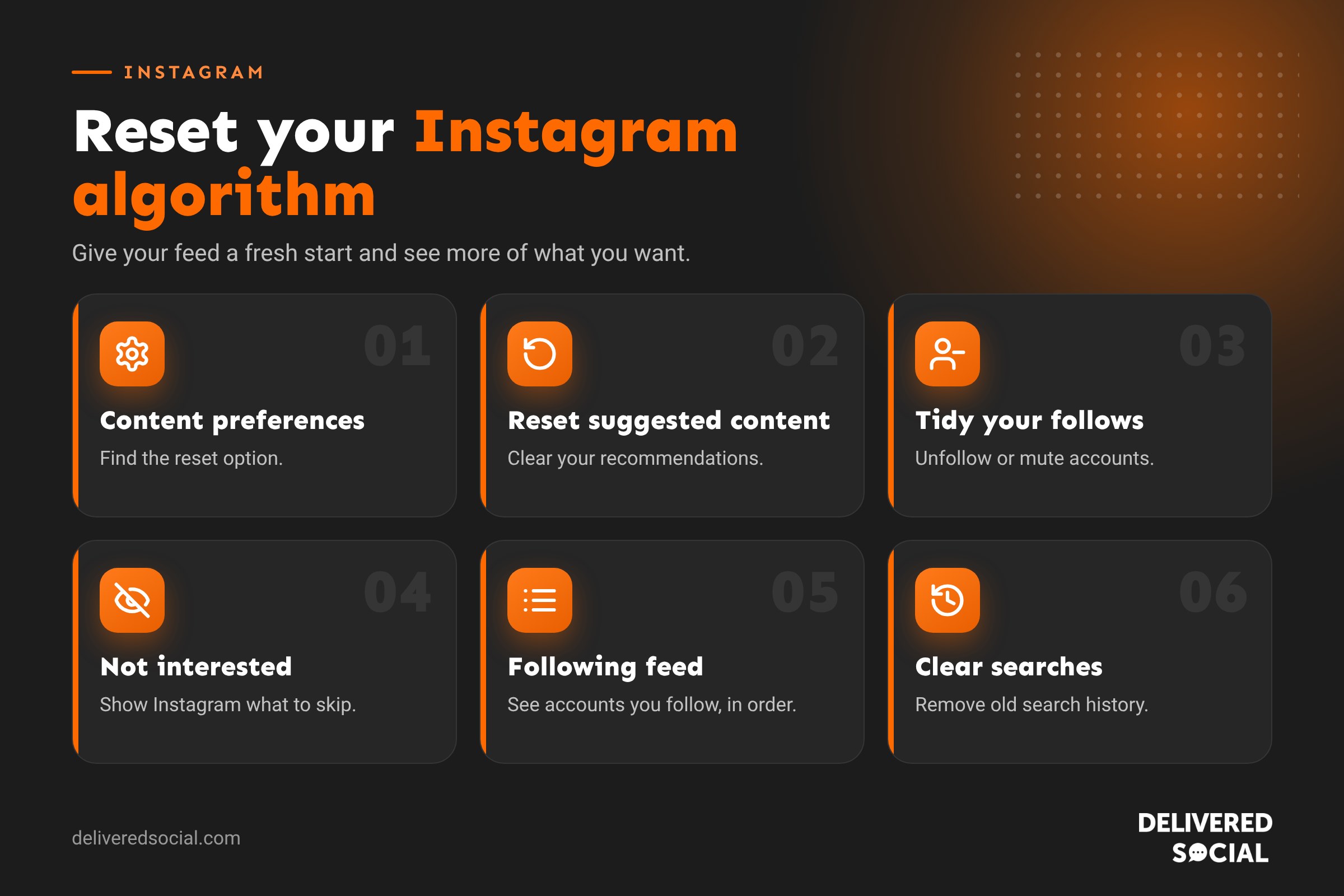
- Go to your profile and tap the three lines at the top right.
- Tap Content preferences.
- Tap Reset suggested content.
- Review the accounts you follow. Instagram gives you the chance to unfollow accounts whose content you no longer want to see.
- Tap Reset suggested content again to confirm.
After resetting, recommendations will be less personalised for a while, then gradually adjust as you use Instagram again. Menu names can vary slightly between app versions, so if you can’t see the option, update the app.
What resetting does and doesn’t do
| Resetting will | Resetting won’t |
|---|---|
| Clear personalised recommendations in Explore, Reels and Feed suggestions | Unfollow accounts unless you choose to |
| Give you a fresh start to train new interests | Delete your posts, saves or messages |
| Help if your feed is full of content you don’t want | Stop ads entirely |
| Work alongside your other content settings | Change how others see your account |
How to tune your feed without a full reset
- Not interested: tap the three dots on a post or Reel and choose Not interested. Instagram will show fewer posts like it.
- Interested: choose Interested on content you like to see more of it.
- Hide by keyword: in Content preferences, add words or emojis so posts with them in the caption are shown less.
- Snooze suggested posts: temporarily hide suggested posts in your Feed.
- Following feed: tap the Instagram logo at the top of your Feed and choose Following to see only accounts you follow, in time order.
- Favourites: add up to 50 accounts to Favourites so their posts appear higher.
- Sensitive content control: choose how much sensitive content can be suggested to you.
- Mute or unfollow: mute accounts you don’t want to unfollow.
Retraining your feed after a reset
- Search for topics you want to see and engage with good content: like, save and follow.
- Watch Reels you enjoy to the end, and skip quickly past ones you don’t.
- Use Not interested on anything off-topic straight away.
- Follow a few great accounts in each area you care about.
- Be patient. It can take a few days of normal use for your feed to reflect your new interests.
Clearing your search history
Past searches can influence recommendations too. To clear them, tap the search bar, then See all next to Recent, and clear individual searches or all of them. You can also manage your search history in Your activity.
What businesses should know about the algorithm
For businesses, the algorithm decides who sees your posts. Understanding it helps you get more reach:
- Reels reach non-followers. They’re the main way to get discovered.
- Watch time matters. Strong hooks and tight editing keep people watching.
- Shares and saves are powerful signals, often more than likes. Useful content gets saved; relatable content gets shared.
- Originality counts. Instagram favours original content over reposts, and may reduce the reach of videos with other apps’ watermarks.
- Consistency helps. Regular posting gives the algorithm more chances to learn who likes your content.
- Conversations help. Replies to comments and DMs build relationships with your audience.
Instagram’s Account Status page shows whether your content is eligible to be recommended to non-followers. If it isn’t, it explains why and how to fix it.
Why your feed might feel repetitive
- You watched several videos on one topic, so Instagram showed more.
- Someone else used your phone or account.
- You follow lots of accounts posting similar content.
- You haven’t marked anything as Not interested.
- Your interests have changed but your activity hasn’t caught up.
Resetting the algorithm on other platforms
| Platform | Option |
|---|---|
| TikTok | Refresh your For You feed in Content preferences |
| YouTube | Pause or clear watch and search history |
| Feed preferences, Show more and Show less | |
| Threads | Not interested, mute and Following feed |
How each part of Instagram ranks content
| Area | What it mainly shows | Biggest signals |
|---|---|---|
| Feed | Posts from accounts you follow, plus suggestions | Your relationship with the account, interest in the topic, recency |
| Stories | Stories from accounts you follow | How often you view their Stories and interact with them |
| Reels | Mostly accounts you don’t follow | Watch time, likes, shares, and what you’ve watched before |
| Explore | New content based on your interests | What you’ve engaged with recently and what similar people enjoy |
Because each area uses different signals, your Reels tab can be full of one topic while your Feed looks normal. A reset clears the suggestions across all of them.
Signs it’s time to reset
- Your Reels are full of topics you watched once by accident.
- You’re seeing content that upsets you or makes you feel worse.
- Someone else has been using your account.
- Your interests have changed, for example a new hobby or a new job.
- You use Instagram for work and want a feed focused on your industry.
Using Instagram for research without wrecking your feed
If you manage social media for a business, you’ll often look at competitors, trends and topics you’re not personally interested in. That can quickly change your recommendations. A few ways around it:
- Use your business account for research, so your personal feed stays as it is.
- Save research posts to a dedicated collection rather than liking them.
- Use the Following feed when you only want to see accounts you’ve chosen.
- Reset your suggestions after a big research session if they start to feel off.
Wellbeing and time management settings
Resetting your recommendations can make Instagram feel better to use, and a few other settings help too:
- Daily time limit: get a reminder after a set amount of time.
- Quiet mode: pause notifications and auto-reply to messages during set hours.
- Take a break reminders: nudges after long periods of scrolling.
- Hide like counts: turn off like and view counts on posts you see.
- Hidden words: filter comments and messages with words you don’t want to see.
You’ll find these under Time management and Content preferences in your settings.
Myths about the Instagram algorithm
- “Instagram hides posts with too many hashtags.” Hashtags have less impact than they used to, but a handful of relevant ones won’t hurt.
- “Editing a post after publishing kills its reach.” Small caption edits are fine.
- “Business accounts get less reach than personal ones.” Instagram says account type doesn’t change how content is ranked.
- “You need to post every day.” Consistency matters more than frequency. A few strong posts a week can outperform daily low-effort ones.
A quick reset routine
- Reset suggested content in Content preferences.
- Unfollow or mute accounts you no longer enjoy.
- Clear your recent searches.
- Add hidden words for topics you want to avoid.
- Spend a few sessions engaging only with content you want more of.
Repeat whenever your feed drifts away from what you want to see. It takes a few minutes and can make Instagram feel like a different app.
Parents and teen accounts
Teen accounts on Instagram have stricter content settings by default, and parents using supervision tools can see the topics their teen has chosen to see more of. Teens can also reset their recommendations. If you’re a parent, sitting down together to reset and retrain the feed can be a good way to talk about what they see online.
Frequently asked questions
Does resetting the Instagram algorithm delete anything?
No. Your posts, followers, saves and messages stay as they are. Only your suggested content is reset.
How often can I reset my recommendations?
You can use the option whenever you need to, but frequent resets mean recommendations will rarely feel personalised.
Will resetting help my business account get more reach?
No. Resetting changes what you see, not how your content is shown to others.
Why can’t I find the reset option?
Update the app. Features roll out gradually, and menu names can differ by version and region.
Want your content to work with the algorithm?
We help small businesses across Surrey, Hampshire and the UK create Instagram content that reaches the right people. See our social media services or call us on 01483 608 303.































